Install 24/7 Website Support in Under an Hour, No Developer Needed
SMB action plan: set up 24/7 website support with a product aware assistant in under an hour, run a 5% to 20% soft launch, and track five ROI metrics.

For a small business or online store, 24/7 website support means an AI assistant widget on your site that answers visitor questions from your own FAQs and product catalog, captures leads while you sleep, and hands off to a human when it hits something it can’t solve. The fastest path to having this live is installing a configurable widget like Konvuno, connecting it to your product feed, and letting it start answering within minutes.
TL;DR:
- Most small businesses can implement a functional AI website assistant within an hour by installing a widget and connecting product or FAQ sources.
- The assistant can achieve a 60% to 80% deflection rate on routine questions but depends heavily on grounding it in accurate, current content.
- Capturing leads outside business hours can significantly increase conversions, especially through automated responses for stock, pricing, and shipping inquiries.
- Regular weekly reviews of unresolved conversations are essential to improve the assistant’s accuracy and maintain user trust.
- Multi-language support with seven languages allows global visitor coverage without complex setup, but keeping content updated is key to reliable answers.
Table of Contents
- How Does an Always-On AI Website Assistant Actually Work?
- Why Do SMBs and E-commerce Stores See Real Returns From This?
- How Do You Set Up 24/7 Website Support Without a Developer?
- What Keeps an AI Assistant Accurate and Trustworthy Over Time?
- Which Metrics Actually Prove This Is Working?
- What We’ve Learned Running This for Small Teams
- Konvuno: A 24/7 Website Assistant Built for Small Teams to Run Themselves
- Sources
- FAQ
How Does an Always-On AI Website Assistant Actually Work?
An AI website assistant answers from the material you already have: your FAQ page, help docs, product pages, and shipping or return policies. It doesn’t guess. It reads what’s on your site and responds with that context, which is why the setup step of pointing it at good content matters more than picking the fanciest model.
The catalog piece is what separates a real e-commerce tool from a generic chat widget. Sync it with WooCommerce, a Google Merchant feed, or a Facebook product feed, and prices, stock levels, and product details stay current automatically instead of going stale the week after a sale ends. According to IBM’s overview of ecommerce chatbots, this kind of assistant functions as a first line of support, handling shipping questions, order status, and pricing while flagging warmer leads for a sales follow-up.
A well-built assistant covers four jobs at once:
- Answers routine questions instantly, day or night, in whatever time zone the visitor is browsing from
- Pulls live product and price data from a synced feed instead of a static script
- Captures name, email, and intent into a connected CRM the moment a visitor shows buying signals
- Replies in the visitor’s own language without a separate setup for each market
Why Do SMBs and E-commerce Stores See Real Returns From This?
The return shows up in two places: fewer repetitive tickets and more leads captured outside business hours. A visitor asking “do you ship to Canada?” at 11 p.m. either gets an answer or leaves. One of those outcomes turns into a sale.
Deflection is the term for questions the assistant resolves without a human touching them. Recent estimates put agentic assistants with strong system integrations at 60% to 80% deflection on tier-1 and tier-2 support issues, a sharp jump from the 15% deflection rates older rule-based bots delivered. That range depends heavily on how well the assistant is grounded in your actual content and how many of your questions are genuinely routine versus complex.
For a small team, that shift changes staffing math. Instead of a person answering “what’s your return window” for the fortieth time, they’re handling the handful of cases that actually need judgment. The measurable gains cluster around a few areas:
- Fewer routine tickets reaching a human inbox, freeing staff for complex or high-value cases
- Leads captured overnight and on weekends that would otherwise just bounce
- Product-aware answers that resolve price and stock questions before cart abandonment
- Coverage across time zones for stores selling to customers outside their home market
Comparee frames this as one of the highest-return, lowest-effort upgrades a website can make, provided the assistant is grounded in accurate, current content rather than a generic script.
How Do You Set Up 24/7 Website Support Without a Developer?
You don’t need an engineering team for this. Most configurable widgets are built for someone running a shop or a small business to set up in an afternoon, not a sprint.
- Install the widget. Add a single script tag to your site so the chat bubble appears on every page, not just the homepage.
- Connect your knowledge sources. Point the assistant at your FAQ page, help docs, and policy pages, then link your product catalog through WooCommerce or a Google Merchant / Facebook feed.
- Configure lead capture. Decide which fields matter (name, email, order number, product interest) and set up CRM routing so captured leads land where your sales process already expects them.
- Set handoff rules. Define what triggers an escalation to a human. Pricing negotiations, complaints, and anything the assistant flags as uncertain should route to a person, along with clear after-hours messaging for when nobody’s available immediately.
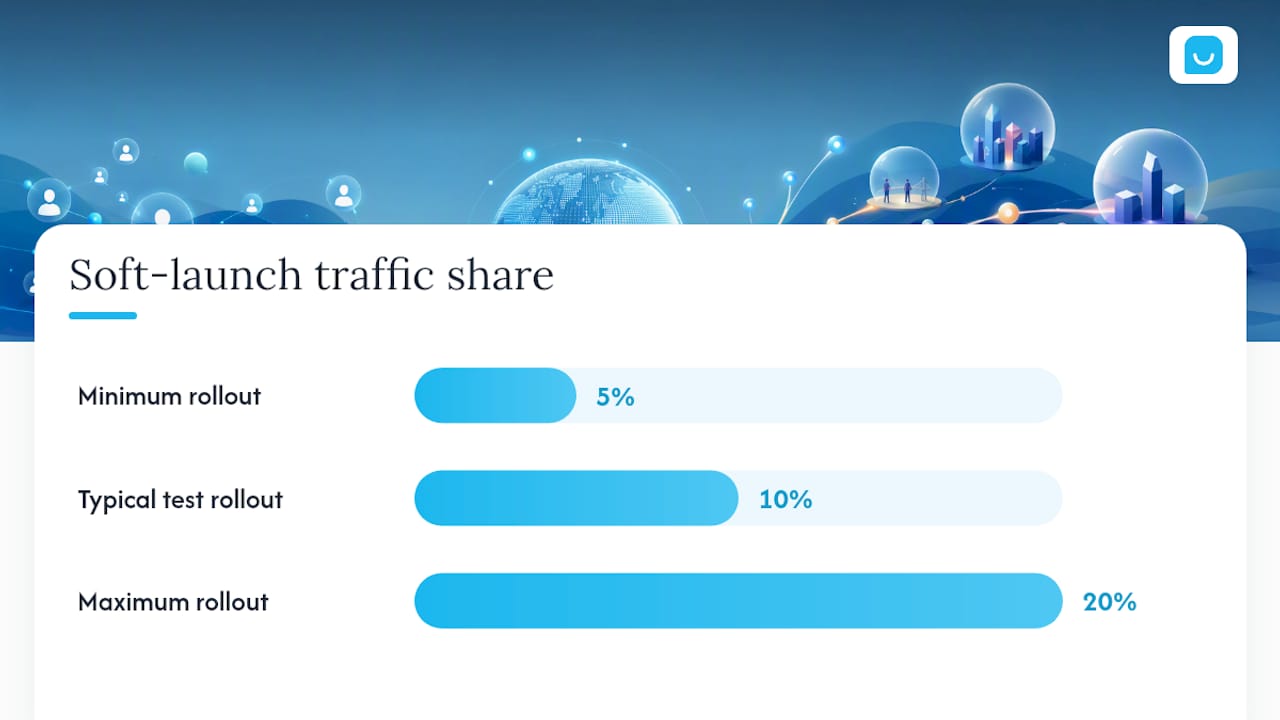
- Run a soft launch. Roll the assistant out to 5% to 20% of your traffic first, read the actual transcripts, and fix gaps before opening it to everyone.
Pro Tip: Don’t launch with every FAQ page and product category connected at once. Start narrow with your top ten questions and best-selling products, then expand weekly once you’ve read real conversations and see what’s actually being asked.
The soft launch step is the one teams skip and regret. A synthetic test conversation never surfaces the weird phrasing real customers use. Reading transcripts from an actual 10% rollout for a week will show you exactly where the assistant guesses instead of answers, and that’s your first fix list.
What Keeps an AI Assistant Accurate and Trustworthy Over Time?
Trust starts with honesty about what the assistant is. Label it clearly as AI, and let it say “I’m not sure, let me connect you with someone” instead of inventing an answer. NN/g’s design guidelines for AI chatbots found that assistants which openly admit uncertainty and disclose their AI nature build more trust with users than ones that pretend to be human or bluff through gaps.
A few design habits make the difference between a tool people rely on and one they abandon after one bad answer:
- Show clickable suggested questions tied to the page a visitor is on, so they don’t have to type from scratch
- Keep one chat entry point that follows the visitor across pages instead of resetting on every click
- Include product images in responses when relevant, not just text descriptions
- Offer accessibility options like voice-to-text input and a way to save or export the conversation
Pro Tip: Set aside 30 minutes every week to read through the conversations your assistant couldn’t resolve. That short weekly audit is what actually improves accuracy, not a one-time setup.
The weekly audit habit is the single highest-leverage practice here. Every failed interaction is a gap in your content or a missing training phrase, and closing a handful of those gaps each week compounds fast.
Which Metrics Actually Prove This Is Working?
Five numbers tell you whether your 24/7 website support is paying for itself, and none of them require a data analyst.
- Deflection rate: the share of conversations resolved without human involvement. Well-integrated assistants can reach 60% to 80% on routine tier-1 and tier-2 questions, though your actual number depends on how much of your traffic asks genuinely routine questions.
- Leads captured: raw count of qualified contacts the assistant collects, especially outside business hours.
- CSAT split: satisfaction score for bot-only conversations compared to escalated ones, which tells you where the assistant is underperforming.
- Handoff rate and time-to-resolution: how often conversations need a human and how fast that handoff happens.
- Revenue-attributed outcomes: meetings booked, orders where the assistant assisted checkout, and month-over-month conversion lift.
You don’t need a dashboard suite for this. A simple weekly spreadsheet tracking these five numbers, reviewed alongside your conversation audit, gives most small teams enough signal to know whether the assistant is earning its place.
What We’ve Learned Running This for Small Teams
Start narrow. The teams that succeed with an AI assistant begin with FAQs and product pages, prove those work, and only then expand into sales workflows like booking meetings or qualifying leads for a demo. Trying to cover everything on day one is how you end up with an assistant that guesses badly across ten topics instead of answering five perfectly.
The staged rollout matters more than people expect going in. A short weekly audit cadence, even just 30 minutes, catches more real problems than any amount of pre-launch testing. And if lead capture is the goal, prioritize your CRM and calendar integrations early. A captured email address that never becomes a booked call is a wasted conversation.
The gap between an assistant that sounds impressive in a demo and one that actually moves revenue almost always comes down to whether someone is reading the failed conversations and fixing them.
— Konstantin
Konvuno: A 24/7 Website Assistant Built for Small Teams to Run Themselves
Konvuno gets you a live, product-aware assistant faster than hiring or training anyone, because setup lives entirely in a hosted dashboard, no developer and no per-seat pricing involved.
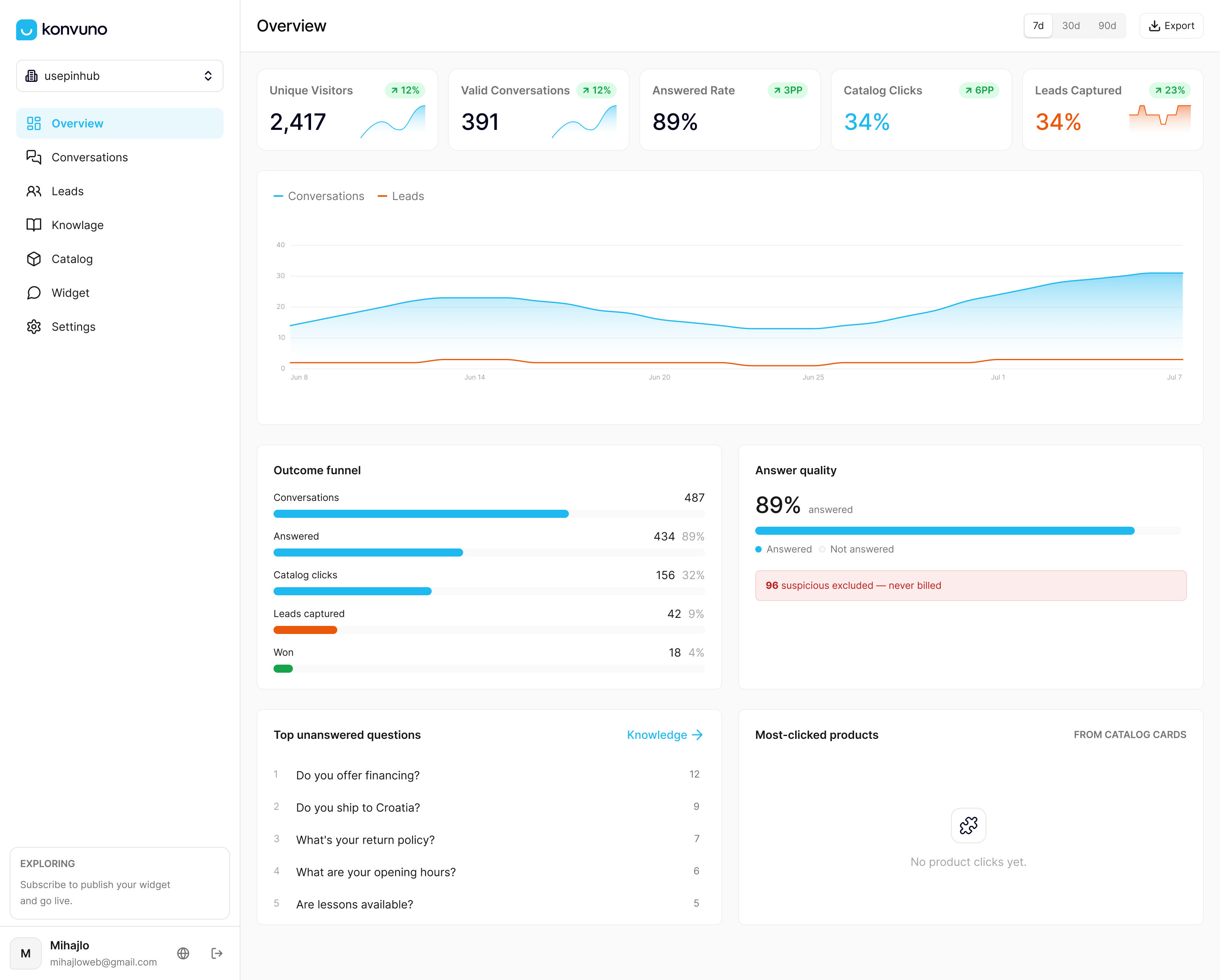
Install one lightweight widget with a single script tag, and Konvuno starts answering from your FAQs, site content, and synced product catalog right away. Connect WooCommerce or a Google Merchant or Facebook feed through Shop Connect, and pricing and stock answers stay accurate without anyone manually updating a script. Every conversation feeds a built-in CRM so captured leads don’t disappear into an inbox, and when a question needs a human, Konvuno hands it off cleanly. It replies in seven languages out of the box, which matters the moment you get traffic from outside your home market. If your knowledge base is the priority, the FAQ Assistant feature is built specifically for that. Start with a Konvuno trial, connect your product feed, and run the soft launch this week instead of next quarter.
Sources
For deeper detail on the design and measurement practices in this guide, see NN/g’s chatbot design guidelines, IBM’s ecommerce chatbot overview, and industry guidance on automating enquiry capture for sales teams handling higher lead volume.
- 10 Guidelines for Designing Your Site’s AI Chatbots - NN/G
- Ecommerce chatbot overview - IBM
- Comparee
FAQ
What Is 24/7 Website Support in This Context?
It’s an AI assistant widget installed on your website that answers visitor questions from your FAQs and product catalog, captures leads, and escalates to a human when needed. It is not a human-staffed technical helpdesk.
How Long Does It Take to Set Up an AI Website Assistant?
Basic setup, including installing the script tag and connecting a product feed, typically takes under an hour. A full soft launch and audit cycle usually runs one to two weeks before opening to all traffic.
What Deflection Rate Should a Small Business Expect?
Well-integrated assistants report 60% to 80% deflection on routine tier-1 and tier-2 questions, though your actual rate depends on how many of your inquiries are genuinely repetitive.
Does Konvuno Support Multiple Languages for Global Customers?
Yes. Konvuno replies in seven languages, which lets a single widget serve visitors across different markets without separate setups for each language.
How Do I Keep the Assistant From Giving Wrong Answers?
Ground it in accurate, current content, label it clearly as AI, and let it admit uncertainty instead of guessing. Reviewing failed conversations weekly and updating your knowledge base is what keeps accuracy improving over time.