Avoid Losing Customers Overnight: After Hours Support Chatbot for SMBs
Practical SMB guide to set up an after hours support chatbot: seven steps for implementation, handoff and hallucination safeguards, compliance checks, and...

For most small and medium businesses, an AI powered after hours chatbot with explicit human escalation rules is the fastest, lowest cost way to provide effective 24/7 customer support. Done right, it covers nights and weekends, answers routine questions, and captures leads while you sleep. The one catch is that handoff design and honesty about using AI need attention, or the convenience turns into a liability.
TL;DR:
- Using AI chatbots for after hours support is cost-effective and scalable, especially for answering routine queries like store hours and order status, reducing missed sales.
- The most suitable model varies; small businesses typically benefit from AI with human escalation for urgent or complex issues, ensuring safety without extensive staffing.
- Building an effective chatbot requires inventorying content, designing clear conversation flows, and testing on high-traffic pages to prevent false confidence and hallucinations.
- Implementing safety measures, such as verification layers and confidence thresholds, minimizes errors during handoff to human agents, safeguarding accuracy and trust.
- Compliance requires transparency about AI use, updating privacy policies, and allowing users to request data removal, while monitoring metrics like containment and handoff rates ensures reliability.
Table of Contents
- Why after hours support chatbots matter for SMBs
- After hours support models: which fits your business
- How to implement an effective after hours chatbot
- Designing safe handoff and hallucination mitigation for chatbots
- Compliance, transparency, and privacy considerations
- Metrics and monitoring: how to know your after hours chatbot is working
- Why Konvuno is a practical option for quick after hours coverage
- Author’s practical perspective and final checklist
- Try Konvuno: demo and quick-start
- Sources
- FAQ
Why after hours support chatbots matter for SMBs
Customers do not wait for business hours to have a problem, and their patience for being ignored has thinned. Many consumers say they feel frustrated by a lack of 24/7 support, and Vonage’s research found that 74% of customers will switch to a competitor after just one poor support experience. That is the real cost of a closed help desk: not a missed chat, but a lost customer.
The gaps show up in specific ways. A shopper browsing your store at 11 PM with a question about sizing or shipping will often buy elsewhere if nobody answers. A homeowner with a broken water heater on a Saturday night will call the next plumber on the list if yours does not respond.
Weigh the two ways to close that gap:
- Hiring a night shift means payroll, scheduling, and training for hours that may see light traffic.
- An automated after hours chatbot answers instantly, never calls in sick, and scales to slow or busy nights without added staffing.
The second option is why after hours automation has become the default starting point for smaller teams rather than a nice to have.
After hours support models: which fits your business
Not every business needs the same setup. The right model depends on your traffic, your risk tolerance, and how complex your typical after hours question gets.
- AI first: the chatbot handles everything overnight with no human on call, best for low stakes questions like store hours or return policies.
- AI plus on call escalation: the bot resolves routine queries and pings a manager or technician for anything urgent, common in home services and healthcare adjacent businesses.
- Extended hours: a small human team covers evenings, with the bot only taking over the deepest overnight hours.
- Follow the sun: distributed human teams across time zones hand off to each other, an option mostly for larger or global operations.
- Outsourced after hours desks: a third party staffs your after hours queue, useful when volume is high but not high enough to justify in-house night staff.
- Offline capture only: no bot, just a contact form or voicemail, which is the weakest option since it does nothing to answer questions in the moment.
To decide, run through this checklist:
- If most after hours questions are repetitive (hours, pricing, order status), an AI first model is enough.
- If your business involves safety, urgent repairs, or high value sales, add on call escalation so a real person gets pulled in.
- If overnight volume is heavy and revenue per interaction is high, extended hours or follow the sun may pay for itself.
- If you lack any structured knowledge base yet, start with offline capture and build toward AI first as you organize your content.
Most SMBs land on AI plus on call escalation: cheap to run, fast to answer, and safe enough because a human is never more than a notification away.
How to implement an effective after hours chatbot
A chatbot is only as good as what it is built on. Skipping the setup work is the most common reason after hours bots feel unhelpful.
- Inventory your content. Pull together your FAQs, help center articles, return and warranty policies, and a sample of past support tickets to see what customers actually ask.
- Sync your product catalog. If you sell physical goods, connect your catalog through WooCommerce, Google Merchant, or a Facebook product feed so pricing and stock answers stay current without manual updates.
- Design the conversation flow. Map out the common paths: order status, booking changes, troubleshooting, and general questions, each with a clear fallback when the bot is unsure.
- Add clarifying prompts. Instead of guessing at an ambiguous question, have the bot ask a follow-up, since Microsoft’s research on human-LLM grounding found that language models often skip the clarifying questions humans would naturally ask, which drives many of their misunderstandings.
- Set escalation triggers. Define exactly which phrases, topics, or repeated failed attempts should route to a human, and make sure the full conversation history transfers with the handoff.
- Build handoff bundles. Package the recent messages, extracted claims, and a short risk note together so the human picking up the thread does not start from zero.
- Pilot on one page first. Launch on your highest traffic product or service page, watch real conversations for a week or two, fix the gaps, then expand site-wide.
Pro Tip: Test your catalog-synced answers about price and stock in a staging environment before launch, and run a daily automated check against the feed so a stale answer never reaches a real customer.
The pilot step matters more than most teams expect. A narrow rollout surfaces the exact questions your bot cannot yet answer, which is far cheaper to fix on one page than across an entire site.
Designing safe handoff and hallucination mitigation for chatbots
The riskiest moment for any support chatbot is not the first answer, it is the handoff, whether that is bot to bot in a multi-agent setup or bot to human. A Springer paper on handoff hallucinations lays out a taxonomy of failure types that occur specifically at these boundaries, where one agent’s confident but wrong claim gets passed along and amplified rather than questioned.

The same research tested a Handoff Verification Layer, which uses recursive grounding and authenticity scoring to catch these errors before they spread. The pilot using this verification layer showed very few detected hallucinations, a sharp contrast to unguarded handoffs, according to the same Springer study.
You do not need a research team to apply the same principles at SMB scale:
- Add a verification step that flags any claim the bot cannot tie back to your actual FAQ or catalog content.
- Use explicit epistemic signals, phrases like “I’m not fully sure, let me check” rather than confident guessing.
- Set a confidence threshold below which the bot defers to a human instead of answering.
- Quarantine uncertain claims with a visible note so reviewers know exactly what to double check.
Operationally, this means requiring the bot to ask a clarifying question before answering anything ambiguous, logging every claim it makes for later review, and having a human spot check a sample of transcripts each week, leveraging solutions like the event-driven AI assistant that integrates metadata into handoffs to prevent errors. None of this is exotic. It is closer to the review discipline a careful editor applies to a junior writer’s draft, catching small errors before they reach a reader.
Compliance, transparency, and privacy considerations
Running an AI chatbot after hours is not just a technical choice, it carries legal weight in most markets. UK government guidance makes clear that businesses using AI agents must be transparent about it and remain legally responsible for AI-generated misinformation, meaning a wrong answer from your bot is still your problem to fix. Similarly, the EDPS genAI orientations stress transparency around data use, clear retention windows, and informing users when they are talking to an AI system rather than a person.
A short checklist covers most of the ground:
- Label the chatbot clearly as AI when that fact is material to the conversation, not buried in fine print.
- Update your privacy notice to reflect how conversation data is stored, for how long, and who can access it.
- Offer a simple way for visitors to request their data or opt out of having it retained.
- If the bot gives incorrect or harmful information, correct it publicly if needed, fix the underlying content source, and notify the affected customer directly.
None of this requires a legal department for a typical SMB rollout, but it does require someone to own it and check it periodically.
Metrics and monitoring: how to know your after hours chatbot is working
A chatbot that launches quietly and never gets reviewed again is a risk, not a convenience. Track these core numbers:
- Containment rate: the share of overnight conversations the bot resolves without human help.
- Handoff rate: how often conversations escalate, and whether that rate spikes on certain topics.
- Time to human response: how fast an escalated query actually reaches a person, even if that person responds the next morning.
- After hours CSAT: satisfaction scores specifically for overnight interactions, since they often differ from daytime scores.
- Conversion or lead capture rate: how many after hours conversations turn into a booked call, a captured email, or a completed sale.
One overlooked but useful signal is grounding acts, the clarifying questions your bot asks before answering. Microsoft’s research treats a drop in these questions as an early predictor of a breakdown in the conversation, so tracking that number alongside containment and handoff rates gives you a warning sign before customers start complaining.
Sampling transcripts weekly, running periodic grounding audits, and setting alert thresholds for sudden spikes in handoff rate are all cheap to set up and catch problems early. Someone on your team, whether that is the support manager or the owner, should own this review on a fixed schedule rather than leaving it to whoever notices a complaint.
Why Konvuno is a practical option for quick after hours coverage
If you want after hours coverage without hiring a night shift or a developer, Konvuno is built specifically for that gap. It installs via a script tag and is configured from a hosted dashboard, enabling setup without engineering help. It answers visitor questions using FAQs and website content, syncs product catalogs automatically from common e-commerce feeds, and captures leads into a built-in CRM to avoid missing contacts overnight.
Konvuno’s FAQ assistant turns your existing help content into direct answers instead of making visitors hunt through pages, and its Shop Connect feature keeps product, price, and availability answers current without manual updates. It supports multiple languages and hands off to a human when a question requires it, benefiting e-commerce stores and service businesses with active product listings that cannot staff a night shift but still risk losing sales to unanswered questions.
Author’s practical perspective and final checklist
The businesses that get the most out of after hours chatbots treat automation and human oversight as a pair, not a replacement. The three pitfalls I see most often: skipping the pilot and launching site-wide on day one, letting the bot answer with false confidence instead of asking a clarifying question, and forgetting that a wrong answer at 2 AM is still your business’s mistake by morning. Start narrow. Pilot the bot on your highest traffic page, watch it for two weeks, and only then expand.
— Konstantin
Try Konvuno: demo and quick-start
Getting after hours coverage running should not take a development sprint. This type of assistant installs with a script tag, configures from a hosted dashboard, and syncs product catalogs automatically, enabling rapid setup without complex contracts.
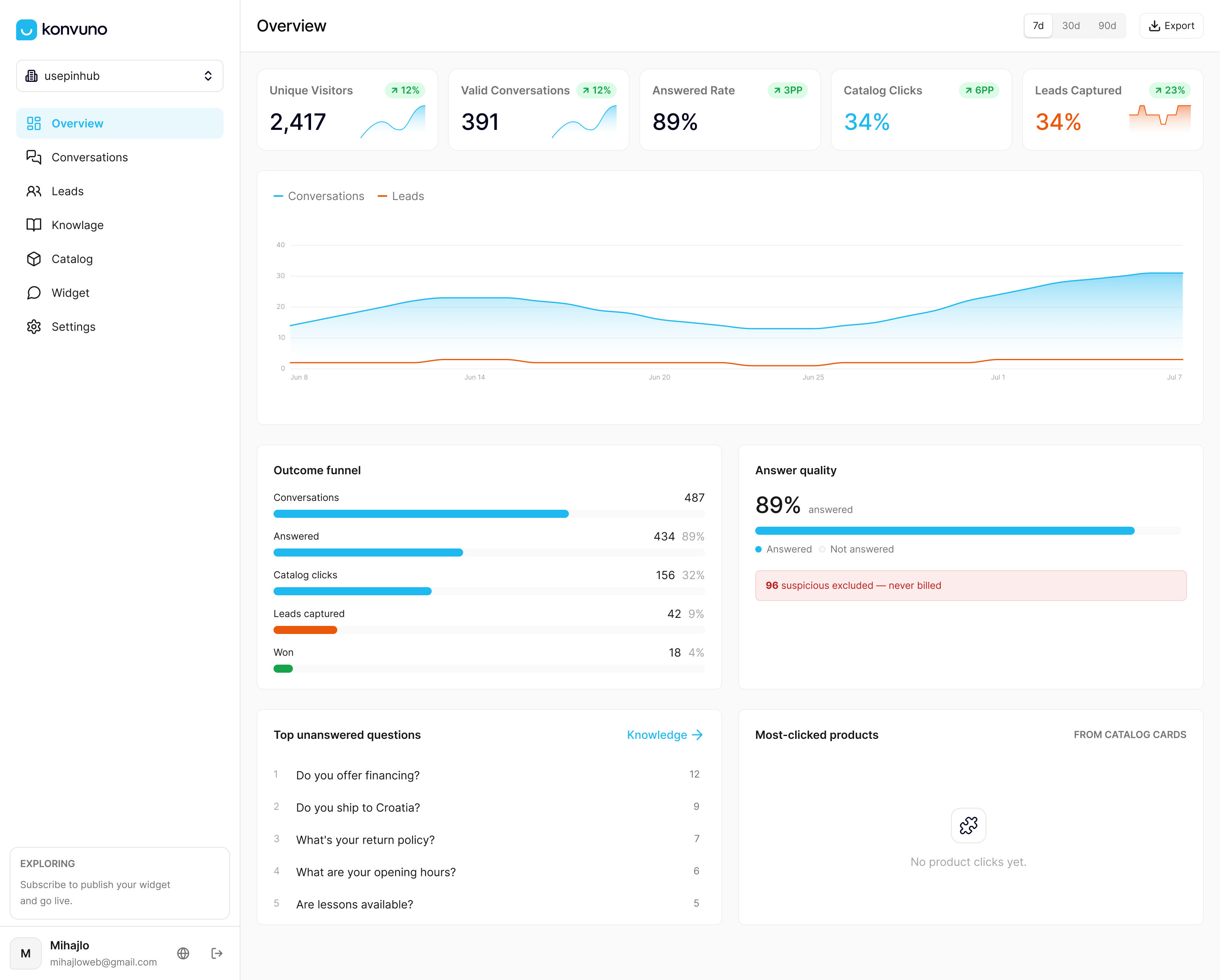
You can preview and configure the assistant before paying anything. Visit the Konvuno landing page to start a demo or trial and see how it handles your own FAQs and catalog.
Sources
- Vonage research reveals nearly half of consumers expect 24/7 customer service support
- Gov
- Navigating rifts in human-LLM grounding (Microsoft Research)
- Handoff hallucinations: taxonomy, benchmark, and mitigation for multi-agent pipeline failures
- EDPS revised genAI orientations
FAQ
Is 24/7 live chat support available for small businesses?
Yes, small businesses can offer round the clock coverage using an AI chatbot even without night shift staff, with human escalation handling anything the bot cannot resolve. This is generally far cheaper than staffing a live agent overnight.
How do I get connected to a live agent from a chatbot?
Most after hours chatbots include an escalation trigger, either a request phrase like “talk to a person” or specific topics that automatically route to a human. The conversation history should transfer with the handoff so you do not have to repeat yourself.
What should I look for in a chatbot for customer service?
Look for a bot that answers from your actual FAQs and product data, asks clarifying questions instead of guessing, and hands off cleanly to a human with full context when needed. Microsoft’s research found that clarifying questions are one of the strongest signals of a chatbot that is actually working well.
Why does 24/7 customer support matter for a business?
Customers expect help outside business hours, and going without it carries real risk. Vonage’s research found that 74% of customers will switch to a competitor after a single poor support experience, which makes after hours coverage a revenue question as much as a service one.