Customer Support Automation: A Resolution-First Playbook
Explore how customer support automation streamlines resolutions, cuts costs, and empowers agents to tackle complex issues effectively.

Customer support automation uses software, and increasingly AI, to resolve routine customer needs without a human agent typing the first reply. It works by detecting what a customer wants, pulling the right answer from a knowledge base or product catalog, and either resolving the issue directly or routing it to a person with full context attached. Done well, it cuts resolution time, lowers the cost per ticket, and gives agents room to handle the harder cases that actually need a human.
The pressure to adopt this is no longer theoretical. A Gartner survey found that 91% of customer service leaders feel organizational pressure to implement AI in 2026, and vendors like Zendesk and Anthropic are converging on the same principle: automation should chase confirmed resolution, not just ticket volume.
What decision-makers get right away:
- Faster answers to repetitive questions (hours down to seconds)
- Lower per-ticket cost as routine volume shifts off human queues
- Coverage outside business hours without new hires
- Agents freed to handle judgment-heavy, high-value conversations
Statistic to remember: Gartner also projects that agentic AI will autonomously resolve 80% of common customer-service issues by 2029, a marker of how far the category is expected to move in the next few years.
Key Takeaways
Resolution-first automation, built on accurate knowledge sources and a clear human handoff path, delivers faster service without sacrificing trust.
| Point | Details |
|---|---|
| Measure resolution, not volume | Track confirmed resolution rate and re-contact rate instead of raw automated conversation counts. |
| Start with repeatable tickets | Pilot FAQs, order status, and routing before touching complex or emotional ticket categories. |
| Secure action-taking agents separately | Use deterministic rule checks and sandboxing for any system that can issue refunds or edit orders. |
| Keep knowledge sources current | Sync product feeds and FAQs continuously so automated answers don’t go stale. |
| Konvuno fits SMB-scale rollouts | Its script-tag install and synced product catalog give small teams a phased automation starting point without developer work. |
Table of Contents
- How Does Customer Support Automation Actually Work?
- What Technologies Power Automated Customer Service?
- What Business Benefits Does Automation Deliver?
- Where Should You Deploy Automation First?
- How Do You Implement Support Automation Step by Step?
- What Are the Risks of Automating Customer Support?
- How Do You Measure Whether Automation Is Working?
- How Does a Small Business Automate Support Without a Dev Team?
- What’s the Real Trade-Off Leaders Are Missing?
- Get a Site-Level Assistant Without Hiring an Automation Team
- Sources
How Does Customer Support Automation Actually Work?
Every automated interaction moves through four stages, whether it is a scripted chatbot or a full agentic system.
- Intent detection. The system parses the incoming message using natural language processing and a classifier trained on prior support conversations. It decides what the customer actually wants: a refund status check, a password reset, a shipping question. Ambiguous requests get flagged for clarification rather than a guess.
- Knowledge retrieval. Once intent is clear, the system searches connected sources: a knowledge base, product feed, order history, or CRM record. This is where answer quality lives or dies. A system pulling from stale product data will confidently give a wrong price.
- Action orchestration. For anything beyond answering a question, the system triggers a workflow: updating a ticket status, calling an API to check order status, or writing a note into a CRM. This is the step that turns a chatbot into an actual agent rather than a search box with a friendly tone.
- Escalation and handoff. When the system hits a confidence threshold it can’t clear, or the customer asks for a person, it needs to hand off with full conversation context intact, not a cold transfer that makes the customer repeat themselves.
Anthropic’s own guidance on deploying generative AI for support stresses that the systems worth building are the ones that handle context-aware, multi-step conversations, not single-turn Q&A. That is the real dividing line between a basic bot and something that resolves issues end to end.
Pro Tip: Test your escalation logic before you test your automation logic. A system that answers well but escalates badly will generate more complaints than one that automates less but hands off cleanly.
What Technologies Power Automated Customer Service?
Not every automation problem needs the same tool. Matching the technology to the use case matters more than chasing the newest model.
- Rule-based chatbots handle narrow, predictable flows (password resets, store hours) reliably and cheaply, but break the moment a question veers off script.
- Generative AI chatbots handle open-ended, multi-step conversations and can synthesize an answer from several sources at once, at the cost of needing tighter guardrails.
- Voice AI and IVR extend the same intent detection to phone channels, useful for triage before a call ever reaches a queue.
- Ticketing automation and routing engines classify and assign incoming tickets automatically, so billing questions land with billing specialists without a human dispatcher.
- Knowledge sync tools pull live data from a product feed, WooCommerce store, or Google Merchant catalog so automated answers about price and availability don’t go stale.
- Agent-assist tools sit beside human agents, drafting reply suggestions and summarizing long threads so agents spend less time reading and more time deciding.
The trade-off is consistent across all of them: scripted tools are predictable but brittle, generative tools are flexible but require more oversight to keep accurate.
What Business Benefits Does Automation Deliver?
The case for automation is mostly an efficiency case, but it shows up in several distinct ways.
- Faster resolution. Routine questions that once sat in a queue for hours get answered in seconds, which directly lowers customer effort scores.
- Lower cost per interaction. Every question resolved by automation is a question an agent never touches, which shows up in reduced average handle time across the team.
- 24/7 coverage. Automation doesn’t take a lunch break or a holiday, closing the gap between when customers have problems and when your team is staffed to answer them.
- Better agent experience. Agents stop repeating the same five answers all day and start handling the conversations that actually use their judgment, which tends to reduce burnout and turnover.
None of this works, though, if the automation is optimized for the wrong number. Zendesk’s guidance on automated customer service is blunt about it: the systems worth measuring are the ones that track confirmed resolution and first-contact success, not raw deflection counts that just mean customers gave up asking.
Where Should You Deploy Automation First?
Not every channel or use case deserves equal attention in a first rollout. Some starting points consistently produce faster wins than others.
- FAQ and knowledge-base answers on web and chat. This is the lowest-risk, highest-volume win: static questions with static answers, ideal for a first pilot.
- Order status and delivery notifications. For e-commerce specifically, automatically answering “where is my order” against live shipping data removes one of the single most common ticket types without any judgment calls involved.
- Ticket triage and routing. Automatically classifying incoming tickets into billing, technical, or refund categories cuts the time a ticket spends waiting for a human to read and reassign it.
- Agent-assist for long threads. Summarizing a 40-message email chain into three sentences before an agent picks it up saves real minutes on every complex case.
Small brands in particular lean on this sequencing. Coverage of how customer service automation is changing how small brands scale support points to FAQs, order updates, and basic routing as the projects that let a five-person support team handle volume that used to require twice the headcount.
How Do You Implement Support Automation Step by Step?
Rolling out automation badly is worse than not rolling it out at all, because a bad first impression with a bot tends to stick. A phased approach protects against that.
- Audit your tickets first. Pull three to six months of ticket history and tag it by topic. You are looking for the repeatable, unambiguous questions, the ones with one right answer that doesn’t change based on context. That’s your automation backlog, not the hard cases.
- Prioritize quick wins and define success metrics before you build anything. Pick two or three ticket categories, decide what “resolved” means for each, and set a target (resolution rate, response time) you can actually check against later. Building first and measuring later is how projects drift.
- Design the flow and set escalation rules explicitly. For each automated flow, define exactly when it should stop and hand off: a confidence threshold, a specific keyword, a customer explicitly asking for a person. Connect the data sources the flow needs, your knowledge base, CRM, and any product feed, before launch, not after. Automation quality tracks directly with data quality: Zendesk notes that accurate, current knowledge bases and product data are what separate reliable automated answers from confidently wrong ones.
- Pilot with a human in the loop. Run the automation live but have an agent review a sample of every session for the first two to four weeks. This is where you catch the failure patterns you didn’t anticipate in the design phase.
- Scale across channels and layer in agent-assist. Once a pilot channel is stable, extend the same flows to email or voice, and start adding agent-assist features (summarization, suggested replies) for the tickets that still need a human.
Pro Tip: Resist the urge to automate your hardest, highest-stakes ticket category first just because it generates the most volume. Start with the boring, repeatable stuff. Confidence and data both compound.
Keeping product information synced matters more than most teams expect going in. A knowledge layer pulling live data from WooCommerce or a Google Merchant feed, the same approach behind Shop Connect, prevents the single most common automation failure in e-commerce: a bot cheerfully quoting a price or stock status that changed yesterday.
What Are the Risks of Automating Customer Support?
Automation fails in a small number of predictable ways, and each one has a known fix.
- Wrong answers erode trust fast. A single confidently incorrect answer about a refund policy does more damage than a slow but correct one. Fix: sample-based QA on live conversations, plus a clear rollback path when a flow starts producing bad answers.
- Prompt injection and unsafe actions. Any system that can take action, issuing refunds, editing orders, needs controls that don’t rely on the AI model behaving itself. Google’s own testing on this is instructive: their reference architecture uses a Semantic Gateway that validates every tool call against deterministic business rules before it executes, plus sandboxed code execution with strict resource limits.
- Customers trapped in a loop with no way out. A bot that keeps offering the same three unhelpful options is worse than no automation at all. Fix: a visible, one-click path to a human, with a defined service-level agreement for how fast that handoff gets a response.
- Data access and compliance gaps. Every automated system touching customer data needs audit logs showing what it accessed and why, especially once it starts writing to CRM or order systems rather than just reading from them.
Action-taking agents are fundamentally different from answer-giving ones. The moment a system can move money, change an order, or edit an account, it needs guardrails that sit outside the model itself, not guardrails the model is merely instructed to follow.
How Do You Measure Whether Automation Is Working?
The wrong metric here is the one every vendor demo leads with: total automated conversations. That number tells you volume, not whether customers actually got helped.
- Confirmed resolution rate. Did the issue actually get solved, verified by a follow-up signal, not just “the bot sent a final message.”
- CSAT on automated interactions. Track it separately from human-handled tickets so a drop doesn’t get buried in an aggregate score.
- Re-contact rate. Customers who come back within 24 to 48 hours about the same issue are your clearest signal of a false resolution.
- Ticket deflection and average handle time. Useful operational metrics, but always read alongside resolution rate, never alone.
- Escalation volume and quality. A rising escalation rate isn’t automatically bad; it might mean the system is correctly recognizing what it shouldn’t handle.
Zendesk’s framing on this is the one worth internalizing: the goal is confirmed resolution and first-contact success, and everything else is a supporting number. Run a pilot with a control group of tickets still handled manually for four to six weeks. That comparison, automated versus manual on the same ticket categories, is the cleanest way to prove the system is actually helping before you scale it further.
How Does a Small Business Automate Support Without a Dev Team?
Most of the phased playbook above assumes a team with engineering resources to build custom flows. Plenty of small and midsize businesses don’t have that, and the tooling has caught up to solve for exactly that gap.
Konvuno is built as a configurable AI website assistant that installs with a single script tag and runs from a hosted dashboard, with no developer required to configure it. It answers visitor questions directly from your existing FAQs, website content, and product catalog, and for stores running WooCommerce or a Google Merchant or Facebook product feed, those answers about price and availability sync automatically rather than going stale.
What that looks like in practice:
- FAQ Assistant answers common questions instantly instead of sending visitors hunting through a support page.
- Shop Connect keeps product, price, and availability answers current by syncing directly from your existing catalog.
- A built-in CRM captures leads from conversations automatically, so a support interaction can also become a sales one.
- Multilingual support across seven languages means one assistant covers international visitors without separate setups.
For a five-person team without a dedicated automation budget, that’s the entire phased rollout compressed into a single afternoon of setup.
What’s the Real Trade-Off Leaders Are Missing?
Most leaders evaluating automation ask the wrong first question. They ask “how much can we automate” when the better question is “which categories are safe to automate first.” The businesses that get burned are almost always the ones that started with their most complex, highest-emotion ticket type because it had the highest volume, not because it was the safest place to learn.

Pilot before you scale, always, and treat the pilot as a genuine test rather than a soft launch you’ve already decided to keep. Change management matters more than the technology choice: agents need to hear, explicitly, that automation is there to remove repetitive tickets from their queue, not to replace them, or you will get quiet resistance that undermines the rollout regardless of how good the system is.
Three things to do this quarter: audit your last ninety days of tickets for repeatable patterns, pick one narrow use case with a clear resolution definition, and set your re-contact rate baseline before you automate anything, so you have something real to compare against later.
— Konstantin
Get a Site-Level Assistant Without Hiring an Automation Team
Building the phased rollout described above from scratch means stitching together a chatbot platform, a knowledge base tool, and separate CRM integration work, plus whoever maintains it all. Konvuno collapses that into one widget and one dashboard.
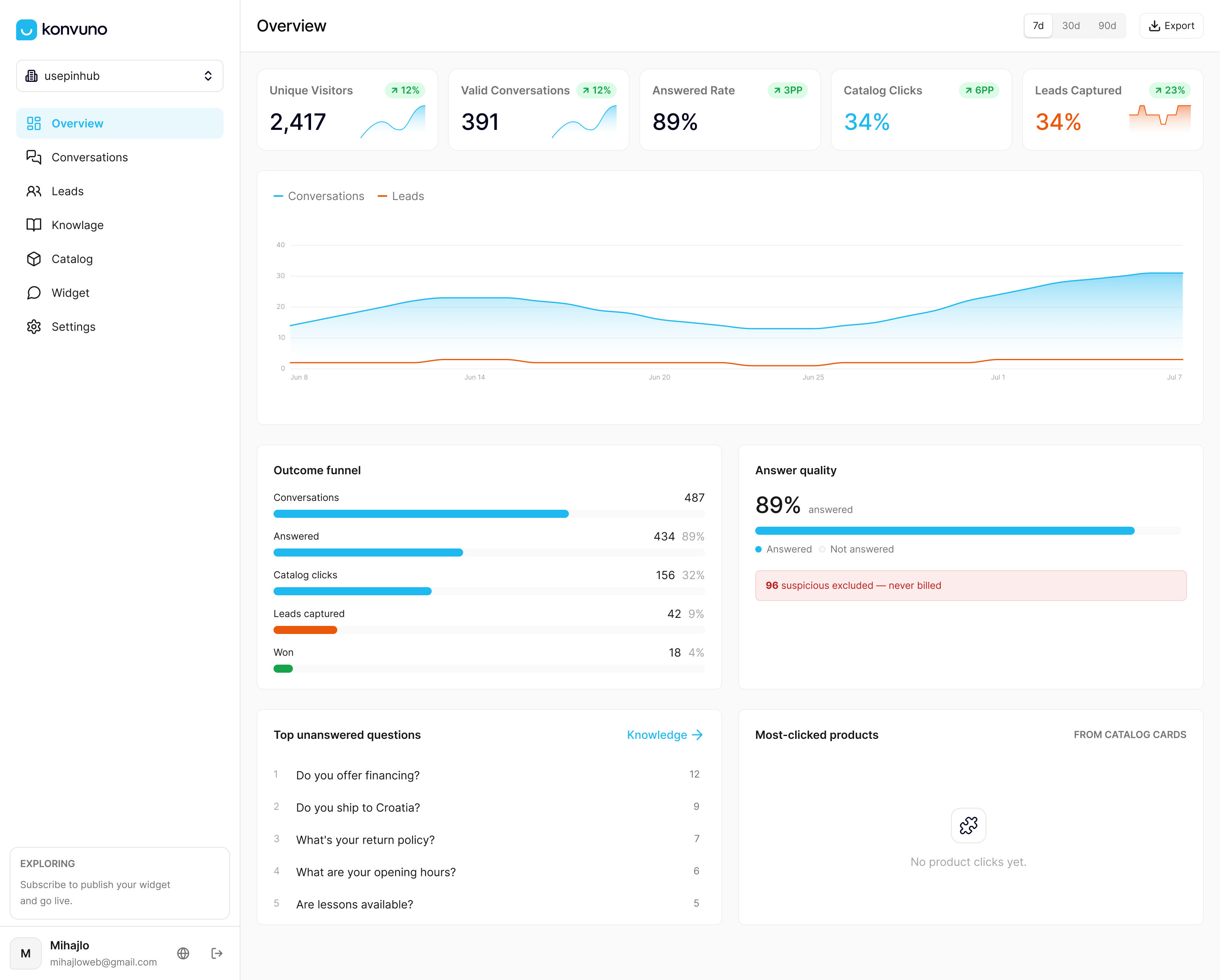
You configure it from FAQs and website content you already have, connect your WooCommerce store or product feed so answers about price and stock stay accurate on their own, and every conversation that needs a person hands off cleanly while leads get captured into the built-in CRM automatically. There’s no per-seat pricing to negotiate and no engineering ticket to file just to change an answer. If you run a small or midsize business, or manage sites for clients as an agency, and you’re tired of visitors bouncing because they couldn’t find a simple answer, set up your assistant on Konvuno and see what visitors are actually asking within the first week.
Sources
- Gartner survey finds ninety-one percent of customer service leaders under pressure to implement AI in 2026
- What is automated customer service? A practical guide - Zendesk
- Google’s $10,000 refund test shows why AI agents need zero trust - Help Net Security
- Customer service automation is changing how small brands scale support
- Customer support | Claude by Anthropic