Cut Support Load: FAQ Automation as an Operational Program for SMBs
SMB playbook to run FAQ automation as an operational program: audit tickets, pilot your top 5–10 questions, set governance, and scale.

FAQ automation uses a chatbot, knowledge base, or AI assistant to answer routine customer questions instantly, without a human touching the ticket. The payoff is straightforward: fewer support tickets, faster answers around the clock, and consistent responses that match your actual policies. Whether it works comes down to one thing: how well the system is grounded in your own content instead of guessing.
TL;DR:
- FAQ automation is most effective when grounded in your own content, with live updates to ensure answers stay accurate and relevant.
- RAG systems that pull from curated documents significantly reduce hallucinations, especially for legal or product-specific questions.
- Focusing on only the top 5 to 10 questions initially improves accuracy and allows for easier expansion based on real user queries.
- Key metrics to track for effectiveness include resolution rate, fallback rate, escalation frequency, and customer satisfaction scores.
- Small businesses should prioritize simple, hosted solutions with live integrations over self-built models for manageable and reliable FAQ automation.
Table of Contents
- What Is FAQ Automation and Where Does It Fit in Support?
- How FAQ Automation Works Under the Hood
- What Are the Real Benefits of Automating FAQs?
- Implementation Checklist: Launching FAQ Automation Step by Step
- Why Do FAQ Bots Hallucinate, and How Do You Stop It?
- Which Metrics Actually Prove FAQ Automation Is Working?
- What Actually Makes FAQ Automation Succeed for Small Businesses
- How Konvuno Handles FAQ Automation for SMBs
- Sources
What Is FAQ Automation and Where Does It Fit in Support?
FAQ automation sits at the front line of customer support, catching the repetitive questions before they ever reach a human inbox. It can take a few forms, each with a different tradeoff between setup effort and answer quality.
Businesses typically deploy it through a website chat widget, inside messaging apps like WhatsApp or Facebook Messenger, embedded in email auto-responses, or as an internal tool for support agents themselves. The mechanism behind the scenes varies:
- Preset or pattern-based bots match a visitor’s question to a fixed list of Q&A pairs using keyword rules. Fast to launch, but brittle when phrasing shifts.
- Semantic search / embeddings convert questions into numerical vectors so the system finds the closest matching answer even when wording differs. A production-ready FAQ assistant on GitHub demonstrates this approach, supporting multiple answers per question along with categories and tags.
- LLM plus retrieval-augmented generation (RAG) lets a language model compose a natural-sounding answer, but only after pulling facts from your approved documents rather than the open internet.
Most businesses that scale past a handful of FAQs end up blending the second and third approaches.
How FAQ Automation Works Under the Hood
The quality of an automated answer depends entirely on what feeds it. That starts with content modeling: organizing your Q&A pairs into categories, tags, and canonical phrasings so the system has clean material to search.
From there, the retrieval method matters more than most business owners expect. Keyword matching looks for exact word overlap, which fails the moment a customer asks “how do I get my money back” instead of “refund policy.” Semantic search and embeddings solve that by understanding intent, not just vocabulary.
RAG takes this a step further. Instead of relying on a model’s general training, RAG lets a bot pull directly from a curated knowledge base, which sharply improves accuracy on business-specific questions like shipping windows or warranty terms.
None of this stays static, though. Real systems need live connections to:
- CRM data, so the assistant knows if it’s talking to an existing customer
- Product catalog feeds (WooCommerce, Google Merchant, Facebook), so prices and stock levels stay current
- Ticketing systems, so unresolved questions become trackable tickets instead of disappearing
Pro Tip: Ask any vendor whether their knowledge base supports hot reload. Embedding-based systems that reload new Q&A pairs without a restart let you fix a wrong answer in minutes instead of waiting for a deployment window.
What Are the Real Benefits of Automating FAQs?
The case for FAQ automation isn’t theoretical. It shows up in four measurable places.
- Lower ticket volume and cost per ticket. Every question resolved by the assistant is one a human agent never has to touch.
- Faster answers, all day and all night. No queue, no time zone gap, no “we’ll get back to you within 24 hours.”
- Consistency across every conversation. A well-configured assistant gives the same policy-aligned answer every time, which matters more than most owners realize when it comes to refund disputes or warranty claims.
- A steady stream of content intelligence. Every unanswered or poorly answered query is a signal about a gap in your knowledge base.
That last point deserves more attention than it usually gets. Treating query analytics as a feedback loop means tracking what visitors search for but can’t find, then closing that gap directly in your FAQ content. Businesses that skip this step end up with a bot that gets stale within a few months, answering questions from a product line you discontinued while missing the ones customers actually ask now.
Implementation Checklist: Launching FAQ Automation Step by Step
Skipping steps here is how projects stall six weeks in. Work through these in order.
- Audit existing FAQs and support transcripts. Pull your last few months of tickets and sort them by frequency. This tells you which 20 questions cause 80% of your ticket volume.
- Choose your approach based on accuracy needs and maintenance capacity. Preset bots keep answers perfectly accurate but demand manual upkeep; semantic search and RAG scale better but need monitoring.
- Structure the knowledge base. Write canonical questions, apply consistent tags, and keep answers short enough to read in one glance, adding visuals where a screenshot beats three sentences of explanation.
- Wire up integrations. Connect the site widget, sync product feeds (WooCommerce or a merchant feed), and link your CRM and ticketing tools so context carries across systems.
- Set confidence thresholds and escalation rules. Decide exactly how uncertain an answer needs to be before the system hands off to a person, and make sure the human receives full transcript context and a suggested reply rather than a cold handoff.
- Test with real queries, then set a refresh cadence. Run actual customer language through the system before launch, measure results, and put a recurring calendar block on updating the knowledge base. A detailed build process from Botpress walks through platform selection, upload, and iteration in more depth.
Pro Tip: Launch with your top 5 to 10 questions only. Expanding a narrow, accurate assistant is far easier than fixing a broad, unreliable one.
Why Do FAQ Bots Hallucinate, and How Do You Stop It?
Hallucinations happen when a language model fills a knowledge gap with something plausible-sounding instead of admitting it doesn’t know. This is the single biggest reputational risk in FAQ automation, and it’s entirely preventable with the right constraints.
The fix is grounding. FAQ agents that respond only from approved documents eliminate the risk of non-compliant answers and preserve auditability, routing anything uncertain to a human and logging every interaction for review.
The system should never answer from what it “knows” in general. It should answer from what your business has explicitly approved, and nothing else.
Practical mitigations worth building in from day one:
- Restrict the model’s sources to your own vetted documents, never the open web
- Set a confidence threshold below which the bot defers instead of guessing
- Route flagged conversations to a human with full context attached
- Keep version history and audit logs for every answer the system gives
Governance matters more once regulation enters the picture. Businesses handling EU customer data should review EU AI Act compliance guidance for SMEs before scaling an AI-driven assistant. And for anything involving legal, medical, or financial specifics, a preset FAQ entry you wrote yourself beats an LLM-generated one every time.
Which Metrics Actually Prove FAQ Automation Is Working?
Six numbers tell you almost everything: resolution rate, fallback (error) rate, escalation frequency, CSAT, containment rate, and time to resolution.
Reading them together matters more than reading any one in isolation. A high fallback rate paired with low CSAT usually points to a knowledge base with real coverage gaps. A high escalation frequency with strong CSAT often means the bot is triaging well, sending only the right conversations to humans rather than dumping everything on them.
- Resolution rate tells you how often the bot closes a query without help
- Fallback rate flags where your content coverage is thin
- CSAT tells you whether the answers people got were actually useful, not just present
The real value comes from closing the loop. Query analytics work as an ongoing feedback mechanism: every fallback is a documentation gap waiting to be fixed, and the businesses that review this weekly, not quarterly, keep their assistants sharp.
What Actually Makes FAQ Automation Succeed for Small Businesses
Most small businesses overthink the technology choice and underthink the operational discipline. A hosted widget with a dashboard beats a self-built bot for the vast majority of SMBs, mainly because nobody on a five-person team has time to babysit a self-hosted model’s infrastructure.
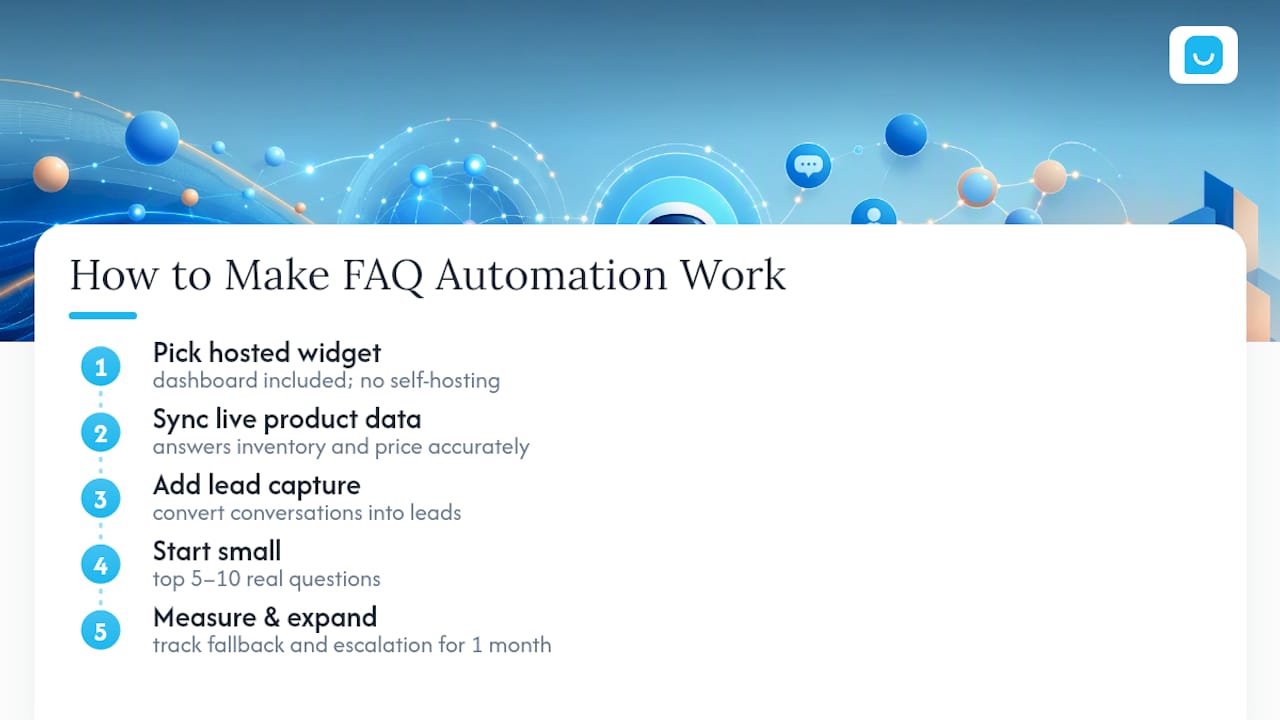
The underrated win is pairing FAQ answers with lead capture and live product data. An assistant that answers “is this in stock” correctly because it’s synced to your catalog does more for revenue than one that just answers politely.
Start with your top 5 to 10 questions. Measure fallback and escalation for a month before expanding scope. Coverage built on real usage data beats coverage built on guesswork every time.
— Konstantin
How Konvuno Handles FAQ Automation for SMBs
Konvuno is a widget you install with one script tag and configure entirely from a hosted dashboard. It answers visitor questions straight from your FAQs and website content, and if you run WooCommerce or a Google Merchant or Facebook product feed, product data syncs automatically through Shop Connect so prices and availability stay current without manual updates.
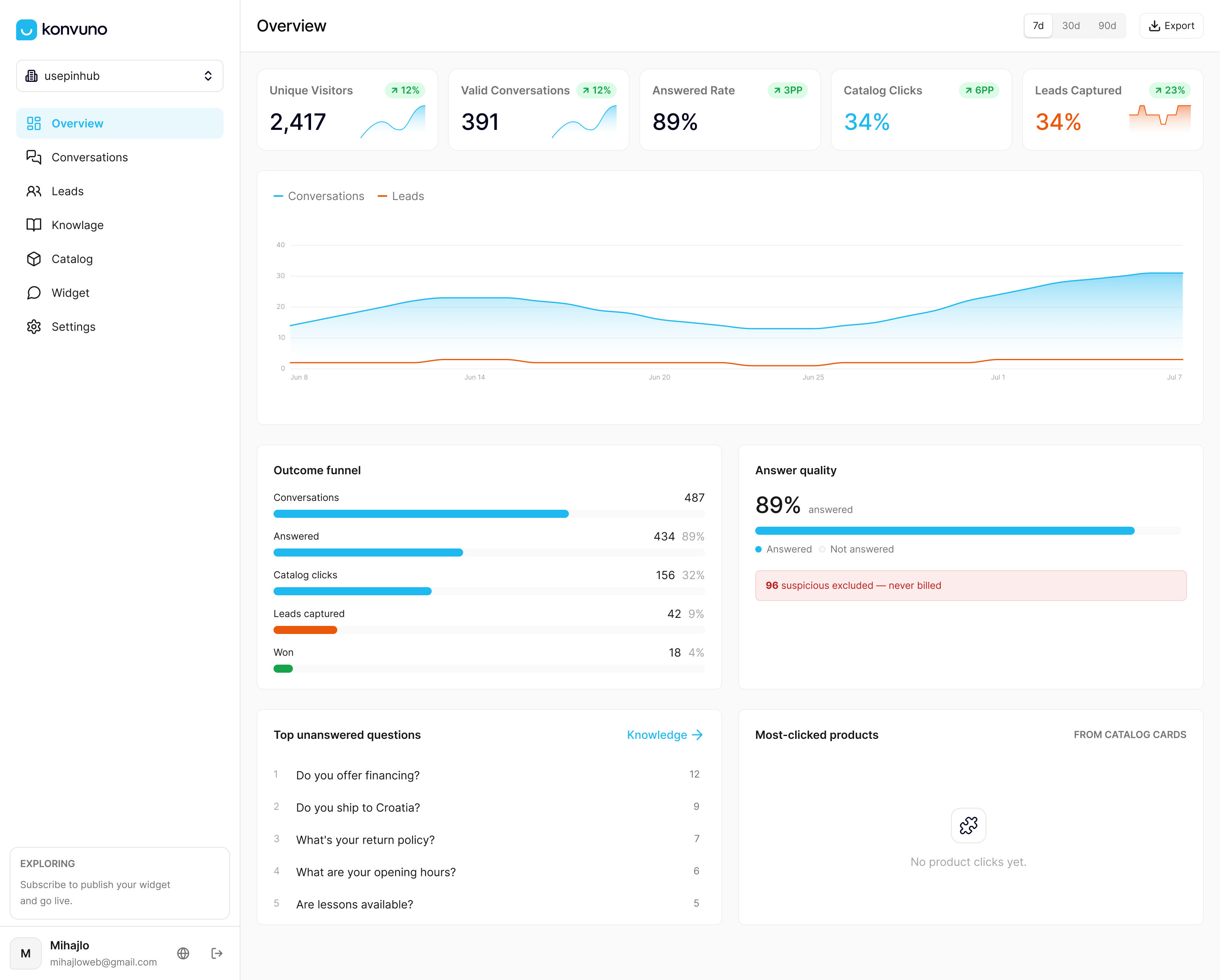
It covers the implementation checklist directly: a manageable knowledge base you control, live integrations, human handoff when a question needs a person, and a dashboard showing exactly what visitors ask so you can close content gaps as they appear. It also captures leads into a CRM and supports multiple languages.
If you’re deciding whether to build this yourself or start with something ready to configure, the Konvuno FAQ assistant is worth testing against your own top 10 questions. Start a trial at Konvuno and see how it answers your actual customer queries within the first day.
Sources
- Qualtrics — The feedback loop: what it is and how to use it
- ai-faq-assistant — GitHub (production-ready semantic search FAQ assistant)
- Botpress — Ultimate guide to FAQ chatbots (2026)