Launch an FAQ automation chatbot in days; SMBs see ROI in 4–8 weeks
A pragmatic SMB playbook to deploy an FAQ automation chatbot fast: audit content, run a one page pilot, sync product feeds, set confidence thresholds, and...

An FAQ automation chatbot answers repetitive customer questions automatically by pulling responses from your existing content, cutting response times from hours to seconds. It works by matching visitor questions to a knowledge base and generating or retrieving the right answer, then escalating anything it can’t handle confidently to a human. Small businesses, ecommerce stores, and product-led SaaS companies see the fastest payoff, since they field the same handful of questions dozens of times a day.
TL;DR:
- Small businesses and ecommerce sites experience rapid ROI within four to eight weeks by focusing on high-volume, repetitive questions in a targeted pilot.
- Using synced product feeds and a clear escalation path ensures answers stay accurate and minimizes content rot over time.
- Hybrid models combining rule-based logic for predictable questions and retrieval-augmented generation for diverse queries outperform pure approaches.
- Regular content audits, workspace ownership, and monitoring low-confidence queries are essential for maintaining bot accuracy and effectiveness.
- Implementing a focused pilot on a high-traffic page with defined success metrics helps identify content gaps and measure impact before expanding.
Table of Contents
- What Is an FAQ Automation Chatbot and How Does It Work?
- What Business Outcomes Should You Expect?
- Rule-Based, RAG, or Hybrid: Which Chatbot Type Fits Your Business?
- How to Implement an FAQ Automation Chatbot: A Step-by-Step Checklist
- Which Data Sources Should Your Chatbot Connect To?
- How Do You Keep an FAQ Chatbot Accurate Over Time?
- What KPIs Should You Track at 1, 3, and 6 Months?
- Common Mistakes That Sink an FAQ Chatbot Launch
- What SMBs Should Actually Prioritize First
- How Konvuno Fits the Checklist You Just Read
- Sources
- FAQ
What Is an FAQ Automation Chatbot and How Does It Work?
An FAQ automation chatbot, sometimes called an AI FAQ assistant or automated helpdesk system, is software that reads a visitor’s question, finds the matching answer in your content, and delivers it without a human touching the conversation. The mechanics behind that simple exchange involve a few distinct layers working together.
- The widget or chat interface sits on your website and captures the visitor’s question in natural language.
- The knowledge source feeds the bot its raw material: FAQ pages, help center articles, product descriptions, pricing pages, and sometimes PDFs or policy documents.
- The retrieval layer searches that knowledge base for the passages most relevant to the question, a technique known as retrieval-augmented generation, or RAG.
- The response generator either returns the matched answer directly or uses a language model to phrase it naturally, citing the source content it pulled from.
- The escalation logic decides when confidence is too low and routes the conversation to a human agent instead of guessing.
Rule-based bots skip most of this. They match exact keywords to pre-written answers and fail the moment a question is phrased differently than expected. Pure LLM-only bots go the other direction, generating fluent answers even when they don’t actually know the answer, which is how you end up with a confidently wrong response about your return policy. Conversational AI that combines retrieval and generation grounds every answer in real documentation, which is the approach most vendors now recommend to keep responses accurate.
What Business Outcomes Should You Expect?
The honest answer is measured, not miraculous. Chatbots deflect the easy, repetitive stuff, freeing your team for the conversations that actually need a person.
Three outcomes show up consistently across implementations:
- Ticket deflection. Questions about hours, shipping times, return policies, and pricing tiers get answered instantly instead of sitting in a queue.
- After-hours coverage. A visitor browsing at 11 p.m. gets an answer instead of a contact form that gets checked Monday morning.
- Lead capture built into the conversation. When the bot can’t fully resolve a question, it can collect an email or phone number before handing off, turning a dead-end query into a sales lead.
The self-service reality check: Gartner’s survey found that only 14% of customer service issues get fully resolved through self-service today. That number matters because it sets realistic expectations. A chatbot is not going to replace your support team, but it can absorb the simple, high-volume fraction of tickets that don’t need a human’s judgment.
Most businesses see measurable ROI within four to eight weeks of a focused pilot, not months. The timeline depends less on the technology and more on how clean your source content is going in. A pilot scoped to one product line or one support channel, with a clear before-and-after ticket count, tells you within a month whether the wider rollout is worth it. Businesses that skip the pilot and go straight to a full deployment tend to discover content gaps the hard way, through frustrated customers rather than a controlled test.
Rule-Based, RAG, or Hybrid: Which Chatbot Type Fits Your Business?
The right architecture depends on how predictable your questions are and how much risk you can tolerate in a wrong answer.
- Rule-based bots work well for a narrow, stable set of questions, think store hours, shipping zones, or a handful of policy FAQs that rarely change. They’re cheap to set up and impossible to fool into saying something false, but they break the instant a customer phrases a question outside the script.
- Retrieval-augmented LLMs handle broad, varied phrasing because they search your actual content before generating a response, rather than relying purely on the model’s training data. RAG reduces hallucination risk by grounding every answer in a retrieved document, which matters most for businesses with large or frequently updated catalogs.
- Hybrid setups blend both: rule-based logic handles the predictable 20% of questions, while RAG covers everything else and escalates what it can’t answer.
Watch for two signals that you’ve outgrown a rule-based bot. First, your fallback rate (the percentage of conversations the bot can’t handle) climbs past 30%. Second, your team keeps rewriting the same rigid decision tree every time you add a product or change a policy. Both point toward a retrieval-based or hybrid approach.
How to Implement an FAQ Automation Chatbot: A Step-by-Step Checklist
Deploying a chatbot well is less about the technology and more about the sequence you follow. Skip a step here and the bot inherits every gap in your content.
- Audit your existing content. Pull together every FAQ page, help article, return policy, and product spec sheet. Flag anything outdated or contradictory before it becomes the bot’s source of truth.
- Define pilot scope and success metrics. Pick one product line, one page, or one support channel. Decide upfront what “working” looks like: a target deflection rate, a response time benchmark, or a specific ticket category you want to shrink.
- Configure the knowledge sources and confidence thresholds. Connect your FAQ content, help docs, and product feed. Set the confidence level at which the bot answers directly versus escalates to a human. This kind of scoped rollout, starting narrow and expanding once metrics hold, tends to outperform a big-bang launch.
- Test with real conversations, not scripted ones. Feed the bot actual customer questions pulled from old support tickets or live chat transcripts. Adjust the knowledge base on what it gets wrong.
- Set a maintenance cadence. Schedule a weekly or biweekly review of conversation logs to catch new question patterns and outdated answers before they pile up.
Pro Tip: Run your pilot on the page or product category that generates the most repetitive support tickets, not the one that’s easiest to configure. A narrow pilot on a high-volume pain point proves ROI fast; a broad pilot on low-traffic pages proves nothing.
Which Data Sources Should Your Chatbot Connect To?
An FAQ chatbot is only as current as the data feeding it, and manual updates are where most bots start drifting out of date within weeks of launch.
- Product feed syncs (WooCommerce, Google Merchant Center, Facebook catalogs) keep prices, stock levels, and product details accurate without anyone touching the dashboard. Vendor guidance on ecommerce chatbots treats this kind of automatic feed sync as one of the highest-ROI integrations available, since manual catalog updates are the single biggest source of stale answers.
Real-time sync beats periodic batch updates whenever your catalog changes daily, price adjustments, stock-outs, seasonal products. Periodic sync is fine for stable content like return policies or shipping zones that rarely change week to week.
How Do You Keep an FAQ Chatbot Accurate Over Time?
Accuracy isn’t a one-time setup task, it’s an ongoing discipline. The bots that stay reliable are the ones somebody actually monitors.
- Track low-confidence queries weekly. These are the questions the bot flagged as uncertain or escalated. They’re your best signal for content gaps.
- Design fallbacks that preserve context. When a bot hands off to a human, the agent should see the full conversation, not just “customer needs help.”
- Use confidence thresholds and citations. Grounding responses in specific source documents, and showing where an answer came from, builds trust with both customers and agents reviewing the conversation later.
Pro Tip: Set your confidence threshold conservatively at launch, even if it means more escalations to a human. It’s easier to loosen the threshold once you trust the knowledge base than to win back a customer who got a wrong answer about a refund.
What KPIs Should You Track at 1, 3, and 6 Months?
The KPIs that matter shift as your deployment matures, and tracking the wrong one early can make a working pilot look like a failure.
- Deflection rate: the percentage of conversations resolved without human involvement. Track this from week one.
- Containment or resolution rate: whether the bot’s answer actually solved the problem, not just whether it responded.
- Average handling time saved: how much agent time gets freed up per week.
- Lead capture conversion: for ecommerce and sales-driven sites, how many chatbot conversations turn into captured contact information.
At the one month mark, expect noisy numbers as the knowledge base gets refined. By three months, deflection rate should stabilize and you can set a realistic escalation criteria for expanding to new pages or product lines. Keep in mind Gartner’s finding that only 14% of service issues resolve fully through self-service industry-wide, so a pilot performing above that baseline is already ahead of the pack. By six months, your analytics should reveal recurring content gaps, the same unanswered question types showing up week after week, which tells you exactly what to write next.
Common Mistakes That Sink an FAQ Chatbot Launch
Most failed chatbot deployments trace back to the same handful of avoidable errors.
- Launching with messy or outdated content. A bot trained on contradictory FAQ pages will give contradictory answers, and customers notice immediately.
- Treating the knowledge base as a set-and-forget asset. Nobody owns it, so it rots. Assign someone the job of reviewing and updating it monthly.
- Skipping human-in-the-loop escalation. A bot with no clear handoff path leaves frustrated customers stuck with no exit.
- Going broad before going deep. Launching across every page at once, instead of piloting on your highest-traffic support topic, makes it nearly impossible to isolate what’s working.
Pro Tip: Assign a single owner for your knowledge base before launch, not after. “Everyone’s responsibility” content maintenance is how FAQ chatbots quietly go stale within two months.
What SMBs Should Actually Prioritize First
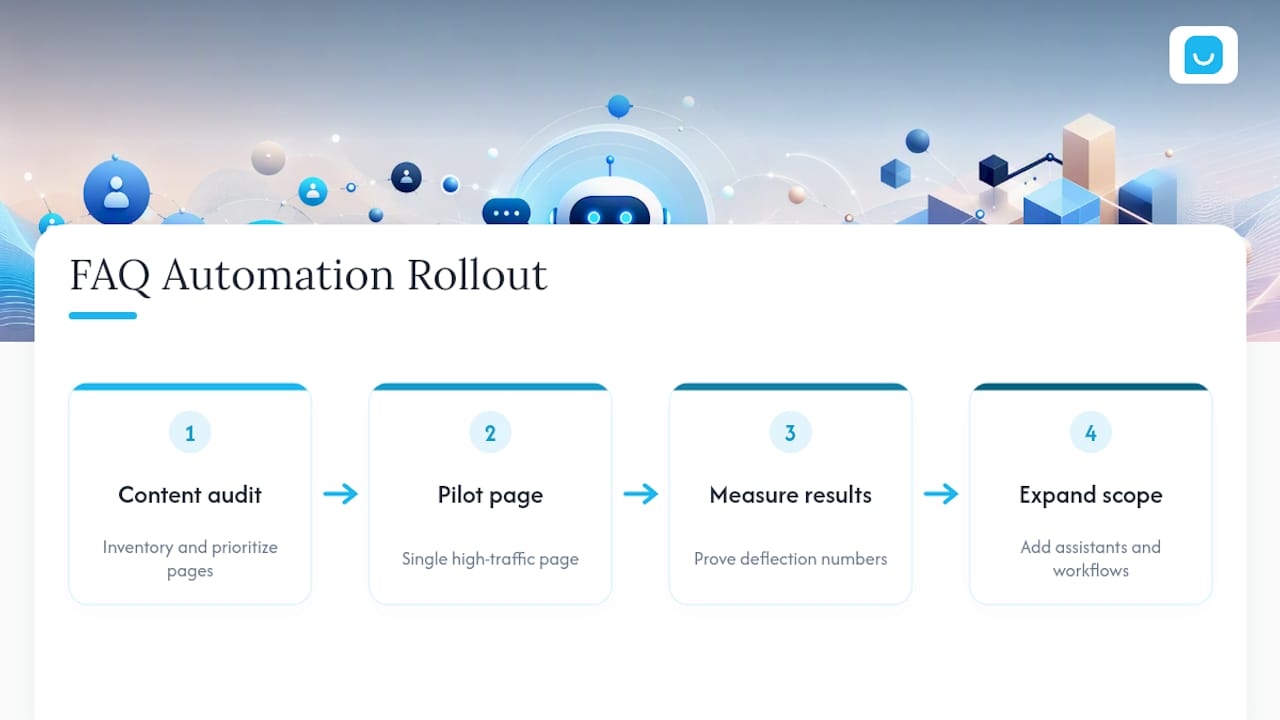
The businesses that get the most out of FAQ automation don’t start with the fanciest model or the biggest knowledge base. They start with a content audit and a single, high-traffic pilot page, prove the deflection numbers move, and only then expand scope.
If your team is small, resist the urge to build something custom. A managed, configurable platform gets you further with less engineering time than a bespoke build that needs a developer every time you want to change an answer. Save the custom-engineering effort for genuinely unique workflows, not for FAQ retrieval that off-the-shelf tools already handle well.
The roadmap beyond FAQ automation points toward assistants that don’t just answer questions, they check order status, capture leads with context, and escalate the right conversations to the right person. Think of the FAQ bot as the foundation, not the ceiling.
— Konstantin
How Konvuno Fits the Checklist You Just Read
Everything in this guide, a widget-first install, synced content sources, confidence-based escalation, points toward one practical setup: Konvuno installs with a single script tag, syncs product catalogs automatically from common ecommerce feeds, and hands conversations to a human the moment a question needs one.
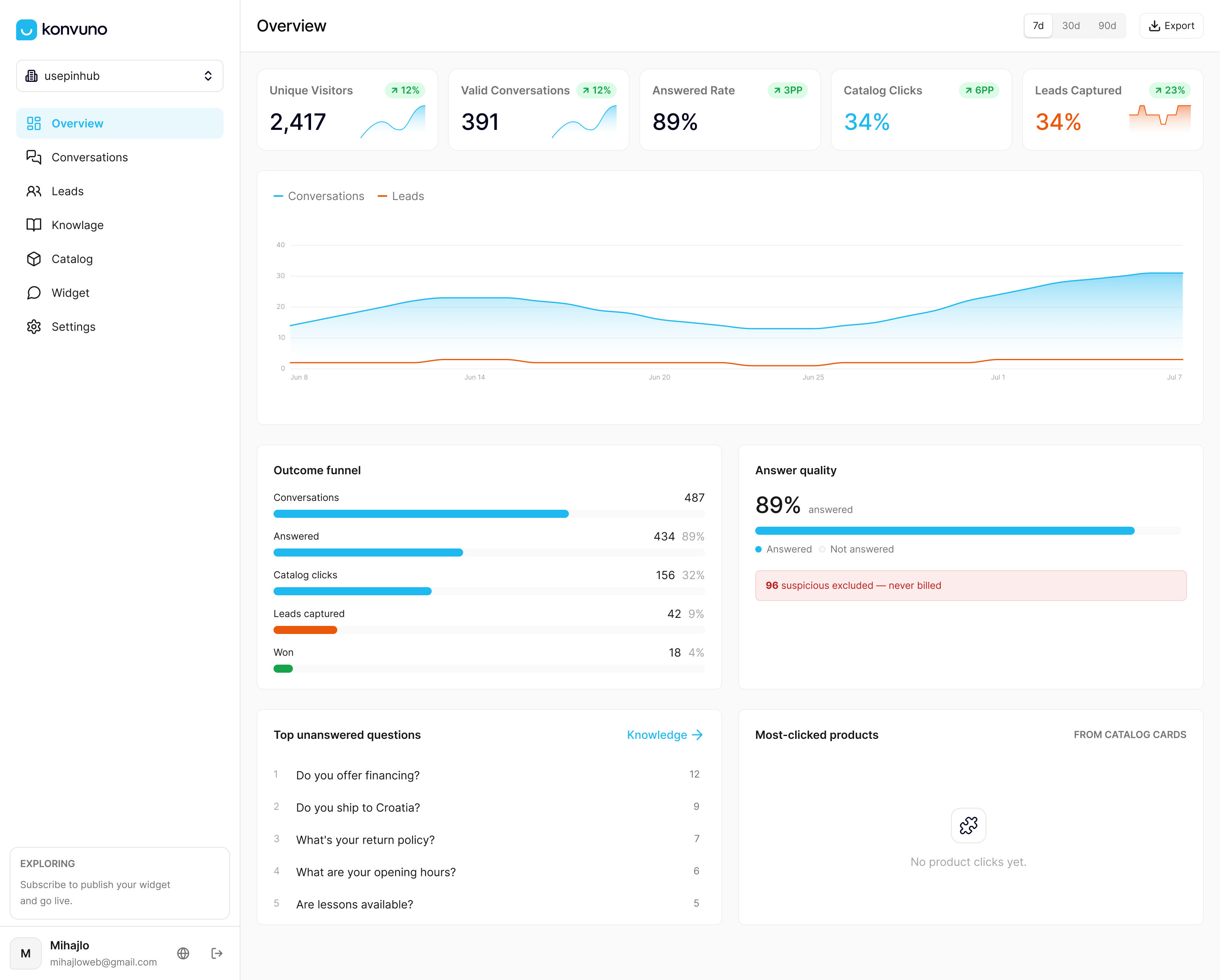
That feed sync solves the exact staleness problem covered in the integration section above. Your FAQ assistant pulls answers straight from your existing FAQs and website content, so there’s no separate content system to maintain. For ecommerce sites, Shop Connect keeps product answers, prices, and availability current without manual edits. Konvuno also captures leads into a built-in CRM when a conversation can’t be fully resolved, offers multilingual support, and skips per-seat pricing entirely. Plans start at entry-level pricing, with multiple tiers available, and every tier includes full conversational catalog features. You can configure and preview the assistant before paying anything. If the implementation checklist above sounds like the right next step for your site, start building your assistant on Konvuno and run your own pilot this week.
Sources
- Gartner: Survey finds only 14% of customer service issues are fully resolved in self-service
- IBM: Conversational AI
FAQ
What Is the Difference Between an FAQ Chatbot and a Live Chat Widget?
A live chat widget connects visitors to a human agent in real time, while an FAQ chatbot answers automatically using your existing content and only escalates to a person when needed.
How Long Does It Take to Set Up an FAQ Automation Chatbot?
A focused pilot can go live within days once your core FAQ content is organized. Konvuno installs with a single script tag and lets you configure and preview the assistant before launch, without needing a developer.
Can an FAQ Chatbot Handle Product Questions for an Online Store?
Yes, when it’s connected to a product feed. Syncing catalogs from WooCommerce, Google Merchant, or Facebook keeps answers about price and stock accurate without manual updates.
What Happens When the Chatbot Doesn’t Know the Answer?
A well-configured bot recognizes low confidence and escalates the conversation to a human agent with the full context attached, rather than guessing.
How Much Does an FAQ Automation Chatbot Like Konvuno Cost?
Konvuno’s pricing starts at the Starter plan for 29 EUR per month, with Growth at 79 EUR per month and Business at 199 EUR per month, all without per-seat charges.