One Script Tag Install: Shopping Assistant Chatbot for SMBs
Practical SMB guide to shopping assistant chatbots: launch with one script tag, track conversion and AOV, cut support tickets, and try Konvuno's turnkey demo.

A shopping assistant chatbot is software that helps online shoppers find products, get answers, and check out faster by holding a real conversation instead of forcing them through menus and search bars. For most small and medium e-commerce sites, deploying one is worth doing: it shortens the path from question to purchase and cuts support volume. Expect measurable gains in conversion and average order value once your catalog and FAQs are synced properly.
TL;DR:
- High catalog synchronization accuracy and multilingual support are essential for maximizing the chatbot’s ability to serve international customers efficiently.
- Tracking conversion lift, average order value, and supported conversation intents over a controlled period provides a clear measure of the chatbot’s impact on sales and support.
- Quick deployment with minimal technical requirements and starting with high-traffic pages ensures faster wins and easier iteration for small and medium-sized stores.
- A focus on data quality through regular feed resyncs and curated FAQs enhances the chatbot’s relevance and reduces support tickets without complex customization.
- Choosing a vendor with transparent data handling policies and reliable integration options safeguards customer privacy and maintains operational smoothness.
Table of Contents
- What Does a Shopping Assistant Chatbot Actually Do?
- How Do Shopping Assistants Work Behind the Scenes?
- How Do You Choose and Set Up a Shopping Assistant Chatbot?
- What KPIs Prove a Shopping Assistant Chatbot Is Working?
- Konvuno as a Turnkey Option for SMB Stores
- Why Speed to Launch Beats Perfect Customization
- Ready to Try a Shopping Assistant on Your Store?
- Sources
What Does a Shopping Assistant Chatbot Actually Do?
A shopping assistant chatbot combines four jobs that used to require separate tools: product discovery, recommendations, general Q&A, and order status lookups. A shopper types “waterproof hiking boots under $120, size 10,” and the assistant filters your catalog and returns matches instead of dumping them into a search results page with forty filters. That’s the core value: it collapses several clicks and a bounce-prone search experience into one exchange.

The business case is straightforward. Shorter buyer journeys convert better, and conversational AI paired with solid product data and analytics tends to produce measurable marketing uplift. For an SMB team without a dedicated CRO specialist, that’s often the fastest lever available.
Concrete benefits worth tracking:
- Conversion lift from shoppers who get answered instead of abandoning a search
- Higher average order value when the assistant recommends complementary items or upgrades
- Fewer support tickets for repetitive questions like sizing, shipping windows, and return policy
- Fewer returns when the assistant asks sizing or fit questions before checkout instead of after
- Reach into new markets through multilingual support, since a shopper browsing in Spanish or French doesn’t need to switch tabs to translate your FAQ
That last point gets overlooked constantly. A chatbot that speaks multiple languages out of the box turns an English-only storefront into something a broader audience can actually shop, without you writing a second version of every product page.
How Do Shopping Assistants Work Behind the Scenes?
Most shopping assistant chatbots run on a handful of predictable building blocks, and understanding them helps you evaluate what you’re actually buying.
- Data sources. The assistant pulls from your product catalog, a merchant feed (Google Merchant Center or Facebook Catalog), your FAQ or help center content, and sometimes live order data for shipment tracking.
- Deployment shape. Three common forms exist: a lightweight widget installed on your site with a hosted dashboard for configuration, a plugin tied to your storefront platform, or a raw API for teams that want to build a custom interface.
- Core capabilities. Natural language product search, personalized recommendations based on stated preferences, escalation to a human agent when the question gets too specific or too sensitive, and a dashboard showing what visitors actually asked.
- Conversation patterns. Many assistants follow a research-and-recommend flow: clarify intent, narrow options, compare a couple of picks with reasoning, then hand over a buy link, a pattern you’ll recognize from independent shopping-assistant tools built around exactly this loop. Others lean on shopper-facing patterns like image search or budget filters, similar to what shows up in app-store listings for consumer shopping apps.
On privacy, treat this like any other tool that touches customer data: check where conversation logs are stored, whether the vendor supports data deletion requests, and whether the assistant is transparent that it’s automated rather than pretending to be a live human. For stores selling internationally, ask specifically how the vendor handles cross-border data storage, since requirements vary by country and you’re the one accountable to your customers either way.
How Do You Choose and Set Up a Shopping Assistant Chatbot?
Pick the wrong tool here and you’ll spend more time managing the chatbot than it saves you. Run through this checklist before signing anything.
Evaluation criteria:
- Does it sync automatically with your product catalog (WooCommerce, Shopify, or a Google Merchant feed), or will someone have to update inventory by hand?
- How accurate is it on real product questions, not scripted demo questions?
- Does it support the languages your actual customer base speaks?
- Does it capture leads into a CRM, or does every conversation vanish once the tab closes?
- Is pricing flat and predictable, or does it scale per seat or per conversation in a way that punishes growth?
- Can a non-technical person install and configure it, or does it require a developer sprint?
Questions to ask a vendor before you commit:
- “Show me how a product-specific question gets answered when the item is out of stock.”
- “What happens when the assistant doesn’t know the answer, does it guess or hand off to a human?”
- “How often does the catalog resync, and what happens if my feed changes mid-day?”
Implementation steps:
- Install the widget or plugin on a staging page first.
- Sync your product feed and confirm prices and stock levels match your live store.
- Curate 15 to 20 FAQ entries covering shipping, returns, and sizing, the questions that generate the most support tickets today.
- Test with real customer-style questions, not just “what do you sell.”
- Run a limited pilot on a subset of traffic before rolling it out site-wide.
- Iterate weekly based on what the conversation logs show people actually asking.
Red flags: heavy developer dependency for basic setup, no analytics dashboard, no catalog sync (meaning someone manually re-enters products), and vague answers about data handling when you ask direct questions.
Pro Tip: Before you evaluate a single vendor, pull your last 90 days of support tickets and tag the five most repeated questions. That list becomes your FAQ curation shortcut and your test-prompt script in one move.
What KPIs Prove a Shopping Assistant Chatbot Is Working?
Track a small set of numbers rather than drowning in dashboard metrics that don’t tie to revenue.
- Conversion lift: compare conversion rate for sessions that used the assistant versus sessions that didn’t.
- Average order value (AOV): check whether assisted sessions produce larger carts.
- Assisted conversions: purchases where the assistant was part of the path, even if it didn’t close the sale directly.
- Chat-to-lead rate: what percentage of conversations turn into a captured email or contact, useful groundwork covered in more depth in lead scoring and journey measurement guides.
- Support-ticket reduction: fewer repetitive tickets hitting your inbox after launch.
A practical test structure: run a 30-day A/B split, half your traffic sees the assistant, half doesn’t, and compare the metrics above. From there, pull the top 10 recurring conversation intents and fix the product data or answers behind each one before expanding the pilot further.
Konvuno as a Turnkey Option for SMB Stores
If you want a concrete example of what “meets the checklist above” looks like in practice, Konvuno is built specifically for stores that don’t have an engineering team to spare.
- Catalog sync: Konvuno’s Shop Connect feature pulls product data automatically from WooCommerce and Google Merchant feeds, so prices and stock stay current without manual updates.
- Install simplicity: one script tag, no developer required, no per-seat pricing to negotiate as your team grows.
- Dashboard: conversations, lead capture into a built-in CRM, knowledge management for your FAQs, and analytics showing what visitors actually ask.
- Multilingual reach: Konvuno speaks 7 languages out of the box, which matters if you’re already getting international traffic and not converting it.
- Human handoff: when a question needs a person, the assistant escalates instead of guessing.
Gartner’s research on agentic AI points toward a growing share of routine customer-service issues getting resolved without a human ever stepping in, which is exactly the trajectory SMB tools like this are built to ride. That’s a meaningful signal for a small team stretched thin on support hours, not a reason to remove humans from the loop entirely.
Why Speed to Launch Beats Perfect Customization
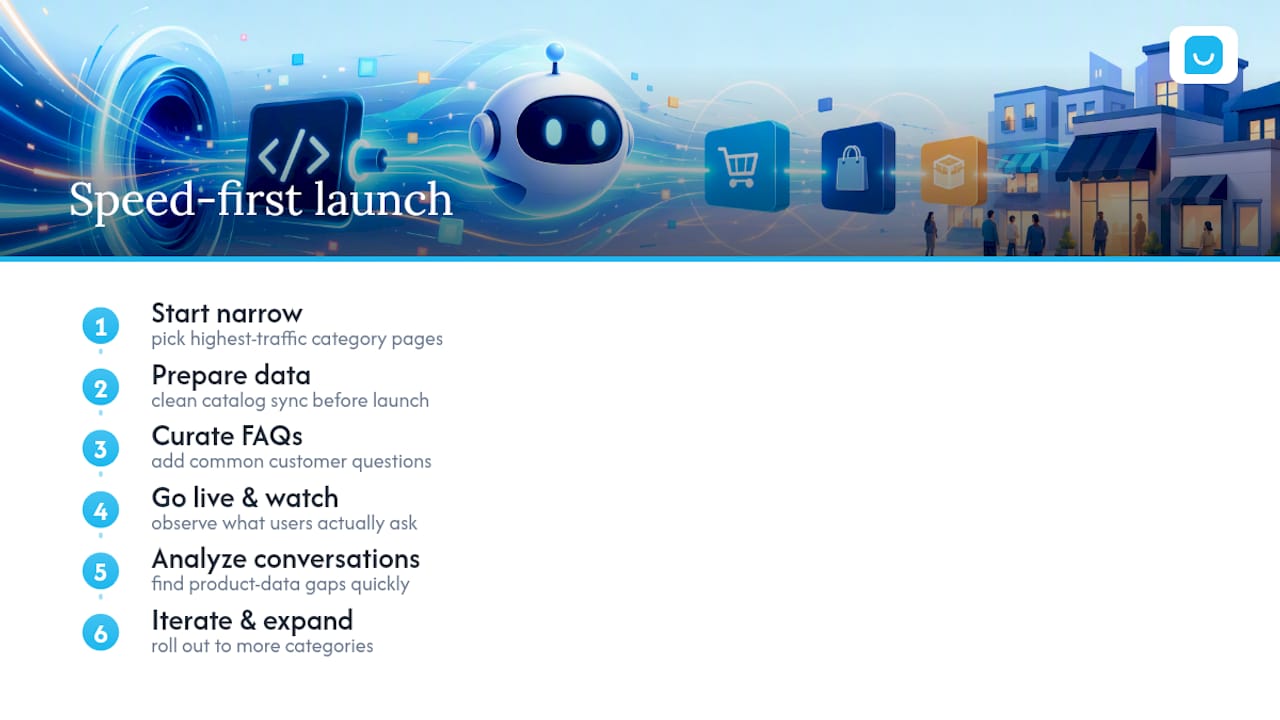
Most SMB teams overthink the launch. They want the assistant to handle every edge case before it goes live, and that instinct kills momentum. A shopping assistant chatbot with clean catalog sync and a curated FAQ set will outperform a half-configured “smart” one every time, because the data feeding it matters more than the sophistication of the model behind it.
Start narrow. Launch on your highest-traffic category pages, watch what people actually ask, then expand. Conversation analytics will tell you where your product data has gaps faster than any internal audit would.
— Konstantin
Ready to Try a Shopping Assistant on Your Store?
Konvuno checks the boxes this guide just walked through: automatic catalog sync, a single script tag install, no per-seat pricing, lead capture, and support for 7 languages, all without hiring a developer.
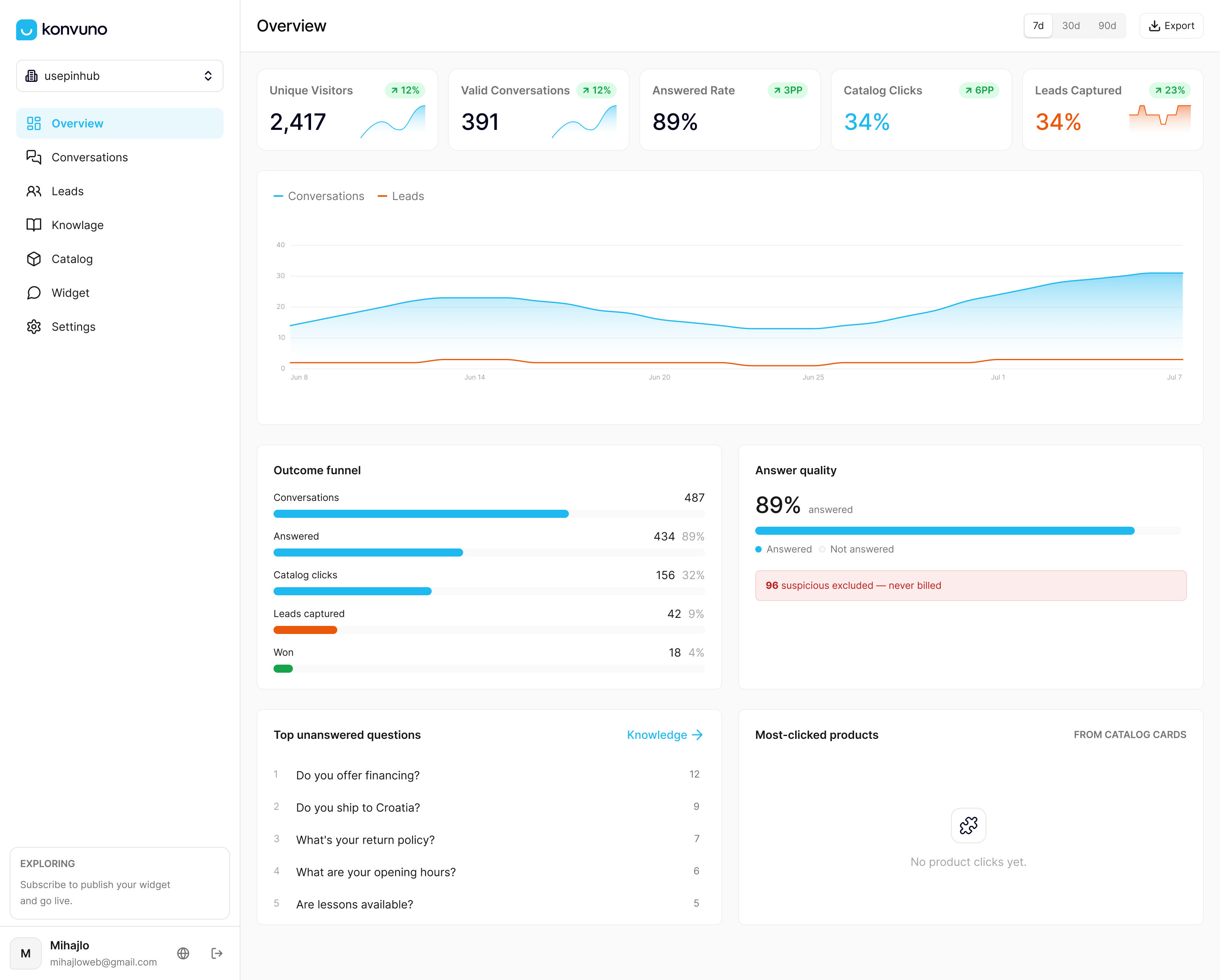
If you’re ready to see it running against your own catalog, start a Konvuno trial and connect your product feed directly. Before the demo, have three things ready: your product feed or WooCommerce connection, a shortlist of your ten most common customer questions, and a clear goal, whether that’s cutting support tickets or lifting conversion on your top category pages. You can also check the FAQ assistant feature first if you want to see exactly how it answers from your existing site content before connecting a full catalog.