Update Chatbot Content in Minutes Without Retraining
Use quick overrides, probe query checks, and scheduled reingestion to keep chatbot content fresh. Includes an automatic catalog sync example.

The best way to update chatbot content is to combine event-driven re-ingestion with scheduled refreshes and query-time live lookups, all under actual change control. Skip any one of those three and stale answers creep back in. Treat every content change as a production release: assign an owner, log the edit, re-index it, and run probe queries before it goes live. Governance is not optional overhead here. It is the difference between a chatbot that stays trustworthy and one that quietly drifts wrong.
TL;DR:
- Re-ingest content only when urgent fixes are needed, using exact Q&A overrides and training examples for tone issues to avoid unnecessary full refreshes.
- Match refresh frequency to content volatility; high changes require event-driven updates, while stable data can use quarterly recrawling.
- Assign dedicated owners for each content source, log edits with versions, and validate updates through probe queries before publishing to ensure accuracy.
- Conduct weekly reviews focusing on feedback, recurring failures, and citation accuracy to catch small problems before they escalate.
- Use automation tools like feed integrations and web retrieval to keep prices and FAQs current without manual updates, reducing reliance on retraining models.
Table of Contents
- How Do You Update Chatbot Content Fast When Something’s Broken?
- Scheduled Refreshes vs. Live Lookup: Which Fits Your Content?
- Who Owns Chatbot Content Updates on Your Team?
- What Should Your Weekly Chatbot Review Actually Cover?
- Which Tools Actually Automate Chatbot Freshness?
- Konvuno: What Automatic Freshness Looks Like in Practice
- Stop Retraining, Start Maintaining
- Get Your Chatbot Content Syncing on Its Own
- Where to Go Deeper on This
- Sources
- FAQ
How Do You Update Chatbot Content Fast When Something’s Broken?
Not every fix needs a full re-index cycle. When a customer flags a wrong answer, or you spot one in a transcript, the fastest path is a direct override rather than waiting for the next scheduled crawl.
Here’s the sequence that works when you need a fix in minutes, not days:
- Write an exact Q&A override for the specific failure. Don’t rewrite the whole knowledge source. Just patch the one broken answer so it stops recurring immediately.
- Add a training-mode example if the problem is tone or refusal behavior rather than facts. Zapier’s Training Mode lets you label a real conversation as a positive or negative example, which nudges future responses without touching your source content.
- Trigger a manual resync on the affected source if the underlying page or feed already changed. Most platforms cap how often you can force this, so save it for urgent cases rather than routine housekeeping.
Training examples shape how the bot talks, not what it knows. That distinction matters when you’re deciding whether to write an example or edit a source document.
Pro Tip: Keep a running log of every manual override in a shared doc. When your scheduled refresh finally catches up to the source content, you’ll know which patches are safe to retire.
Scheduled Refreshes vs. Live Lookup: Which Fits Your Content?
Not all chatbot content ages at the same speed, and treating a return policy the same way you treat today’s inventory count is where most maintenance plans fall apart. The fix is tiering sources by how often they actually change, then matching the refresh method to that tier.
- High volatility, event-driven: prices, stock levels, promotions. These need a trigger tied to the change itself, not a calendar.
- Medium volatility, weekly cadence: blog content, service descriptions, seasonal policies. A weekly automated crawl usually keeps pace.
- Low volatility, quarterly cadence: company history, core FAQs, legal boilerplate. Recrawling these often is wasted compute.
Apify’s guidance on chatbot data pipelines recommends daily or weekly automated crawls for general freshness, paired with query-time web retrieval for anything too time-sensitive to pre-index, like live pricing or breaking availability.
Retrieval at query time solves the freshness problem but adds latency and cost per query, and it depends entirely on the live source being reachable and accurate at that instant. Scheduled re-ingestion is cheaper and faster to answer from, but it’s only as current as the last crawl. Most production setups use both: index the stable stuff, look up the volatile stuff live, and let the retrieval layer decide which one to trust when it needs a confidence check on stock or pricing.
Who Owns Chatbot Content Updates on Your Team?
A content fix that never gets re-ingested is not a fix. It’s a page that changed while the chatbot kept answering from the old copy. That gap is where most “why is the bot still saying that” complaints come from, and it’s a process failure, not a model failure.
- Assign an owner per source group. Product data, policy pages, and support docs rarely belong to the same person, so don’t let one person’s backlog block updates to the others.
- Log every edit with its index version. When something goes wrong, you need to know exactly which content version was live at the time.
- Require probe-query validation before publishing. Run a small set of known questions against the updated index and confirm the answers changed the way you expected.
- Make re-ingestion a release gate, not an afterthought. NIST’s AI Risk Management Framework frames this kind of update as a governed production change, with testing and validation scaled to the risk of getting it wrong.
Updating the live website without re-ingesting it does nothing for the chatbot. The agent answers from what it has already indexed, according to current RAG maintenance guidance, so a change only counts once it’s been pulled back in.
What Should Your Weekly Chatbot Review Actually Cover?
You don’t need a quarterly audit to catch drift. You need a short, repeatable weekly loop that catches problems while they’re still small.
- Clear the negative feedback queue first and read the actual transcripts behind each thumbs-down.
- Turn recurring failures into new Q&A pairs instead of letting the same question get logged five times.
- Rerun your probe-query set after any source update to confirm nothing broke elsewhere in the index.
- Watch for handoff spikes on specific topics. A sudden jump usually means the bot lost confidence on something it used to answer fine.
- Spot-check citation behavior if your setup shows sources. A bot citing outdated pages is telling you exactly what to fix next.
Social Intents documents this pattern as a roughly fifteen-minute weekly commitment, and it beats waiting for a monthly overhaul to catch what’s already gone wrong.
Pro Tip: Keep your probe-query list in a spreadsheet with expected answers next to each one. Rerunning it takes ten minutes and catches regressions before customers do.

Which Tools Actually Automate Chatbot Freshness?
Manual updates don’t scale past a handful of pages, so the tooling layer matters more than most teams initially budget for.
- Feed integrations for anything product related. Syncing directly from WooCommerce or a Google Merchant feed means prices and stock update without anyone touching the chatbot dashboard.
- CMS and ticketing hooks that fire a re-ingest job automatically when a policy page or help article changes, instead of relying on someone remembering to trigger it.
- Query-time web retrieval for facts too unpredictable to pre-index reliably, like a shipping carrier’s current delay notices.
- Clean data pipelines before ingestion. Apify recommends converting crawled pages into clean text, stripping navigation and ad clutter, so the model isn’t learning from page furniture.
Konvuno: What Automatic Freshness Looks Like in Practice
Konvuno was built around the idea that most chatbot content problems are really catalog and knowledge sync problems in disguise. Its product catalog connects directly to WooCommerce, Google Merchant, and Facebook product feeds, so prices and availability update on their own instead of waiting for someone to notice they’re wrong.
Beyond the catalog, the assistant answers from a site’s existing FAQs and page content, hands off to a human when a question needs one, and provides owners with a dashboard showing conversations, captured leads, and what visitors are actually asking. That analytics view doubles as a probe-query signal. If the same question keeps generating a handoff, the owner knows where to add an answer.
- Automatic catalog sync removes the manual product update step entirely
- Owner dashboard surfaces the questions the content is currently failing to answer
- Multilingual support helps keep translated content aligned without separate maintenance tracks
Stop Retraining, Start Maintaining
Most teams reach for retraining when the real problem is a missing owner and no probe queries. Retraining a model is expensive and slow; fixing a broken source and re-ingesting it takes minutes. Invest in the boring stuff, tiered sources, named owners, a weekly transcript review, and you’ll fix more real problems than any retrain ever will.
— Konstantin
Get Your Chatbot Content Syncing on Its Own
Konvuno is built for owners who don’t have a dedicated team to run crawl schedules and re-ingestion pipelines by hand. Instead of manually updating prices or chasing down outdated FAQ answers, you connect your WooCommerce store or product feed once, and the catalog stays current without anyone touching a dashboard.
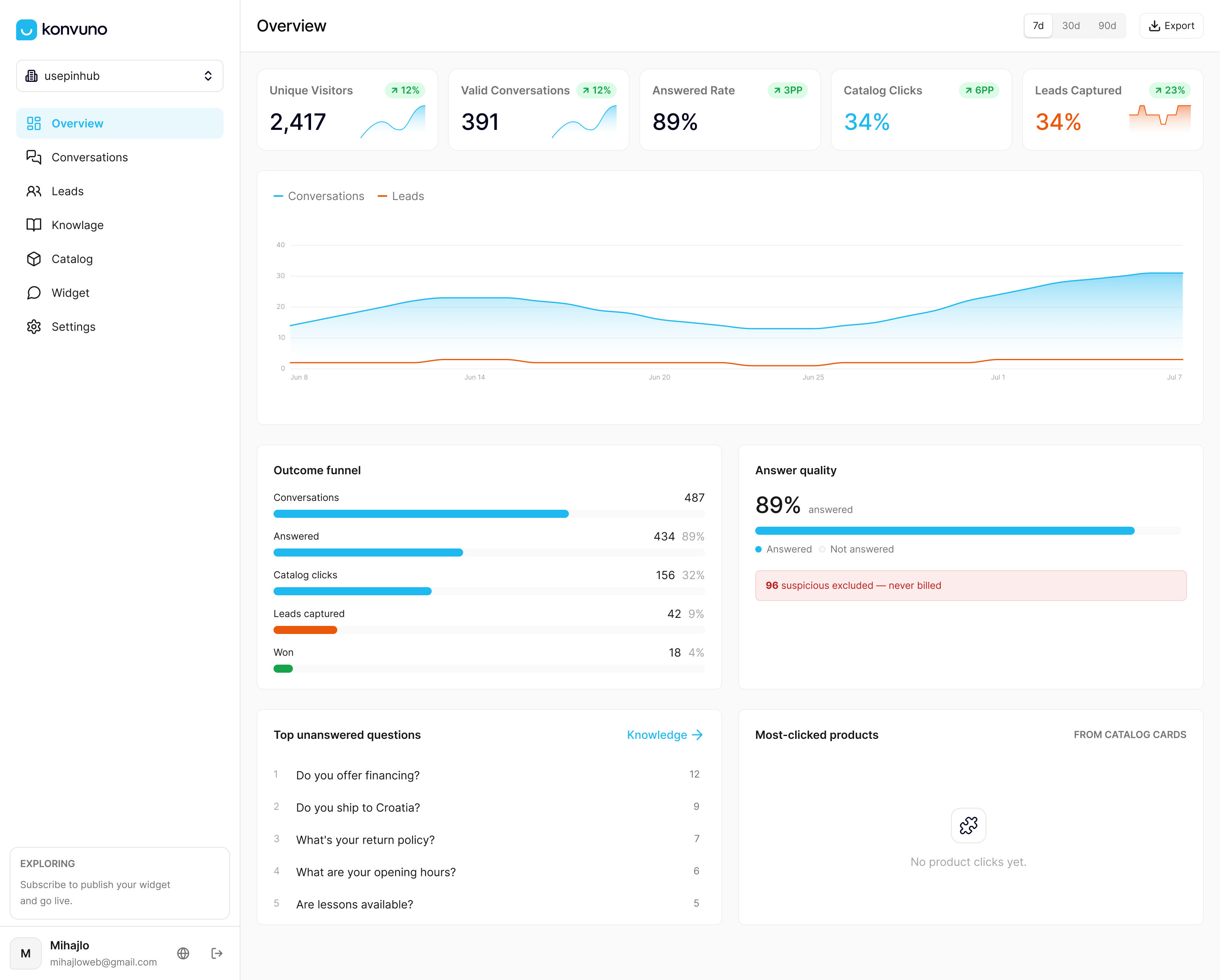
The FAQ Assistant handles the question volume your team shouldn’t have to answer by hand, pulling directly from your existing site content, and the built-in dashboard shows you exactly which questions are triggering handoffs so you know what to fix first. There’s no developer dependency and no per-seat pricing to manage as your team grows. Plans start with Starter at €29 per month, Growth at €79 per month, and Business at €199 per month, all configurable and previewable before you commit. Set up your Konvuno assistant and see what your visitors are actually asking.
Where to Go Deeper on This
For teams building out formal governance around chatbot updates, a few references are worth bookmarking:
- NIST’s AI Risk Management Framework for testing and validation standards proportional to risk
- Apify’s chatbot data guidance for crawl scheduling and clean data ingestion
- Owlish’s knowledge base maintenance guide for volatility tiering and probe-query practices
- SzopaLabs on securing AI chat access to company files for risk-based testing around sensitive requests
Sources
- Turn any website into chatbot-ready data · Apify
- NIST: AI Risk Management Framework
- How to Keep Your AI Support Knowledge Base Up to Date
- Use Training Mode to improve chatbot responses – Zapier
FAQ
How Do I Update My Chatbot’s Responses?
Edit the specific source document or add a direct Q&A override for the exact failure, then re-ingest that source so the change reaches the live index. For tone or refusal issues rather than factual gaps, a training-mode example usually works faster than editing source content.
How Often Should I Refresh My Chatbot’s Knowledge Base?
It depends on how volatile the content is. High-change data like pricing needs event-driven updates, medium-change content like service pages works on a weekly crawl, and stable content like company policies can run on a quarterly cycle.
What Topics Should a Chatbot Avoid Answering On Its Own?
Anything involving legal advice, medical guidance, or financial commitments the business hasn’t explicitly authorized should trigger a human handoff instead of a generated answer. NIST’s guidance recommends defining these refusal boundaries explicitly rather than leaving them to the model’s judgment.
Does Updating Content Improve Chatbot Performance Metrics?
Yes. Fresh, accurate source content reduces handoff rates and improves resolution on the first response, since the bot stops guessing at outdated facts. Running probe queries after each update confirms the improvement actually landed instead of assuming it did.
What Does Konvuno Cost If I Want This Kind of Automated Freshness?
Konvuno offers three plans: Starter at €29 per month, Growth at €79 per month, and Business at €199 per month, all available through the Konvuno site. Every plan includes automatic catalog sync, so pricing and availability update without manual edits.