Chatbot Branding: A Playbook for Marketers and Owners
Elevate your chatbot branding with our playbook. Design a seamless visual identity and conversation style that enhances customer engagement.

Chatbot branding is the deliberate design of a bot’s visual identity and conversational behavior so it feels like an extension of your company, not a bolted-on script. The first action is simple: map three brand traits (say, warm, competent, and direct) to a short list of UI tokens and voice rules before you touch any copy.
Run through this checklist before launch:
-
Lock your color tokens, avatar style, and bubble shape to existing brand assets.
-
Write a greeting and an escalation line that sound like the same person wrote your homepage.
-
Disclose that visitors are talking to an AI, clearly and once, near the first message.
-
Set a human handoff path that never dead-ends.
-
Define two or three metrics you’ll check in week one: engagement rate and handoff rate are the fastest signals.
Within 30 to 90 days, a well-branded bot typically shows a lift in return engagement, a drop in unnecessary human handoffs, and steadier customer satisfaction scores across conversations. A systematic review of AI conversational agents found that aligning verbal and visual cues increases likeability and continuance intent, provided the bot stays transparent about what it is. Platforms like Konvuno build these tokens directly into the setup dashboard, which is where most of this checklist gets executed in practice.
Key Takeaways
Chatbot branding works when visual tokens, conversational tone, and disclosure all stay consistent with what a visitor already expects from your brand.
| Point | Details |
|---|---|
| Start with three traits | Map three brand traits to concrete voice and UI tokens before writing any scripts. |
| Disclosure builds trust | Label the AI clearly and expose context so visitors feel informed, not surveilled. |
| Sequence the rollout | Move from brand audit to tokens to scripts to prototype to staged launch, in that order. |
| Track a small metric set | Watch containment rate, handoff rate, and CSAT weekly rather than everything at once. |
| Konvuno handles setup | Konvuno syncs FAQs and product feeds and applies your tone across 7 languages from one dashboard. |
Table of Contents
Why Chatbot Branding Matters for Trust and Conversion
A chatbot is often the first “person” a visitor talks to on your site, and it either confirms the brand promise your homepage just made or contradicts it. When the tone, colors, and phrasing match everything else on the page, visitors extend the trust they already have in your brand to the conversation. When they don’t match, that mismatch reads as a red flag, even if the answers are technically correct.
The effect shows up in both soft and hard numbers. On the soft side, a mismatched bot damages brand perception and likeability almost immediately, since visitors notice inconsistency faster than they notice accuracy. On the hard side, branding influences containment rate (how many conversations resolve without a human), conversion per chat, and repeat usage. Research on conversational agents backs this up directly: anthropomorphism, personalization, and empathetic design increase trust and continuance intentions when they’re paired with clear disclosure that a bot is a bot.
Track these after launch:
-
Containment rate (resolved without escalation)
-
Conversion or lead capture rate per conversation
-
Return visitor engagement with the bot specifically
-
CSAT tone consistency across different conversation types
Pro Tip: Prioritize the changes that touch trust first, greeting, disclosure, and escalation phrasing, before you spend time on cosmetic polish like custom illustrations. Trust signals move metrics faster than visual flourishes.
What to Customize: Visual and Conversational Design Levers
Chatbot branding splits into two buckets: what the visitor sees and what the visitor reads. Both need attention, but they fail in different ways.
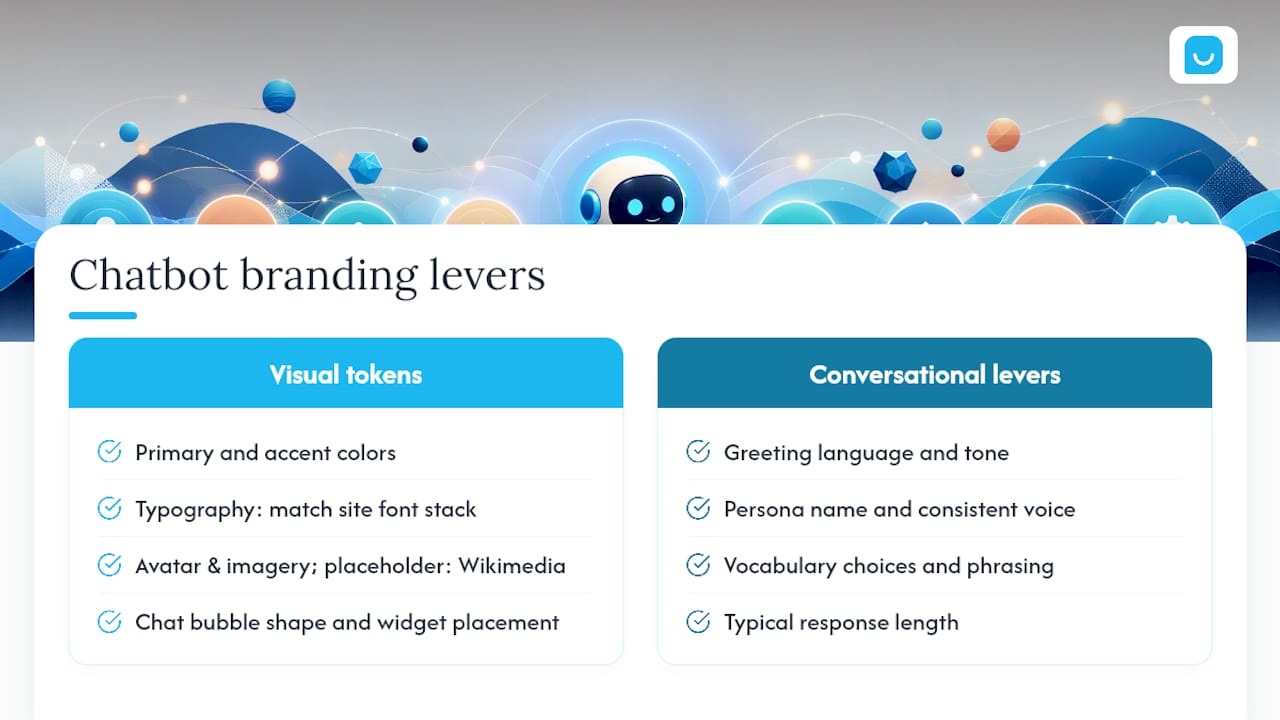
Visual tokens include your primary and accent colors, typography (matched to your site’s font stack, not a chat-widget default), avatar or icon style, chat bubble shape, and where the widget sits on the page. Imagery should follow your existing brand rules; if you need placeholder or accessibility-friendly avatar art, openly licensed sources like Wikimedia Commons work well for non-branded assets.

UI and affordance details matter more than most teams expect. The empty state, the first screen a visitor sees before typing anything, deserves real attention: a welcome message, three or four suggested prompts, and a short capability list all reduce abandonment and get visitors typing faster. Button styling, streaming text behavior, and contrast ratios all belong on this list too.
Conversational levers are where most brand personality actually lives: greeting language, persona name and tone, vocabulary choices, typical response length, how the bot phrases an escalation, and how it declines requests it can’t handle. A bot that’s chatty in its greeting but clipped in its refusals feels like two different employees.
Some areas call for restraint rather than personality. Privacy language, regulatory disclosures, and pricing information should stay precise and literal, no wordplay, no cute euphemisms. Save expressiveness for microcopy, small acknowledgments, and the occasional light touch in casual exchanges.
Accessibility is not optional here: check contrast ratios on your chosen colors, use readable font sizes, confirm keyboard focus moves logically through the widget, and label every interactive element for screen readers.
Pro Tip: Build a one-page style sheet with your five conversational rules (tone, vocabulary, max response length, refusal phrasing, escalation phrasing) and hand it to whoever writes chatbot copy, the same way you’d hand over brand guidelines to a new copywriter.
How Do You Align a Chatbot With Your Brand Guidelines?
Turning existing brand guidelines into a working chatbot takes a sequence, not a single meeting. Skipping steps is the fastest way to end up with a bot that looks branded but talks like a generic script.
-
Audit your brand guidelines. Pull colors, fonts, logo usage rules, and your existing tone-of-voice document. If no formal voice document exists, write one from your best-performing marketing copy.
-
Build design tokens. Translate the audit into concrete values: hex codes, font families, avatar specs, bubble radius, and widget placement.
-
Write conversation scripts. Draft the greeting, three to five suggested prompts, common answer templates, refusal language, and the escalation script.
-
Prototype the flow. Load scripts and tokens into your chatbot platform and walk through the ten most common visitor questions end to end.
-
User test. Run the prototype past a handful of real customers or internal staff unfamiliar with the project, and watch where they hesitate or misread tone.
-
Roll out in stages. Launch to a subset of traffic or pages first, watch containment and handoff rates, then expand site-wide.
Ownership matters as much as sequence. Marketing typically owns tone and voice tokens, design owns visual tokens, product or engineering owns integration and testing infrastructure, legal reviews disclosure language, and customer support or operations owns escalation flow and staffing for handoffs. A structured approach to implementing AI in a business generally treats this cross-functional handoff as the point where most projects stall, not the technology itself.
Before launch, run through a testing checklist: content review for tone consistency, an accessibility pass, a privacy and disclosure review, edge-case scripts for angry or confused customers, and a full test of the escalation path from bot to human.
Timeline estimates vary by scope. A minimal viable branded bot, just tokens, a greeting, and an escalation script, can ship in a week or two. A medium project with full script libraries and product catalog integration usually takes three to six weeks. Complex, multi-language deployments with custom testing cycles can run two to three months.
Pro Tip: Ship the minimal viable branded bot first. A consistent greeting and honest escalation path beat a half-finished persona with twenty scripted responses.
How Do You Give a Chatbot a Consistent Voice?
Start with three brand traits, not ten. Pick words your customers would actually use to describe your best support rep, then translate each one into a voice rule. “Warm” might mean contractions and first names. “Competent” might mean no filler words before an answer. “Playful” might mean one light aside per conversation, never in a refusal or an error message.
Industry analysis on AI brand design puts it plainly: the strongest AI products succeed by giving their assistant a consistent point of view rather than chasing technical polish alone. That point of view has to survive contact with an annoyed customer, not just a friendly demo.
Sample microcopy to adapt:
-
Greeting: “Hi, I’m here to help with orders, shipping, or product questions. What’s on your mind?”
-
Clarification: “Just to make sure I get this right, are you asking about a current order or a new purchase?”
-
Refusal: “That’s outside what I can help with directly, but I can connect you with our team right now.”
-
Handoff: “Let me get a person on this for you, they’ll have the full conversation history so you won’t need to repeat yourself.”
A simple persona template covers name, three character traits, two example lines, and an escalation style (does it apologize, stay neutral, or offer alternatives first?).
Designing an assistant’s behavior works less like writing a script and more like training a new hire: memory, guardrails, and consistent judgment calls matter as much as the individual lines it says.
Avoid over-anthropomorphizing. A name and a friendly tone are fine; claiming feelings, pretending to have had a “long day,” or dodging the AI-disclosure question erodes trust fast once a visitor catches it.
Pro Tip: Test your refusal and escalation scripts out loud before shipping. If they sound stiff or robotic spoken aloud, they’ll read as cold in text too.
Implementation and Deployment: What Has to Be in Place
Branding a chatbot only pays off if the technical and policy foundation underneath it actually holds up.
On integration, connect your CMS or FAQ content, sync your product feed if you sell online, wire up analytics, route captured leads into your CRM, and define clear authentication boundaries for any account-specific data the bot might touch.
On disclosure, a chat interface has six components most teams get right, and one they consistently miss: the disclosure surface. It should clearly label the assistant as AI, show context about what it can access, and expose a basic audit trail, so visitors feel informed rather than watched.
On UI behavior, follow established chat interface patterns: label the AI clearly, offer suggested prompts, stream responses smoothly, and include a stop-generation control alongside a visible path to a human agent at every stage.
Operationally, define your escalation paths in advance, set a realistic SLA for how fast a human should respond after handoff, monitor conversation logs for drift, and have a rollback plan ready if a new script or persona underperforms.
-
CMS and FAQ content synced and current
-
Product feed connected for live pricing and availability
-
Clear AI disclosure visible early in the conversation
-
Stop-generation and human handoff both one click away
-
Monitoring in place for tone drift and escalation failures
Pro Tip: Put your disclosure line and your escalation button in the same visual weight class. Burying either one in fine print undoes the trust you just built with good visual branding.
Common Chatbot Branding Mistakes to Avoid
Most branding failures aren’t dramatic, they’re small inconsistencies that add up. Watch for these:
-
Tone drift, where the greeting is warm but error messages sound like a legal disclaimer.
-
Visual mismatch, an avatar or color scheme that looks like it came from a different company.
-
Misleading disclosure, vague or buried AI labeling that makes visitors feel tricked once they realize.
-
Over-personification, a bot that claims emotions or personal experience it doesn’t have.
-
Weak escalation, a handoff that loses conversation context or leaves visitors waiting with no estimate.
After launch, watch for red flags: a sudden spike in one complaint type, a falling containment rate, or a chatbot that starts drifting away from its scripted tone in edge cases. Most of these are fixable within a week or two: retrain the refusal script, tighten the escalation SLA, or run a quick tone audit across recent transcripts and patch the worst offenders first.
How Do You Measure Chatbot Branding Success?
Track a compact set of metrics rather than everything the analytics dashboard offers: engagement rate, containment rate, handoff rate, CSAT or NPS specific to bot conversations, conversion per chat, and average resolution time.
Run small experiments instead of one big redesign. Test two greeting variants against each other, try a warmer persona against a more formal one for two weeks, compare button-based suggested prompts against free-text input, and test with an avatar versus without one.
A lightweight cadence works best: review metrics biweekly, and structure each test as hypothesis, metric, test, decision, then move to the next question rather than letting experiments run indefinitely.
Pro Tip: Pick one metric as your primary decision driver, usually containment rate or CSAT, so experiments don’t stall out in endless debate over which number matters most.
Konvuno in Practice: A Sample Branded Setup
A first Konvuno setup usually follows the same checklist covered above: install the widget script, sync your FAQ and website content, connect your product feed if you sell online, choose from the 7 supported languages, and turn on lead capture into the built-in CRM.
-
Install script, then import FAQ and site content as the knowledge base
-
Connect WooCommerce or a Google Merchant/Facebook feed for live product answers
-
Set escalation labeling so handoff requests route to the right inbox
Small businesses running this setup for a full month typically see fewer repetitive support emails and a small but steady stream of qualified leads captured directly from chat conversations.
Where Chatbot Branding Actually Pays Off
Branding effort earns the highest return in high-frequency, repetitive contexts: product discovery on an e-commerce site, order status questions, or FAQ-heavy support. Those are the moments a visitor forms a lasting impression of your company in under a minute.
The real skill isn’t writing a clever persona. It’s balancing personality against reliability, a bot that’s charming but gives wrong answers does more brand damage than a plain one that’s simply accurate.
How Konvuno Turns Brand Guidelines Into a Working Chatbot
Konvuno gives you the fastest path from brand guidelines to a live, on-brand assistant, without hiring a developer or an agency to build it. You install one script tag, sync your FAQs and website content so answers stay accurate, connect your WooCommerce or product feed catalog so pricing and availability update automatically, and set your tone and escalation rules from a hosted dashboard. Support for 7 languages means the same brand voice carries across markets without separate builds.
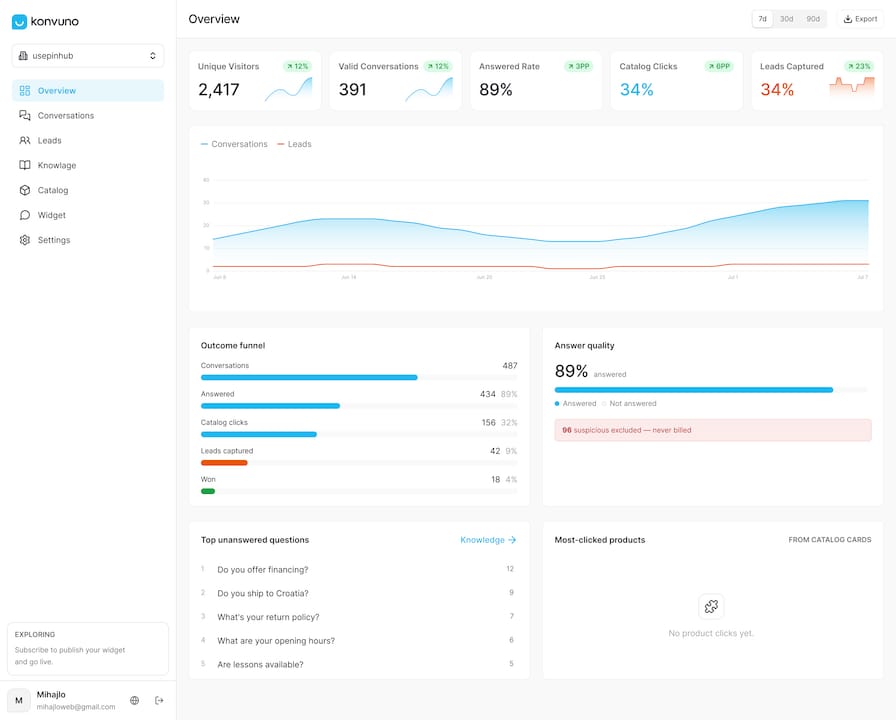
If you’re ready to stop losing visitors to a search bar that doesn’t understand them, start with the Konvuno FAQ assistant to see how fast a synced knowledge base gets you to a first working version, then connect your catalog through Shop Connect once product questions are part of the conversation. You can get a branded assistant live on your site this week.
Frequently Asked Questions
What is chatbot branding? Chatbot branding is the practice of designing a bot’s visual identity, colors, avatar, bubble style, and its conversational behavior, tone, vocabulary, escalation phrasing, so both match your company’s existing brand guidelines.
How long does it take to brand a chatbot? A minimal branded bot with tokens and a basic script can ship in one to two weeks. Fuller projects with product integration and multi-language support typically take three to six weeks, and complex enterprise rollouts can run two to three months.
Does chatbot branding actually affect conversion rates? Yes. Consistent visual and verbal branding increases trust and likeability, which shows up in containment rate, conversion per chat, and repeat engagement, not just in how the bot looks.
What’s the biggest mistake in chatbot branding? Tone drift, where the greeting sounds warm and on-brand but error messages or refusals sound generic or robotic, is the most common failure teams overlook until customers complain.
Do I need to disclose that visitors are talking to an AI? Yes. Clear, early disclosure that a visitor is interacting with an AI assistant, along with an obvious path to a human, builds trust rather than undermining it.
Sources
-
Anatomy of a Chat Interface | Conversational UI for Designers | AI Design Patterns
-
How to make your AI brand stand out when everything else feels the same