Use a Lead Qualification Chatbot to Convert More Visitors
Boost your conversions with a lead qualification chatbot that engages visitors instantly, routing quality leads to your sales team.

If your website gets traffic but your sales team keeps chasing dead-end form fills, install a lead qualification chatbot on your highest-intent page and run a two-week pilot before you touch anything else. The math is simple: a bot that engages visitors the moment they land converts better than a static form, and it routes the good leads to a human before they lose interest. Salesforce’s guidance on lead-generation chatbots notes that a conversational, helpful tone builds trust while syncing lead data to your CRM automatically, so nobody’s typing a contact into a spreadsheet at 6 PM.
Here’s the immediate move: pick one high-intent page (pricing, demo request, or a top landing page), install a lightweight widget, and let it run for two weeks before judging results. Implementation guides suggest basic qualification flows can go live in hours, with 1 to 2 weeks needed to tune scoring and routing.
Your two-week pilot checklist:
- Choose one pricing or demo page as the test surface.
- Write a five-question flow that captures budget, timeline, role, and use case.
- Connect the bot to your CRM or a webhook so leads land somewhere real.
- Set a scoring threshold and define what “hot” means for your sales team.
- Check completion rate and time-to-contact after week one, then adjust.
Key Takeaways
A lead qualification chatbot works best when it combines a short, five to seven question flow, clear scoring thresholds, and reliable CRM routing tested before launch.
| Point | Details |
|---|---|
| Start with a pilot | Test on one high-intent page, like pricing or demo request, for two weeks before expanding. |
| Keep questions short | Limit qualifying flows to five to seven questions to reduce visitor drop-off. |
| Wire before you polish | Test webhooks and CRM sync before refining conversational copy or tone. |
| Score and route by threshold | Set clear point values and hot/warm/cold cutoffs so sales knows exactly what to act on. |
| Konvuno covers setup end to end | A single script install links FAQ answers, product feed sync, and lead capture to a built-in CRM. |
Table of Contents
- What Is a Lead Qualification Chatbot and Why Does It Help SMBs?
- How Do You Build and Deploy a Lead Qualification Chatbot?
- Which Qualifying Questions and Scoring Rules Actually Work?
- How Do You Connect the Bot to Your CRM and Sales Workflow?
- What KPIs and Tests Actually Improve Chatbot Performance?
- How Does Konvuno Handle Each Step of This Checklist?
- How Do Popular Lead Qualification Chatbot Platforms Compare?
- When Should You Automate Qualification vs. Rely on Human Triage?
- Konvuno: A Practical Way to Launch Your Chatbot Pilot
- Sources
What Is a Lead Qualification Chatbot and Why Does It Help SMBs?
A lead qualification chatbot is a conversational tool that captures a visitor’s contact details, asks a short set of qualifying questions, scores the answers, and routes the result to the right person or list, all inside one interaction. Instead of a visitor filling out a static form and waiting days for a reply, the bot does the discovery work in real time and hands your team a ranked lead instead of a raw name and email.
For small and medium-sized businesses, the appeal comes down to a few concrete gains:
- 24/7 capture. The bot works nights and weekends when your sales team doesn’t, so a visitor browsing at 11 PM still gets engaged.
- Higher completion than forms. Conversational flows tend to finish at higher rates than multi-field forms because each question feels like a quick answer, not a chore, a pattern backed up in comparative looks at conversational capture versus static forms.
- Faster follow-up. Because scoring and CRM sync happen automatically, your sales rep can call a hot lead within minutes instead of days.
- Mobile-friendly by default. Chat windows work better than long forms on a phone screen, where thumb-typing ten fields kills conversion.
Most SMBs deploy these bots on a website widget first, then expand to channels like WhatsApp once the flow is proven. The pages that benefit most are the ones with the highest buying intent already: pricing pages, demo request pages, and product pages where someone is already deciding, not just browsing. Vendor benchmarking on qualification tools consistently points to pricing and demo pages as the best place to start, because that’s where visitor intent is already established and the qualifying questions feel relevant instead of intrusive.
How Do You Build and Deploy a Lead Qualification Chatbot?
Building your first bot is less about technology and more about sequencing. Get the order below right and the technical pieces fall into place fast.
-
Pick your pilot page and KPIs first. Before writing a single question, decide where the bot lives and how you’ll judge it. A demo request page is a strong choice because visitors there already have intent. Track qualified leads per week, completion rate, and time-to-contact from day one, since you can’t improve what you didn’t baseline.
-
Write a welcome message that sounds like a person, not a script. Skip “How can I help you today?” That’s the default line every visitor has already seen a hundred times. Try something closer to: “Hey, looking into [product]? I can answer quick questions or get you talking to someone on our team in under two minutes.” Short, specific, and it tells the visitor exactly what happens next.
-
Map the conversation before you build it. A workable structure looks like this: greeting → five core qualifying questions → contact capture → scoring → routing. Draw it on paper or a whiteboard first. Every extra branch you add now is a branch someone on your team has to maintain later.
-
Install the widget script. Most platforms, including Konvuno, use a single script tag you drop into your site’s header. No developer sprint required. This is genuinely the easiest step, and skipping ahead to fancier logic before this is solid is a common mistake.
-
Map your fields. Decide exactly what data each question captures, and name those fields the same way your CRM does. If your CRM calls it “company_size” and your bot calls it “team_size,” you’ll spend a weekend untangling a sync error instead of talking to leads.
-
Configure webhooks or your native CRM connector. This is the step people skip because it feels technical, and it’s the step that actually determines whether your pilot works. An open-source lead scoring project shows a common pattern: a
config/questions.jsonfile defining the flow and aconfig/scoring.jsonfile defining point values, both feeding a webhook that routes to Make.com, n8n, or Zapier. You don’t need to build this from scratch, but understanding the shape of it helps you evaluate any platform you’re considering. -
Define your escalation points. Decide, in writing, when the bot hands off to a human. Common triggers: a lead scores above your “hot” threshold, a visitor explicitly asks for a person, or the bot can’t answer a question after two attempts. Also decide your hours: if nobody’s watching Slack at 9 PM, the bot should say so and offer a calendar link instead of leaving the visitor hanging.
Pro Tip: Build the wiring before you polish the words. A perfectly worded welcome message means nothing if the webhook silently fails and your “captured” leads are sitting in a dead endpoint nobody checks. Test the full pipe, from question to CRM record, before you touch the copy.
Here’s a sample welcome-to-capture script you can adapt directly:
Bot: “Hi! Looking into [Product]? I can point you to pricing, or ask a couple quick questions and connect you with our team.” Visitor: “Pricing, please.” Bot: “Got it. Quick one first: what’s your team size?” (after 4 more questions) Bot: “Thanks! What’s the best email to send details to?” Bot: “Perfect, someone from our team will reach out within a few hours. Want to grab a time now instead?”
That’s the whole shape of it: five questions, one contact field, one soft close. Nothing fancy, and nothing that takes more than two minutes of a visitor’s time.
Which Qualifying Questions and Scoring Rules Actually Work?
The classic BANT framework (budget, authority, need, timeline) still works, but asking all four bluntly in a chat window feels like an interrogation. A lighter version usually performs better for SMB sites:
- “What are you hoping to solve with [category of product]?” (need, phrased as a question about them, not your product)
- “Roughly how many people would use this?” (a softer stand-in for budget/company size)
- “Are you the one who’d make this decision, or should we loop in someone else?” (authority, asked politely)
- “Are you looking to get started soon, or just exploring for now?” (timeline)
If that still feels like too much, an ICP-based approach trims it further: ask only for company size, role, and the specific use case, then infer fit from those three answers alone. Behavior-triggered qualifiers add a fourth signal without asking anything: a visitor who clicked “Book a Demo” or spent time on your pricing page has already told you something a question can’t.
A workable scoring rubric might look like this:
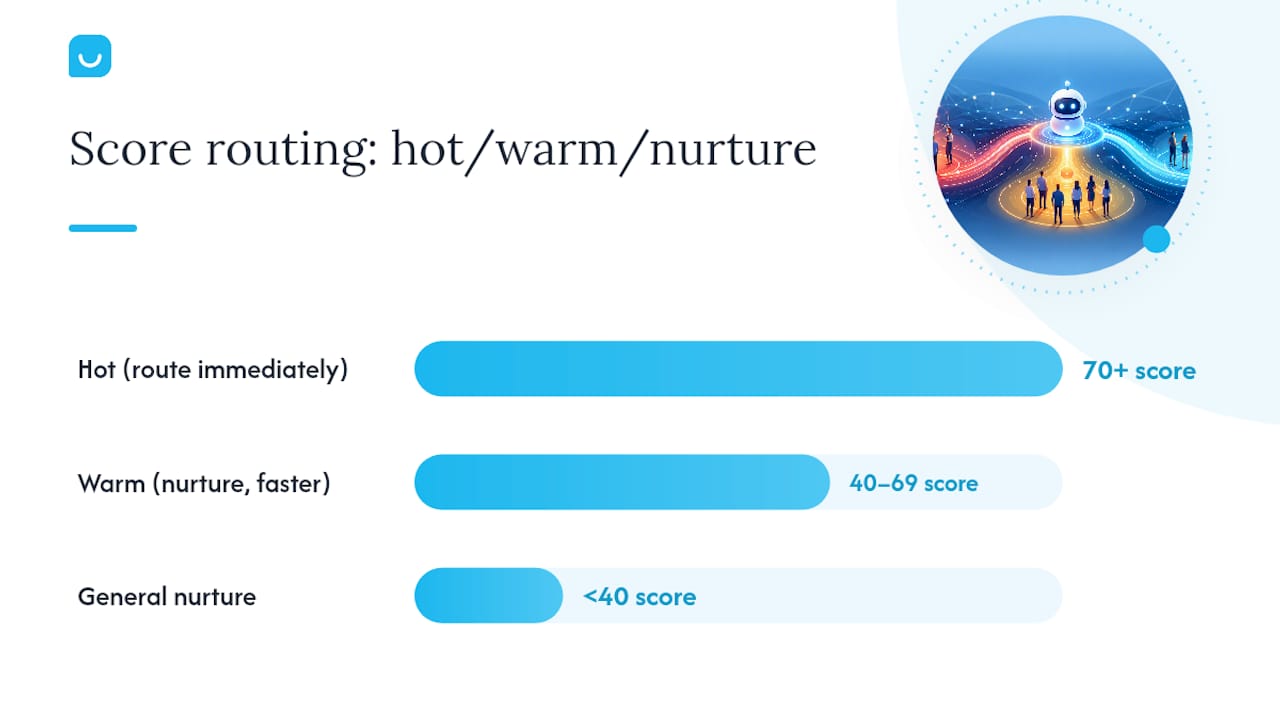
Set your thresholds once and stick with them until you have data to revise: 70+ points routes to “hot” (immediate sales notification), 40 to 69 goes “warm” (nurture sequence with a faster check-in), and under 40 goes to general nurture. Implementation guides consistently recommend keeping the whole flow to five to seven questions, because every additional question past that point measurably increases drop-off. If you’re tempted to add an eighth question “just to be sure,” don’t. Score on inference instead.
How Do You Connect the Bot to Your CRM and Sales Workflow?
A chatbot that captures leads but doesn’t move them anywhere is just a fancier form. The wiring matters more than the conversation design, and it’s where most pilots quietly fail.
You have three practical integration paths. Webhooks to automation platforms like Make.com, n8n, or Zapier give you the most flexibility, letting you route a lead through multiple steps (CRM entry, Slack alert, calendar invite) without writing code. Native CRM connectors, where they exist for platforms like HubSpot or Salesforce, are faster to set up but less flexible if your routing logic gets complex. Direct API calls make sense once you have developer time and a specific reason the first two options don’t cover.
Routing rules should follow directly from your scoring thresholds:
- Score 70+ and role is a decision-maker → notify sales rep on Slack immediately and offer a calendar link.
- Score 40 to 69 → create a CRM contact tagged “warm” and enter a 3-email nurture sequence.
- Score under 40 → add to general newsletter list, no sales notification.
- Visitor requests a human directly, regardless of score → route to live chat or a fallback contact form if no one’s online.
For calendar booking, connect a scheduling tool directly into the “hot” path so a qualified visitor can grab a slot without waiting for a callback. If sales is offline, the fallback matters just as much as the happy path: offer an email capture with a promised response window instead of leaving the visitor at a dead end.
On data mapping, name your fields identically across the bot’s config and your CRM (company size, not “team_size” in one place and “org_size” in another), and test the full pipeline with a dummy submission before launch. A combination of automation platform routing and CRM sync is the most common setup for SMB teams that don’t have a dedicated ops engineer, and it holds up fine once it’s tested.
What KPIs and Tests Actually Improve Chatbot Performance?
Track four numbers weekly: qualified leads per week, demo conversion rate, chat completion rate, and time-to-contact for hot leads. If completion rate is dropping, your flow is probably too long. If time-to-contact is creeping up, your routing rule or webhook likely broke somewhere.
Run these tests in order of impact:
- Welcome message copy. Test a generic greeting against a specific, benefit-led one. This is usually the single highest-leverage change you can make in week one.
- Question order. Ask the easy, low-commitment question first (use case) before the sensitive one (budget). Order affects completion more than most people expect.
- Scoring thresholds. If sales complains leads are too cold, raise the “hot” bar. If sales says there aren’t enough leads, lower it.
- Routing rules. Test Slack notification versus email notification for speed of sales response.
The most common pitfalls are mundane, not exotic: too many questions killing completion, a webhook that silently stopped firing three weeks ago, leads misrouted because a field name changed in the CRM, or product data going stale because nobody’s syncing the catalog. Keep a simple experiment log with columns for date, change made, and result, so you’re not relying on memory when someone asks “why did we change the welcome message again?”
Pro Tip: Check your webhook logs weekly, not just when someone complains leads have dried up. A silent failure can run for a month before anyone notices, and by then you’ve lost every lead that would have converted.
How Does Konvuno Handle Each Step of This Checklist?
Every step in this guide maps to a specific Konvuno feature, which is exactly the point of building the platform this way. Installation is a single script tag, no developer sprint needed. Lead capture flows directly into a built-in CRM, so there’s no separate tool to configure for step six above. Product and pricing questions stay accurate automatically because Konvuno syncs product feeds from WooCommerce or Google Merchant, which matters if your qualifying flow touches specific SKUs or plans. And because Konvuno speaks seven languages, a single install covers visitors who arrive in different languages without a second configuration pass.
Here’s what a sample flow looks like in practice:
- Visitor lands on a pricing page and the widget opens with a context-aware greeting.
- The bot asks three qualifying questions (team size, use case, timeline) and captures an email.
- The lead scores as “hot” based on team size and stated urgency.
- The lead appears instantly in Konvuno’s dashboard, tagged and ready for a sales follow-up.
A lead qualification setup only proves itself once you can see, in one dashboard, exactly which questions visitors answer, where they drop off, and which leads actually convert. That visibility, not the chat window itself, is what separates a working pilot from a bot nobody trusts.
Author credentials, selected case studies, and internal performance metrics for Konvuno pilots are available on request for readers evaluating a deployment.
How Do Popular Lead Qualification Chatbot Platforms Compare?
Most tools in this space fall into three rough categories, and knowing which one you need saves weeks of evaluation.
Enterprise conversational platforms offer deep customization and heavy AI capability, but they typically require a longer setup process, dedicated technical resources, and pricing built around larger deal sizes. These make sense once you have a sales ops team and a six-figure pipeline riding on qualification accuracy.
Point solutions for lead capture focus narrowly on forms-to-chat conversion. They’re often cheaper and faster to launch than enterprise platforms, but they usually lack a built-in CRM, meaning you still need a separate tool to store and route captured leads, plus the integration work to connect the two.
Configurable, all-in-one website assistants like Konvuno sit in between: a single widget handles FAQ answering, lead capture, scoring, and CRM storage without a per-seat pricing model or a developer dependency. For an SMB running a lean marketing or sales ops function, this category usually offers the best ratio of setup effort to functional coverage, since you’re not stitching together a chat tool, a CRM, and a webhook platform separately.
The honest trade-off: point solutions can be marginally faster to launch for a single narrow use case, and enterprise platforms can go deeper on custom AI logic. What most SMBs actually need, though, is one tool that captures, scores, routes, and reports without three separate logins and three separate invoices.
When Should You Automate Qualification vs. Rely on Human Triage?
Automated qualification earns its keep fastest on high-traffic, repetitive-question pages: pricing, demo requests, product comparison pages. That’s where a bot can screen volume a human never would have time to touch individually.

Human-first triage still wins for complex, high-value B2B sales where the buying committee is large and the questions genuinely vary deal to deal. No flowchart replaces a rep’s judgment on a seven-figure enterprise deal.
For a pilot, I’d staff it lean: one marketer to write the flow, one sales ops or rep to define scoring and routing, and a two-week runway before the first real read on the data. Don’t add a third person just to have a committee. Small teams move faster, and this is a small-team project by design.
— Konstantin
Konvuno: A Practical Way to Launch Your Chatbot Pilot
Building the checklist above from scratch means stitching together a widget builder, a scoring engine, a CRM, and a webhook platform, then maintaining all four. Konvuno collapses that into one dashboard: install a single script tag, configure your qualifying questions and scoring rules, and captured leads land directly in a built-in CRM with no separate tool to manage.
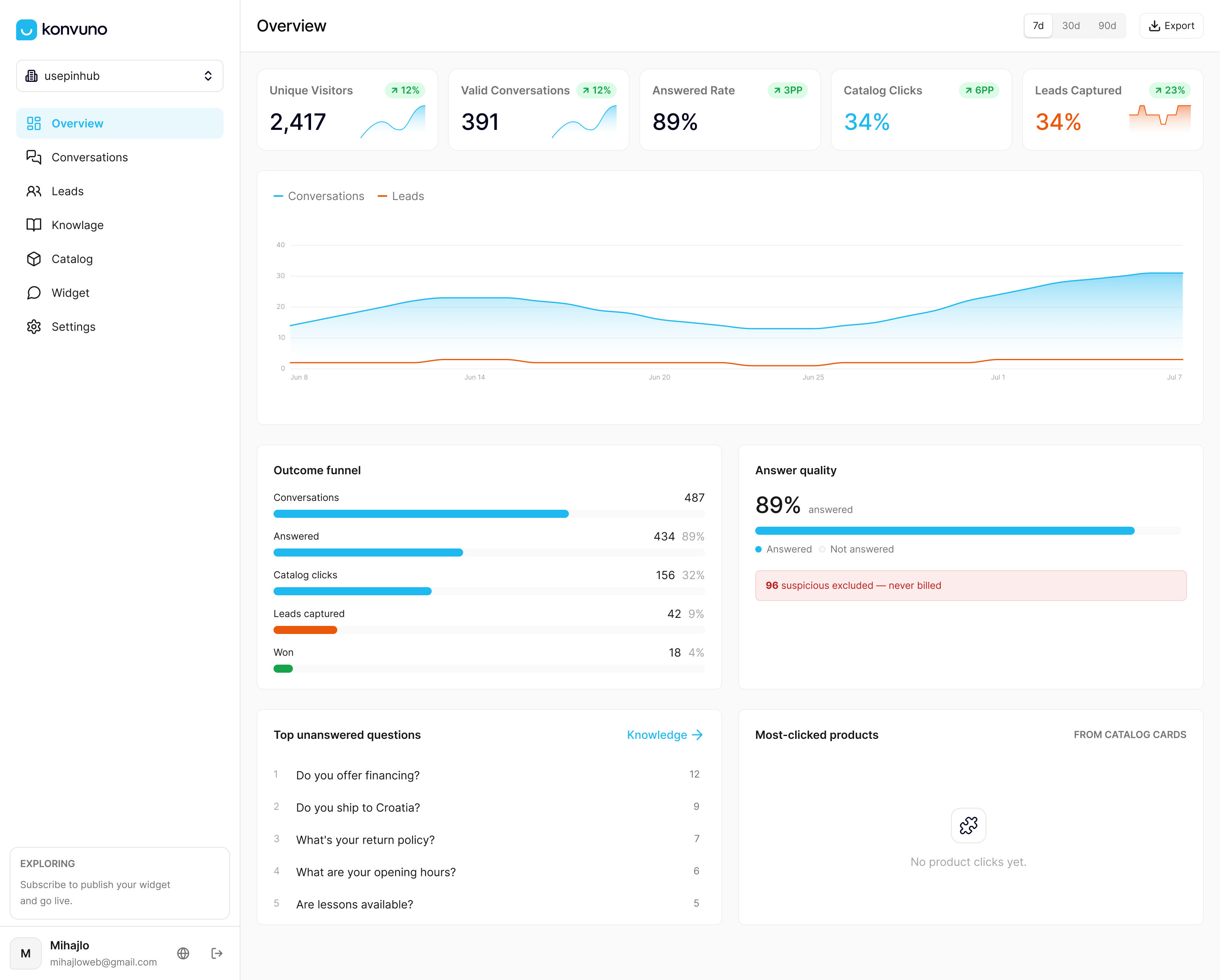
For the two-week pilot outlined earlier, Konvuno covers the technical half automatically. Product and pricing answers stay current through feed sync with WooCommerce or Google Merchant, so you’re not manually updating the bot every time a price changes. The FAQ assistant handles the informational questions your qualifying flow doesn’t need to, while the qualification flow itself handles scoring and routing. Seven-language support means one install serves visitors regardless of what language they land in.
Start your pilot by installing the widget on your pricing or demo page this week, configuring five qualifying questions, and checking your first completion-rate numbers within seven days. Visit Konvuno to start a trial and see the dashboard populate with your first real conversations.