Chatbot Pricing for Small Businesses: What to Budget
Discover how to effectively budget for chatbot pricing, with options for small businesses ranging from free plans to custom builds.

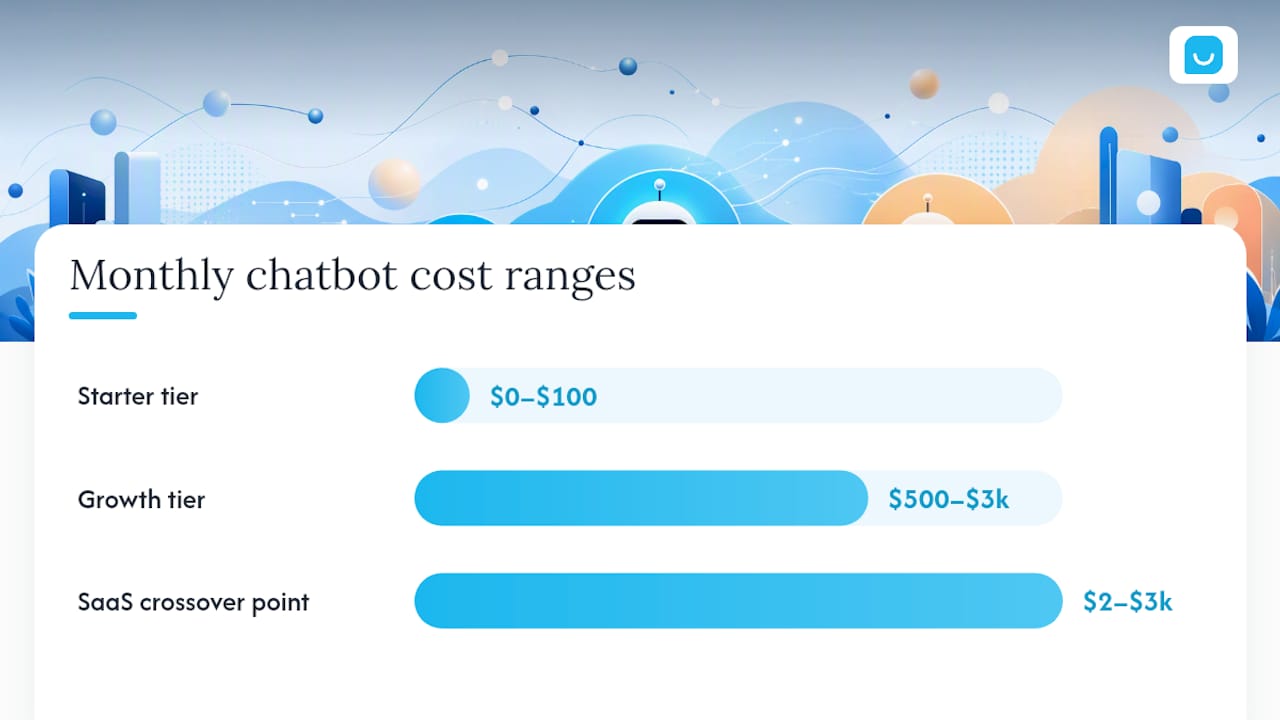
Most small and medium businesses will pay somewhere between $0 and $500 a month for a SaaS chatbot, $500 to $5,000 a month for a growth-tier plan with real AI capability, and upwards of $8,000 as a one-time cost if they commission a custom build. For nearly every SMB, the right move is to start with a SaaS pilot, not a custom build. Custom development only pencils out once your SaaS bill would otherwise run $2,000 to $3,000 a month.
Before you talk to a single vendor, know these three numbers:
- Starter tier: often free to around $100/month, usually capped at a few hundred conversations
- Growth tier: roughly $500 to $3,000/month, which is where most SMBs with real traffic land
- Enterprise/custom: $8,000 to $150,000+ upfront, or contact-sales pricing with no public number
Your next step: run the quick calculator further down this guide against your actual monthly traffic, then start a no-code trial before you sign anything longer than a month.
Key Takeaways
Most SMBs should pilot a SaaS chatbot in the $0 to $3,000 monthly range before ever considering a custom build that starts at $8,000 upfront.
| Point | Details |
|---|---|
| Starter tier is a test, not a solution | Expect free to roughly $100/month with capped conversations and basic automation only. |
| Growth tier fits most SMBs | Budget $500 to $3,000/month for real AI responses, CRM integration, and higher caps. |
| Custom build has a crossover point | Building your own only beats SaaS once your monthly SaaS bill would exceed $2,000 to $3,000. |
| Model choice drives the real bill | Token consumption and AI model tier move your monthly cost more than conversation volume alone. |
| Konvuno fits the SMB budget profile | No-code widget install, automatic product feed sync, and a built-in CRM avoid the integration fees that inflate other vendors’ bills. |
Table of Contents
- Chatbot Pricing Models: How Vendors Actually Bill You
- What Do Starter, Growth, and Enterprise Chatbot Plans Include?
- The Hidden Costs: Usage Caps, Add-Ons, and Contract Terms
- How Do You Estimate Your Monthly Chatbot Bill?
- Choosing a Chatbot Vendor: Questions and Red Flags
- Why Konvuno Fits Small and Medium Business Budgets
- Sources
Chatbot Pricing Models: How Vendors Actually Bill You
Five billing structures dominate the market, and they produce wildly different bills for identical usage. The models are per-resolution, per-seat, usage-based, flat/tiered subscription, and custom/owned build, and each one shifts the risk between you and the vendor differently.
Flat/tiered subscription is the model most SMBs recognize: you pick a tier, get a conversation cap, and pay the same amount every month regardless of whether you use 200 conversations or 2,000. It’s predictable, which is exactly why it dominates the SMB segment. Usage-based pricing bills per message or per token instead, so your invoice tracks your actual volume, sometimes to the penny. Per-seat pricing charges by the number of human agents using the platform, a model that made sense for live-chat software and gets awkward once AI resolves most conversations without a human touching them. Per-resolution pricing charges only when the bot actually solves a query, which sounds ideal until you notice a catch worth understanding on its own.
A quick example: 3,000 monthly conversations at a moderate per-resolution rate with about half resolved by the bot can cost around a mid-thousand-dollar figure. Improved resolution with a smarter model may increase costs proportionally, even if traffic remains steady. Compare that to a flat $299/month growth-tier plan, and the crossover point arrives faster than most buyers expect.
What Do Starter, Growth, and Enterprise Chatbot Plans Include?
Plan tiers exist because the underlying cost structure changes as you add AI sophistication, integrations, and support obligations. Knowing what triggers a tier jump saves you from overpaying for capacity you don’t need or underbuying capability you do.
Starter plans typically run free to a few hundred dollars a month. Expect a single widget, a hard cap on monthly conversations, rule-based or basic automation, limited integrations, and usually the vendor’s branding stamped somewhere on the widget. This tier fits a business testing whether a chatbot helps at all, not one running serious volume.

Growth or business tiers are where most SMBs with real website traffic end up. This is where you get actual large language model responses instead of decision-tree scripts, CRM and helpdesk integrations, conversation analytics, higher (sometimes unlimited) conversation caps, and often a limited version of retrieval-augmented generation (RAG) that lets the bot pull answers from your documents. FAQ-style bots at this level commonly run $20 to $100 a month to operate once built, while a fuller production support bot lands closer to $200 to $3,000 a month.
Enterprise tiers add advanced model access, full multi-channel deployment (web, WhatsApp, SMS, social), formal SLAs, dedicated customer success, compliance certifications, and custom integration work. This tier is almost always “contact sales” rather than a listed price, and build costs for multi-workflow enterprise systems can run $70,000 to $150,000 or more.
Four things typically push you up a tier:
- Access to newer, more capable AI models instead of basic scripted flows
- Needing integrations beyond the vendor’s default connector list
- Adding channels beyond your website (messaging apps, social platforms)
- Requiring RAG search over a large or frequently updated document library, which can increase complexity and cost
The Hidden Costs: Usage Caps, Add-Ons, and Contract Terms
The advertised price on a pricing page rarely matches what you actually pay by month three. Overages, add-ons, and contract terms do the real damage to an SMB budget.
Watch for these limits buried in the fine print:
- Conversation or message caps that trigger a forced upgrade mid-cycle
- Token limits that quietly throttle response quality once you hit them
- Per-resolution fees that scale with how well the bot performs
- API rate limits that cause failures during traffic spikes
- Seat counts that charge per human agent even if AI handles most volume
Add-ons are where vendors recover margin. Expect extra charges for additional bots beyond your first, premium integrations (Salesforce, HubSpot, and similar CRMs often cost more than basic connectors), RAG indexing for large document sets, onboarding or data migration help, and SLA or compliance packages for regulated industries. Vendor pricing and upgrade guides consistently show that premium AI model access and enterprise add-ons raise subscription costs substantially beyond the base tier price.
Pro Tip: Ask every vendor for their overage rate in writing before you sign anything. A vendor that can’t give you a straight number for “what happens if I go over” is telling you something about how they bill.
Before signing, confirm the trial length, whether the trial has hidden usage caps, what the cancellation notice period is, and whether unused conversations roll over or simply vanish at renewal.
How Do You Estimate Your Monthly Chatbot Bill?
You can build a rough monthly estimate in five steps using numbers you already have from your website analytics.
- Estimate monthly conversations. Pull your monthly unique visitors and apply a realistic engagement rate. A site with 10,000 visitors and a 5% chatbot engagement rate produces around 500 conversations.
- Pick an average message or token count per conversation. A typical support exchange runs 6 to 10 messages. Complex sales or troubleshooting conversations run longer and burn more tokens.
- Choose a candidate pricing model. Compare a flat tier against usage-based pricing at the same volume to see which wins at your scale.
- Apply the per-unit rate. Multiply your conversation count by the vendor’s per-resolution or per-message rate, or check whether you fit inside a flat tier’s cap.
- Add fixed costs. Hosting, monitoring, and any onboarding or RAG-indexing fee sit on top of the usage cost.
Support teams handling that same volume manually often spend far more; one documented case with 3,000 conversations and 50% deflection generated roughly $7,350 a month in handling-cost savings compared to human-only support. At one-sixth that volume, the savings scale down but the direction holds.
Model choice moves this number more than almost anything else. A basic model handling simple FAQ lookups costs a fraction of what a frontier model costs for the same conversation count, because token consumption and model tier are the biggest driver of operating cost at scale. Adding RAG over a large product catalog increases token usage per query, since the bot has to process retrieved context alongside the user’s message.
Choosing a Chatbot Vendor: Questions and Red Flags
Price alone doesn’t tell you total cost. Match the plan to your actual operating constraints first, then negotiate.
Weigh these criteria before you compare a single price tag:
- Your realistic monthly conversation volume, not your hoped-for volume
- Which integrations you actually need (CRM, helpdesk, e-commerce platform)
- Compliance requirements if you handle payment or health data
- Expected deflection rate and what happens when the bot can’t resolve something
- How much support and SLA coverage you need versus what you’re paying for
On a vendor call, ask directly: What happens when I exceed my plan’s conversation cap? Do overage fees apply automatically or do I get a warning first? Which AI models are included versus gated behind a premium tier? Does the plan support RAG over my own documents, and is indexing included or billed separately? What’s your support response time, and is migration assistance included if I switch platforms later? Third-party attestations like SOC 2 compliance matter here if you handle sensitive customer data.
Red flags worth walking away from: vendors who won’t put overage pricing in writing, trials with no stated conversation or day limit, contracts requiring annual commitment with no usage reporting dashboard, and vague language around uptime or data security SLAs. A tool like Bitrupt’s cost calculator can help you sanity-check a vendor’s quoted numbers against independent build-versus-buy math before you commit.
Why Konvuno Fits Small and Medium Business Budgets
Konvuno was built around the reality that most SMBs don’t have a developer on staff and don’t want per-seat billing punishing them for growth. You install one widget script, everything else configures from a hosted dashboard.
- No-code setup: a single script tag replaces a development project
- Automatic product feed sync from WooCommerce, Google Merchant, or Facebook keeps pricing and stock answers current without manual updates
- Built-in CRM captures leads directly, so you’re not paying for a separate integration
- Seven-language support without extra localization fees
- Human handoff built in, so complex questions don’t dead-end the visitor
The recurring maintenance cost buyers forget to budget for is keeping a knowledge base fresh. Konvuno’s automated feed sync exists specifically to close that gap without adding an ongoing content task to someone’s plate.
A note from the product team
Run a pilot before you commit to anything annual. Measure your deflection rate for 30 days, then decide whether to scale…
Try Konvuno Before You Commit to a Longer Contract
There are other paths here: a per-seat platform, a per-resolution vendor, or a custom build if your volume justifies it. If you want to see what SMB-fit pricing actually looks like without a development project, Konvuno installs in minutes and syncs your product catalog automatically, so you’re not paying separately for e-commerce integration work. The built-in CRM means lead capture is included, not a bolt-on fee. Start a no-code trial and check the FAQ Assistant feature against your own website content before deciding on anything longer than a monthly commitment.
Sources
- AI Chatbot Pricing & Cost in 2026: Ranges + ROI | DestiLabs
- Chatbot Pricing Models 2026: Per-Resolution vs Seat vs Usage | Metageeks
- How Much Does an AI Chatbot Cost in 2026? Complete Pricing Guide | Vortenza
- AI Chatbot Pricing: 2026 Cost Guide for Support | IrisAgent