Chatbot Welcome Message Examples and Templates for SMBs
Discover effective chatbot welcome messages that engage visitors. Boost interaction with tailored greetings and actionable buttons today!

The best chatbot welcome message uses three parts: a context hook that names the page the visitor is on, a one-line value statement, and two or three verb-first buttons instead of an open “How can I help?” prompt. Page-aware messages like this outperform static, generic greetings by 25 to 40 percent, and clickable buttons beat open text fields by 37 to 48 percent. Here are three you can paste today:
-
High-intent (pricing page): “Comparing plans? I can find the right one for your team size. [See plans] [Talk to sales] [Ask a question]”
-
Low-intent (blog/browsing): “Enjoying the read? I’ve got related guides and quick answers if you need them. [Related articles] [Ask something] [No thanks]”
-
Returning visitor: “Welcome back! Want to pick up where you left off, or ask something new? [Continue] [New question]”
Pro Tip: Match the template to the page’s job. Pricing and product pages want the high-intent version; blogs and resource pages want the low-intent one; anything gated behind a login should default to the returning-visitor version.
Key Takeaways
Page-aware welcome messages with 2 to 3 verb-first buttons consistently outperform static, open-ended greetings across engagement and conversion metrics.
| Point | Details |
|---|---|
| Use the three-part structure | Combine a context hook, a value statement, and 2 to 3 verb-first buttons instead of open text. |
| Match triggers to page intent | Fire instantly on pricing and product pages; delay or use scroll triggers on blog and content pages. |
| Keep it short | Stay within 8 to 20 words for the greeting line since longer copy measurably hurts engagement. |
| Test one element at a time | Change only the hook, value line, or buttons per experiment to isolate what actually works. |
| Automate it with Konvuno | Konvuno generates page-aware greetings from your site content and catalog, with analytics and human handoff built in. |
Table of Contents
What a chatbot welcome message is and when it appears
A chatbot welcome message is the first line a website visitor sees when a chat widget opens, built from a hook that names their context, a short value statement, and a set of buttons or a text field for their next move. It’s the first exchange in what’s formally called conversational marketing, and it sets the tone for everything after.
These messages fire on several common triggers:
-
Page load (instant, as soon as the page renders)
-
Time delay (after 5 to 15 seconds of reading)
-
Scroll depth (once a visitor passes 50 percent of the page)
-
Exit intent (cursor moves toward the browser’s close button)
-
Click-to-chat (visitor opens the widget manually)
-
URL-based or page-aware triggers (different message per page type)
Pick the trigger based on intent. A pricing page can afford an instant, direct greeting. A blog post should wait, or trigger on scroll, so it doesn’t interrupt someone mid-sentence.
Why a customized greeting actually moves your numbers
A generic “Hi, how can I help?” gets ignored because it asks the visitor to do the work of explaining themselves. A customized greeting does that work for them, and the payoff shows up in real numbers, not just goodwill.
-
Higher engagement: visitors respond faster when the message already reflects what they’re looking at.
-
More conversions: guiding a pricing-page visitor straight to “See plans” shortens the path to a sale.
-
Lower support load: FAQ-style greetings route common questions before a human ever gets involved, which is a large part of why FAQ chatbots reduce contact center volume in the first place.
-
Faster answers: buttons resolve intent in one tap instead of a back-and-forth typed exchange.
Messages with 2 to 3 clickable options outperform open-ended prompts by 37 to 48 percent, which is the single biggest lever most businesses leave untouched. Personalize by name only when you have a real reason to (a returning customer, a logged-in account); personalize by page context on every single visit, since that’s the variable that consistently drives the lift.
Best practices: what works and what kills engagement
Most welcome messages fail for the same handful of reasons, and most of them are easy to fix once you see the pattern. Start with what to do.
Do:
-
Keep the greeting line to 8 to 20 words. BotHero’s analytics tie messages over roughly 40 words to an 18 to 22 percent engagement drop.
-
Open with a context hook that names the page or the visitor’s likely reason for being there.
-
State the value in one short clause: what the bot can actually do for them right now.
-
Offer 2 to 3 verb-first buttons (“See pricing,” “Track order,” “Book a table”) rather than a blank text box.
-
Always include an escape hatch, something like “No thanks, just browsing,” so visitors don’t feel cornered.
Don’t:
-
Lead with “How can I help you today?” as the only option. It’s the most common greeting on the web and it asks the visitor to do the thinking.
-
Write long, paragraph-style copy that reads like a terms-of-service disclaimer.
-
Use the same static greeting on every page regardless of what the visitor is actually looking at.
-
Trigger an aggressive popup the instant someone lands on a blog post or article page. It reads as an interruption, not a service.
Tone should match the brand and the page. A cafe or boutique can be casual: “Hey there! Looking for today’s specials or want to book a table?” A B2B software company on a pricing page should be more direct: “Comparing plans? I can match you to the right tier in under a minute.”
Device matters more than most teams assume. On mobile, screen real estate is scarce, so keep the greeting to 12 words or fewer and cap it at two buttons instead of three. Desktop visitors can handle a slightly longer hook and a third button without the interface feeling cramped.

Pro Tip: Build device-aware variants from the start rather than shrinking one message to fit both. A greeting that reads naturally on desktop often looks cramped and pushy on a phone screen, which is exactly where most visitors first encounter your site.
Pro Tip: Order your buttons by actual click frequency, not by what seems most important internally. If “Track my order” gets tapped three times more often than “Contact sales,” put it first. The button in position one gets disproportionately more clicks regardless of what it says.
Ready-to-use welcome message examples by scenario
Below are paste-ready templates grouped by the situations SMBs and marketers actually deal with. Adjust the bracketed placeholders and the tone to fit your brand; these are meant as starting points, in the same spirit as the curated example collections Jotform maintains for teams building out their own libraries.
1. E-commerce, product page “Looking at the [product name]? I can check stock, sizing, or shipping times. [Check stock] [Shipping info] [Ask a question]” Trigger: page load or 10-second delay. Watch: click-to-conversion on “Check stock.”
2. E-commerce, cart abandonment “Still deciding? Your cart’s saved, and I can answer questions about returns or delivery. [Continue checkout] [Return policy] [Ask something]” Trigger: exit intent on the cart page. Watch: recovered-cart rate.
3. E-commerce, order tracking “Need an update on your order? [Track my order] [Return an item] [Talk to support]” Trigger: click-to-chat from a “track order” link. Watch: handoff rate to human support.
4. SaaS, pricing page “Comparing plans? I can help you find the right tier for your team. [See plans] [Book a demo] [Ask a question]” Trigger: instant on page load. Watch: click-to-conversion on “Book a demo.”
5. SaaS, onboarding help “New here? I can walk you through setup or answer a quick question. [Setup guide] [Common questions] [Talk to a human]” Trigger: page load, logged-in dashboard. Watch: self-serve resolution rate.
6. SaaS, trial conversion “Your trial ends in [timeframe]. Want help picking a plan before it wraps up? [Compare plans] [Talk to sales] [Not now]” Trigger: time-based, tied to trial end date. Watch: trial-to-paid conversion.
7. Local business, bookings “Looking to book? I can check today’s availability. [Book now] [See hours] [Ask a question]” Trigger: instant on booking page. Watch: booking completion rate.
8. Cafe or restaurant, menu and hours “Hey there! Want to see today’s menu or check if we’re open? [View menu] [Hours & location] [Order ahead]” Trigger: page load. Watch: “Order ahead” click rate.
9. Local business, professional services “Have a question about [service]? I can point you to pricing or book a consult. [Get pricing] [Book a consult] [Ask something else]” Trigger: scroll depth past 50 percent. Watch: consult bookings.
10. Content or blog page “Enjoying this? I’ve got related guides if you want to keep reading. [Related articles] [Subscribe] [No thanks]” Trigger: scroll depth, delayed 15 to 20 seconds. Watch: subscribe click rate.
11. Returning visitor, general “Welcome back! Pick up where you left off, or ask something new. [Continue] [New question]” Trigger: page load, recognized cookie or account. Watch: repeat engagement rate.
12. Loyalty member “Good to see you again. Want to check your rewards balance or browse new arrivals? [Check rewards] [New arrivals] [Ask a question]” Trigger: page load, logged-in loyalty account. Watch: rewards redemption rate.
13. After-hours or support-focused “We’re offline right now, but I can answer common questions or take a message. [FAQs] [Leave a message] [Check hours]” Trigger: page load outside business hours. Watch: FAQ resolution rate versus handoff requests.
Every one of these works better with contextual personalization when you have the data (a returning visitor’s name, a logged-in loyalty tier, or the specific product they viewed last). Where you don’t have that data, the page-aware version still beats a static greeting by a wide margin, since the page itself tells you enough about intent to write a relevant hook.
How to write your own welcome message in 15 minutes
Every effective chatbot welcome message follows the same four-part formula. Once you’ve written one, the rest take five minutes each.
-
Context hook. Name the page or the visitor’s likely reason for being there. (“Comparing plans?” / “Looking at [product]?”)
-
Value frame. State what the bot can do for them in one short clause. (“I can match you to the right tier.”)
-
Button array. Offer 2 to 3 verb-first buttons under 5 words each. (“See plans,” “Book a demo,” “Ask a question.”)
-
Escape line (optional). Give a clear out. (“No thanks, just browsing.”)
Fill-in-the-blank version: “[Context hook about page/product]? I can help you [value: find/check/book/answer] [specific thing]. [Button 1] [Button 2] [Button 3, optional escape]”
Swap the tone to match your brand. Formal: “Welcome. I can help you review pricing options or connect you with our team.” Casual: “Hey! Want help finding the right plan, or just poking around?”
Before you publish, run through this checklist:
-
Does it read naturally out loud, or does it sound like a form?
-
Have you checked how it looks on mobile, not just desktop?
-
Is the trigger event tagged in your analytics so you can measure it?
-
Is there a clear handoff path if the visitor needs a human?
-
Have you added a short privacy note if the bot collects an email or phone number?
Measuring what works: metrics and simple A/B tests
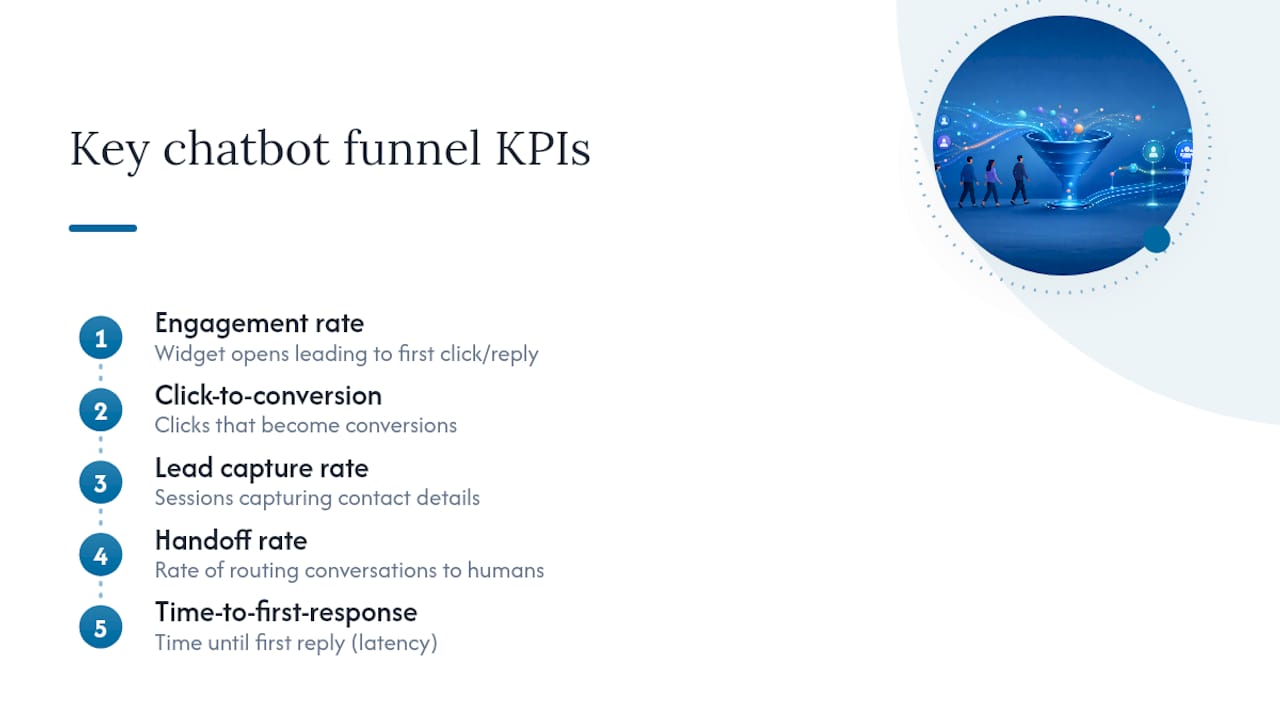
Track five metrics from the start: engagement rate (widget opens that lead to a first click or reply), click-to-conversion, lead capture rate, handoff rate to a human, and time-to-first-response. These map directly onto the funnel KPIs you already track elsewhere, and treating conversational experiences as a measurable channel rather than a set-and-forget widget is what separates teams that improve their bot over time from those that don’t.
Run one change per test. Swap only the hook, only the value line, or only the buttons, never all three at once, so you know what actually moved the number. A practical minimum for an SMB is a few hundred sessions per variant over one to two weeks; smaller sites should run longer rather than call a result early. A reasonable hypothesis: “Adding a page-aware hook on the pricing page increases click-to-conversion versus a static greeting.” Given that page-aware messages already show a 25 to 40 percent lift in broader analytics, that’s a strong bet even before you run your own test.
Quick launch checklist: triggers, handoff, and privacy
Before you flip a welcome message live, run through this short list:
-
Set the trigger to match page intent (instant on pricing, delayed or scroll-based on content pages).
-
Confirm each button routes to the right destination, whether that’s a page, a form, or a live agent queue.
-
Define clear handoff rules: what qualifies as “needs a human” and what context gets passed to the agent.
-
Tag the trigger event and each button click in your analytics so results are measurable from day one.
-
Add a short privacy line whenever the bot collects a name, email, or phone number, following the same transparency principle laid out in standard privacy policies.
Handoff rules matter more than most teams plan for. A visitor who’s already answered two or three questions and still needs help should never restart from scratch with a human agent. Pass along what the bot already knows.
What I’d prioritize if I were launching this today
If you’re rolling out welcome messages for the first time, don’t try to cover every page on your site in week one. Start with your two or three highest-intent pages, typically pricing and your top product or service page, since that’s where a well-written hook converts fastest and where a bad one costs you the most.
From there, run one experiment a week. Change the hook one week, the button order the next, and let the data tell you what’s working instead of guessing based on what sounds good in a meeting. Small, sequential tests beat a total rewrite every quarter, because you actually learn which piece of the message was doing the work.
The businesses that get the most out of this aren’t the ones with the cleverest copy. They’re the ones who treat the welcome message as a living piece of the site that gets adjusted based on what visitors actually do, not what the team assumes they’ll do.
Let Konvuno write, personalize, and test your greetings for you
Konvuno turns everything covered above into something you configure once instead of rebuild by hand for every page. Its assistant reads your site content, FAQs, and product catalog to generate page-aware greetings automatically, so a pricing page and a product page get different, relevant hooks without you writing custom logic for each one.
A few specifics that matter for SMBs and marketers running this solo:
-
Install with a single script tag, no developer needed.
-
Pre-built templates you can adapt in minutes, not hours.
-
Button and CTA controls built into the dashboard, no code required.
-
Product feed sync from WooCommerce, Google Merchant, or Facebook, so e-commerce answers about stock and pricing stay current without manual updates.
-
Built-in analytics showing exactly which greetings and buttons get clicked, plus human handoff when a question needs a person.
If FAQ-style routing is your main use case, the FAQ assistant handles that out of the box, pulling answers straight from your existing content. Start a free trial at Konvuno and have a page-aware welcome message live on your site before the end of the day.
Frequently asked questions
What is a chatbot welcome message? It’s the first line a visitor sees when your chat widget opens, typically built from a context hook, a short value statement, and a set of buttons or a text prompt for their next step.
How long should a chatbot greeting be? Aim for 8 to 20 words. Messages that stretch past roughly 40 words see 18 to 22 percent lower engagement, and mobile greetings should stay even shorter, around 12 words.
Should every page have a different welcome message? Yes, where possible. Page-aware messages that reference what the visitor is actually looking at outperform one static greeting used sitewide by 25 to 40 percent.
What’s the best trigger for a welcome message? It depends on the page. High-intent pages like pricing and product pages can trigger instantly on load. Content and blog pages do better with a scroll-depth or time-delay trigger so the message doesn’t interrupt reading.
How do I A/B test a chatbot greeting? Change one element per test (the hook, the value line, or the buttons), run it for one to two weeks or until you have a few hundred sessions per variant, and compare click-to-conversion and engagement rate before calling a winner.
Do I need a privacy note in my welcome message? Add a short line whenever the bot collects personal information like an email or phone number. It doesn’t need to be legal language, just a clear, honest statement of what you’re collecting and why.