Chatbots vs Live Chat: A Practical Guide for SMBs
Discover when to use chatbots versus live chat for your SMB. Optimize customer support by leveraging both solutions effectively.

Use chatbots for high-volume, predictable questions, live chat for anything emotional or genuinely complicated, and a hybrid setup wherever the outcome has to be reliable every single time. That’s the whole decision in one sentence. Most small and medium businesses overthink this choice because they treat it as picking a winner, when it’s actually a design question: which parts of your support flow can a machine own outright, and which parts need a human’s judgment in the loop?
Here’s the short version before you read further:
- Pick chatbot-first for order status, store hours, return policies, appointment scheduling, and anything a visitor could find in your FAQ if they had the patience to look.
- Pick live-chat-first for billing disputes, angry customers, multi-step technical troubleshooting, and anything touching money, health, or legal exposure.
- Pick hybrid when the query starts simple but sometimes turns complicated, which describes most real support queues once you actually look at the transcripts.
If you’re evaluating vendors, skip ahead to the checklist section for the exact questions to ask and the red flags that predict a bad rollout.
Key Takeaways
The right approach for most SMBs is a hybrid one, where chatbots handle predictable volume and live chat handles judgment calls, measured continuously against repeat contact and satisfaction data.
| Point | Details |
|---|---|
| Match tool to query type | Route repetitive, documented questions to bots and reserve human agents for emotional or high-stakes conversations. |
| Watch repeat contacts | Rising containment paired with rising repeat contacts signals the bot is closing conversations without solving them. |
| Budget for escalation overhead | Failed bot interactions become more expensive human interactions, so clean handoff design matters more than raw deflection rate. |
| Pilot before scaling | Test one high-volume flow for 30 days, measure CSAT and resolution, then expand to additional flows. |
| Konvuno fits the hybrid model | Konvuno installs as a single widget, syncs FAQs and product feeds automatically, and hands off to a human when a question needs one. |
Table of Contents
- Chatbots vs Live Chat: What a Chatbot Actually Is
- Chatbots vs Live Chat: What Live Chat Actually Is
- What Are the Key Differences Between Chatbots and Live Chat?
- Chatbots vs Live Chat: A Feature Face-Off
- When Should You Use Chatbots, Live Chat, or Both?
- How Do You Choose Between Chatbots and Live Chat?
- What Does Chatbot and Live Chat Implementation Actually Take?
- What Should You Budget for Cost and Timeline?
- Which Metrics Actually Prove the Rollout Is Working?
- How a Practical Hybrid Setup Works
- Try a Hybrid Assistant Built for SMBs
- Frequently Asked Questions
- Sources
Chatbots vs Live Chat: What a Chatbot Actually Is
A chatbot is software that answers visitor questions using pre-set rules, a trained language model, or some blend of both, without a human typing the response in real time. The category splits into three tiers. Rule-based bots follow decision trees you build yourself (“if user types ‘refund,’ show policy page”). Conversational AI bots use natural language models to understand phrasing variations and pull answers from your content instead of a rigid script. Agentic AI goes further still, taking actions like completing a return or rebooking an appointment rather than just describing how to do it.
Most SMB tools sold today sit in that middle tier: conversational AI that reads your FAQs, product pages, and help docs, then answers in plain language, demonstrating practical chatbot use cases to drive engagement and streamline service.
What that middle tier typically handles:
- Instant answers pulled from your existing FAQ content, no rewriting required
- Order status and shipping lookups tied to your store or CRM data
- Simple form capture (name, email, reason for contact) before any human gets involved
- Basic transactions like appointment booking or coupon retrieval
A customer checking “where’s my order” at 11 p.m. and a shopper asking “do you carry this in size 10” are the two clearest examples of tasks built for this category, not a person.
Chatbots vs Live Chat: What Live Chat Actually Is
Live chat is a human agent typing real-time responses to a visitor, full stop. No matter how much software sits behind the scenes, a person reads the question, decides how to respond, and owns the judgment calls a script can’t make. That’s the entire distinction that matters here.
Modern live chat platforms layer AI assistance on top of that human, without replacing them:
- Response suggestions that draft a reply the agent can edit or send as-is
- Sentiment flags that surface a frustrated or urgent tone before the agent even opens the chat
- Context summaries that pull order history and prior tickets so the agent isn’t asking the customer to repeat themselves
The catch is availability. Live chat runs on staffing, which means business hours, time zones, and however many agents you can afford to schedule. A three-person support team can’t offer the same round-the-clock coverage a bot delivers by default, and that gap is the single biggest reason hybrid setups exist at all.
What Are the Key Differences Between Chatbots and Live Chat?
Comparing chatbots and live chat by feature list misses the point. What actually matters is where each one wins on the dimensions that drive your budget and your customer relationships.
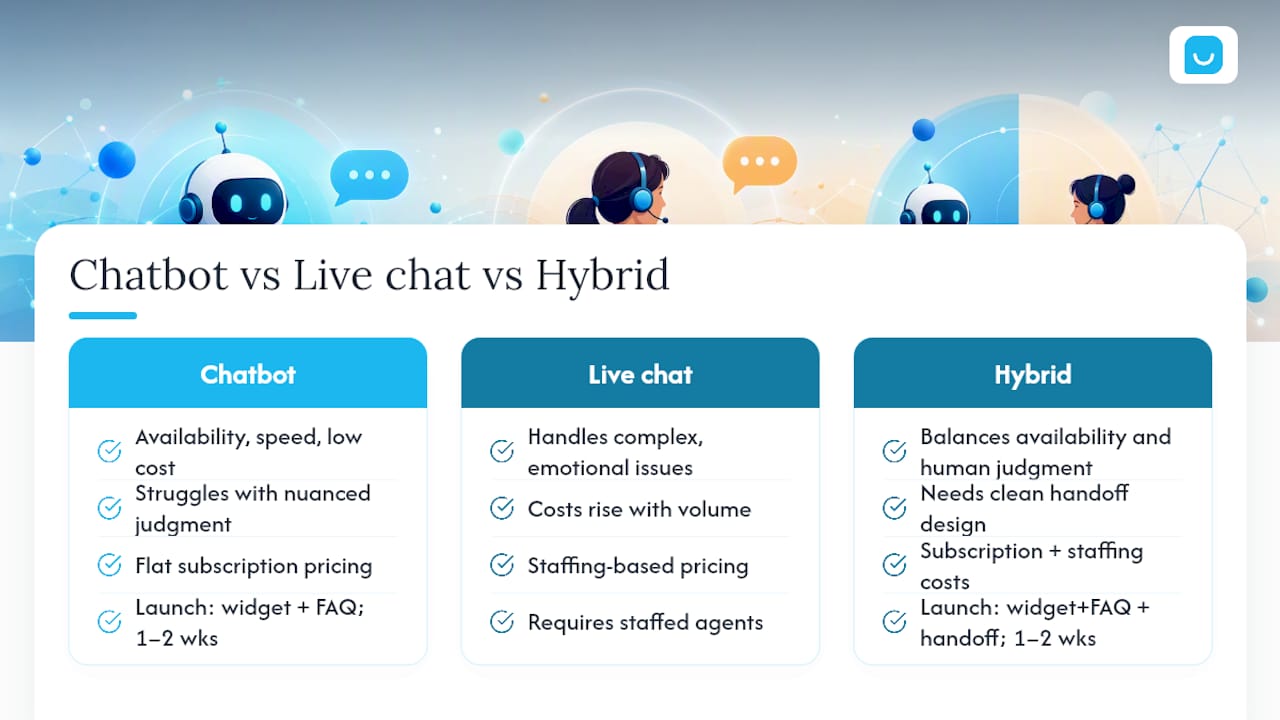
- Speed and availability. Bots respond in under a second, any hour, any day. Live chat responds only when an agent is logged in and free, which for most SMBs means business hours plus maybe a skeleton evening shift.
- Cost shape. Chatbot costs are mostly fixed: a subscription or setup fee, then flat regardless of volume. Live chat costs scale with headcount, meaning your busiest season is also your most expensive one.
- Scalability. A bot handles one conversation or ten thousand at the same marginal cost. Live chat hits a wall the moment queue volume outpaces available agents, and customers start waiting.
- Complexity and accuracy. Bots are excellent at narrow, well-documented questions and weak at anything requiring judgment, negotiation, or reading between the lines. Mailchimp’s comparison frames this cleanly: chatbots win on availability and scale, live chat wins on empathy and complex issue handling.
- Empathy and trust. A frustrated customer generally wants to feel heard, not routed through a decision tree twice. Forrester’s research on customer service points to a persistent gap between what companies deliver and what customers actually expect, and that gap tends to widen fastest in emotionally charged conversations.
- Handoff quality. The best bots know their limits and escalate cleanly with full context attached. The worst ones loop customers through the same three unhelpful answers until they give up or get angry.
The trade-off that trips up most SMBs isn’t cost or speed. That repeat-contact tax often erases whatever labor savings the automation promised in the first place.
Pro Tip: Don’t just measure how many conversations your bot “contains.” Sample a batch of contained conversations weekly and check whether the customer actually got what they needed, or just stopped responding out of frustration. Deflection and resolution are not the same metric, and confusing them is how unsupervised automation quietly damages customer trust for months before anyone notices.
Chatbots vs Live Chat: A Feature Face-Off
Here’s how the two options stack up across the dimensions that matter most for procurement decisions. These are typical shapes, not universal numbers. Actual figures depend heavily on your vendor, your volume, and how well the tool is configured.
| Dimension | Chatbots | Live Chat |
|---|---|---|
| Best for | High-volume, repetitive, well-documented questions | Complex, emotional, or high-stakes conversations |
| 24/7 support / availability | Always on, no staffing required | Limited to staffed hours unless outsourced |
| Handling complex/nuanced queries | Weak; struggles outside trained scope | Strong; agents adapt in real time |
| Implementation time and effort | Days to a few weeks for basic setups | Days for tooling, longer to hire and train staff |
| Upfront & running costs | Mostly fixed subscription, low marginal cost | Scales with headcount and hours covered |
| Scalability | Near-unlimited concurrent conversations | Capped by agent headcount |
| Customer satisfaction / empathy | Adequate for simple asks, poor for frustration | Strong when staffed well |
| Handoff to humans / escalation | Varies widely by vendor; a key differentiator | Not applicable; already human |
A few notes on reading this table for your own decision. The “implementation time” row tends to hide the real cost: a bot can go live in days, but a bot with weak knowledge coverage generates support tickets of its own. The “handoff” row is where long-term risk actually lives. A cheap bot with no clean escalation path saves money upfront and costs you customers later. And remember that vendor pricing models vary wildly, per-chat, per-seat, flat subscription, so treat any of these rows as a starting framework for questions, not a quote.
When Should You Use Chatbots, Live Chat, or Both?
Match the tool to the query, not to your budget alone.
Chatbots handle these well:
- Order status, tracking, and delivery estimates
- Store hours, location, and return policy questions
- Appointment booking and rescheduling
- Basic troubleshooting with a known fix (“how do I reset my password”)
Live chat earns its cost here:
- Billing disputes or refund negotiations involving judgment calls
- Multi-step technical troubleshooting that doesn’t fit a script
- Sensitive conversations touching health, legal, or financial details
- Any interaction where the customer is already upset
Retail and e-commerce sites typically let a chatbot own the “where’s my stuff” conversations and route anything involving damaged goods or disputes straight to a person. SaaS companies often use bots for plan questions and basic setup help, then hand off the moment a customer mentions a bug or a billing error. Professional services firms, law offices, clinics, financial advisors, tend to use chatbots only for scheduling and intake, keeping every substantive conversation with a licensed human because the stakes and the regulations demand it. In each case, the escalation point is the design decision that matters most, not the bot’s vocabulary.
How Do You Choose Between Chatbots and Live Chat?
Work through this checklist before you sign anything.
- Map your query volume by type. What percentage of contacts are repetitive versus genuinely unique? This ratio alone often decides the right mix.
- Define the outcomes that must never fail. Some conversations, refund approvals, safety complaints, cannot tolerate a bot getting it wrong.
- Check your integration requirements. Does the tool need to read your CRM, product feed, or ticketing system to give accurate answers?
- Confirm data security and compliance needs. Regulated industries need audit logs and data handling guarantees, not just a chat window.
- Set your SLA expectations up front. Decide your target response time and resolution rate before you evaluate tools, not after.
Ask vendors these questions directly during a demo:
- “Walk me through exactly how a handoff happens when the bot doesn’t know the answer.”
- “How do you measure deflection, and does that number account for repeat contacts?”
- “What happens when the bot is confidently wrong? How is that detected?”
- “What can I control through an API versus only through your dashboard?”
- “Is pricing per-chat, per-seat, or flat, and what happens if my volume spikes?”
Watch for these red flags:
- No clear, testable escalation path to a human
- No audit logs or conversation history you can export
- Analytics limited to conversation counts, with nothing on resolution quality
- Per-chat pricing with zero containment guarantee, meaning you pay more as the bot fails more
What Does Chatbot and Live Chat Implementation Actually Take?
Standing up either tool in an SMB environment follows roughly the same sequence.
- Install a lightweight widget, usually one script tag, no development team required.
- Sync your knowledge base: FAQs, help docs, and product catalog.
- Connect your CRM or ticketing system so conversations and leads land where your team already works.
- Run a test batch with real (or realistic) questions before opening it to live traffic.
- Monitor early conversations closely, then expand scope once the first flow is stable.
The integrations that matter most: your CRM for lead and contact history, your helpdesk or ticketing tool for escalations, your e-commerce product feed (WooCommerce, Google Merchant, or Facebook catalog) for accurate pricing and stock answers, and basic analytics so you can see what visitors are actually asking.
Start narrow. Pick one high-volume, well-documented flow, like order status or FAQ retrieval, get it working reliably, then expand to the next flow. Trying to automate everything on day one is the most common way SMB rollouts stall.
What Should You Budget for Cost and Timeline?
Realistic timelines break into three tiers:
- Basic FAQ bots: days to two weeks to launch, assuming your content is already organized.
- Conversational AI with catalog sync and CRM integration: several weeks to a few months, depending on data cleanup needed.
- Full agentic automation that completes transactions end-to-end: months, and usually an iterative rollout rather than a single launch.
On the cost side, expect a subscription fee as your main upfront cost for chatbot tools, with ongoing maintenance mostly limited to content updates. Live chat’s real cost is staffing, hiring, training, and scheduling agents, which dwarfs software fees for most businesses once you factor in headcount. The hidden cost on either side is escalation overhead: every contact a bot fails to resolve becomes a more expensive human interaction than if a person had handled it correctly the first time, a dynamic Gartner’s analysis of conversational AI ties directly to supervision quality. Expect net ROI to show up within one to two quarters if you’re tracking the right metrics, not immediately at launch.
Which Metrics Actually Prove the Rollout Is Working?
Track these from week one, not after a quarter of guessing:
- CSAT or NPS on every resolved conversation, bot or human
- Containment/deflection rate: percentage of conversations resolved without human involvement
- Average handle time (AHT) for both bot and agent-handled conversations
- First-contact resolution rate
- Repeat contact rate, the number that catches a bot quietly failing
- Escalation rate and how often it happens cleanly versus after visible frustration
- Lead capture or conversion rate tied to chat interactions
Give yourself at least two to four weeks of data before drawing conclusions. Small sample sizes make single bad days look like trends. The single most important pattern to watch: if containment is rising at the same time repeat contacts are also rising, your bot is closing conversations without actually solving them. That combination is the clearest sign of an unsupervised automation problem, and it’s exactly the gap Forrester’s consumer expectations research warns companies to watch for.
How a Practical Hybrid Setup Works
Konvuno was built around the exact hybrid model this article recommends: automation owns the predictable volume, a human owns the exceptions. It installs as a single widget on your existing site and answers visitor questions using your FAQs, website content, and product catalog, without requiring a developer or a per-seat contract.
What that looks like in practice:
- Quick install via one script tag, live in minutes rather than weeks
- Knowledge sync pulled directly from your FAQs and product feed, including automatic sync from WooCommerce, Google Merchant, or Facebook catalogs
- Every conversation that captures a name or email drops straight into a built-in CRM, so leads never get lost in a chat log
- A live handoff workflow for the moments a visitor’s question needs a person, not a script
For SMBs specifically, the appeal is low setup friction, no per-seat pricing that punishes you for growing your team, support across seven languages for businesses with international visitors, and product answers that stay accurate on their own because the catalog sync runs automatically instead of needing manual updates.
Author’s Practical Recommendation for SMBs
My honest read after digging through the evidence: the businesses that get this right treat automation and human support as one system, not two competing options. Design for the failure points first, ask “what happens when the bot doesn’t know,” before you ask “how many questions can it answer.” Run a 30-day pilot on your single highest-volume query type and measure repeat contacts before you expand anywhere else.

Try a Hybrid Assistant Built for SMBs
If you’ve read this far, you already know the checklist: clean handoff to a human, knowledge that stays current, no per-seat pricing that punishes growth, and product answers that don’t go stale. Konvuno is built to answer yes to each of those questions directly, rather than making you dig through a sales deck to find out.

It syncs your FAQ content and product catalog automatically, whether you’re running WooCommerce or a Google Merchant or Facebook feed, through the Shop Connect integration, so pricing and availability answers stay accurate without manual updates. Every visitor question gets answered from your actual site content through the FAQ Assistant, and every conversation that captures contact information lands in a built-in CRM rather than disappearing into a chat transcript. When a question needs a person, the handoff happens cleanly instead of leaving the visitor stuck in a loop.
Setup takes minutes, not a procurement cycle. If you want to see how it handles your own FAQ content and product feed, start with Konvuno and run it against your highest-volume support flow first.
Frequently Asked Questions
Is a chatbot better than live chat for customer support? Neither wins outright. Chatbots win on availability, speed, and cost at scale; live chat wins on handling complex, emotional, or high-stakes conversations. Most SMBs get the best results from a hybrid setup rather than choosing one exclusively.
How much does it cost to add a chatbot to a small business website? Costs are typically structured as a flat subscription rather than scaling with volume, which is one of the biggest cost differences versus live chat, where staffing costs rise with call volume and hours covered.
Can a chatbot handle complex customer service issues? Basic and even conversational AI chatbots struggle with nuanced, judgment-heavy issues like billing disputes or emotionally charged complaints. The better question is whether the bot recognizes its limits and hands off cleanly, not whether it can bluff its way through.
What’s the fastest way to launch a hybrid chatbot and live chat setup? Install a widget-based assistant, sync it to your existing FAQ content and product catalog, and add a live handoff path from day one rather than treating human support as an afterthought. Basic setups can launch within one to two weeks.
How do I know if my chatbot is actually working? Track containment rate alongside repeat contact rate and CSAT, not containment alone. If containment rises while repeat contacts also rise, the bot is closing conversations without resolving them, which erodes trust even as your deflection numbers look good on paper.
Sources
- Forrester: Consumer expectations for customer service don’t match what companies deliver
- Chatbot vs. Live Chat: Pros and Cons for Businesses | Mailchimp