Multilingual Customer Support: A Practical Rollout Plan
Enhance customer retention and satisfaction with effective multilingual support. Learn practical steps to implement this essential service.

Multilingual customer support means answering customer questions in the language they actually speak, across whatever channel they pick. The right approach for most businesses is to prioritize two or three high-traffic languages first, pair AI assistants with human handoff for the rest, and expand from there. Done right, it raises retention and conversion faster than most other support investments.
TL;DR:
- Supporting top two or three high-traffic languages first delivers better ROI than attempting full coverage immediately.
- Prioritize live chat and voice channels for real-time support, as these users expect instant, fluent communication during critical interactions like checkout.
- Use AI translation for routine questions but rely on native speakers for nuanced or emotionally charged interactions to ensure clarity and empathy.
- Track KPIs such as CSAT, FCR, response time, and escalation rates by language to identify and address quality gaps early.
- Start small with the most revenue-generating flows, expand gradually, and maintain a shared glossary and style guide to ensure consistent brand tone across languages.
Table of Contents
- Why Multilingual Customer Support Pays Off
- Which Channels Need Language Coverage First?
- Should You Hire, Outsource, or Go Hybrid?
- What Technology Actually Works for Multilingual Support
- What KPIs Actually Tell You It’s Working
- How to Roll Out Multilingual Support in 90 Days
- How Konvuno Handles Multilingual Support in Practice
- What I’d Tell Any Business Before They Launch This
- Get Multilingual Support Running Without Hiring a Translation Team
- Where to Learn More About Multilingual Support
- Sources
Why Multilingual Customer Support Pays Off
The math is blunt: 96% of customers stop using a product after one bad support experience. Language barriers are one of the fastest ways to create that experience. A customer who can’t get a straight answer in their own language doesn’t file a complaint. They just leave and buy from someone else.
Native-language support changes the equation in three measurable ways.
- Higher satisfaction scores. Customers rate interactions higher when they’re not mentally translating your reply.
- Lower churn. Support that meets people in their own language removes a common, silent reason customers quietly cancel.
- Faster market entry. Businesses that support a language before they aggressively market into that region convert visitors who’d otherwise bounce at checkout.
Multilingual support also does something subtler: it signals commitment. Forbes coverage of the topic notes it strengthens loyalty and eases entry into new markets, which matters more than it sounds once you’re competing against local players who already speak the language natively. The ROI shows up less in dramatic wins and more in fewer abandoned carts, fewer refund requests tied to confusion, and support tickets that close on the first reply instead of bouncing back and forth in broken translation.
Which Channels Need Language Coverage First?
Not every channel deserves equal investment on day one. Chat and email tolerate a short delay while you find the right resources; voice and live chat during checkout do not.
- Live chat and voice: These carry the tightest expectations. A customer mid checkout who hits a language wall usually abandons within minutes, so these channels need either fluent agents or an AI assistant with instant, accurate handoff.
- Email: More forgiving on timing, which makes it a good testing ground for a new language before you commit to real-time coverage.
- Social and messaging (WhatsApp, Messenger, Instagram): Increasingly the first point of contact in many regions, and customers there expect a casual, fast tone, not a formal ticket-style reply.
- Self-service and FAQs: This is the cheapest channel to localize and the one with the biggest deflection payoff. A translated FAQ page answers thousands of repeat questions without a single agent touching them.
Prioritize whichever channel touches revenue directly. If checkout support drives sales, staff that language gap before you worry about polishing your help center in the same language.
Should You Hire, Outsource, or Go Hybrid?
There’s no single right answer here. It depends on your volume, budget, and how much quality control you’re willing to manage yourself.
In-house native hires give you the tightest brand-voice control and the deepest product knowledge, but they’re expensive to staff across time zones and hard to scale quickly if demand in a language spikes.
Outsourcing to a specialized provider solves the scale and time-zone problem fast, though quality varies by vendor and you’ll need clear style guides to keep the brand voice from drifting.
Smartshoring, which blends onshore, nearshore, and offshore staff, is how a lot of mid-size companies split the difference: nearshore or offshore teams handle volume and off-hours coverage while a smaller onshore team handles escalations and culturally sensitive cases.
On-demand interpretation (phone or video) fills gaps for rare languages you can’t justify staffing permanently. LanguageLine’s model of combining scheduled interpreters with on-demand access works well as a stopgap while you build out permanent coverage.
- In-house: best brand control, highest fixed cost
- Outsourced: fastest to scale, requires strong QA
- Smartshoring: balances cost and coverage across time zones
- On-demand interpretation: covers rare languages without permanent headcount
Pro Tip: Start with a hybrid model even if you eventually want full in-house coverage. It lets you validate demand in a language before committing to a full-time hire.
What Technology Actually Works for Multilingual Support
Machine translation has gotten good enough that most businesses no longer need a human translator for routine replies. Enterprise tools like Language Weaver process 80–90% of localized content with minimal post-editing in cases like NetApp’s, which tells you the technology has crossed from “nice to have” to genuinely production ready for high-volume, low-risk content.
Where it still falls short is nuance: apologies, refunds, and anything emotionally charged read stiff or even rude when machine-translated without a human pass. That’s where AI assistants earn their keep for the routine 80% of questions, with a live agent stepping in for the rest.
Combining AI translation inside the agent’s own helpdesk with a smaller team of native speakers for escalations tends to deliver the best balance of speed, cost, and quality, according to CoSupport’s analysis of multilingual service models.
A few practical patterns worth adopting:
- Use AI assistants for FAQ answers and product questions around the clock, with human handoff triggered the moment a question needs judgment.
- Sync your product catalog automatically (through WooCommerce, Google Merchant, or a Facebook feed) so multilingual answers about price and stock don’t go stale.
- Use a localization platform like Crowdin to manage glossaries and translators when you’re localizing help content, not just live chat.
- Connect your CRM and helpdesk so a conversation in one language doesn’t lose its history when it escalates to another agent.
Most vendors in this space, including major helpdesk platforms, now support dozens of languages out of the box, so the integration question matters more than the raw translation capability.
What KPIs Actually Tell You It’s Working
Track the same metrics you’d use for English support, but break them out by language, because averages hide problems.
- CSAT by language — a global average of 90% can mask a language sitting at 65%.
- First contact resolution (FCR) — low FCR in a specific language usually points to a translation or knowledge gap, not an agent skill problem.
- Response and resolution time — compare these against your English baseline; a widening gap signals under-resourcing.
- Escalation rate — high escalation in one language often means the AI assistant’s knowledge base needs a native-speaker review.
Set a baseline in week one for each language you launch, then sample a handful of closed tickets weekly for quality, not just speed. Sentiment analysis on chat transcripts can flag a frustrated tone pattern in a specific language long before it shows up in your CSAT numbers.
How to Roll Out Multilingual Support in 90 Days
You don’t need a full localization department to start. You need a prioritized list and a willingness to launch imperfect and improve fast.
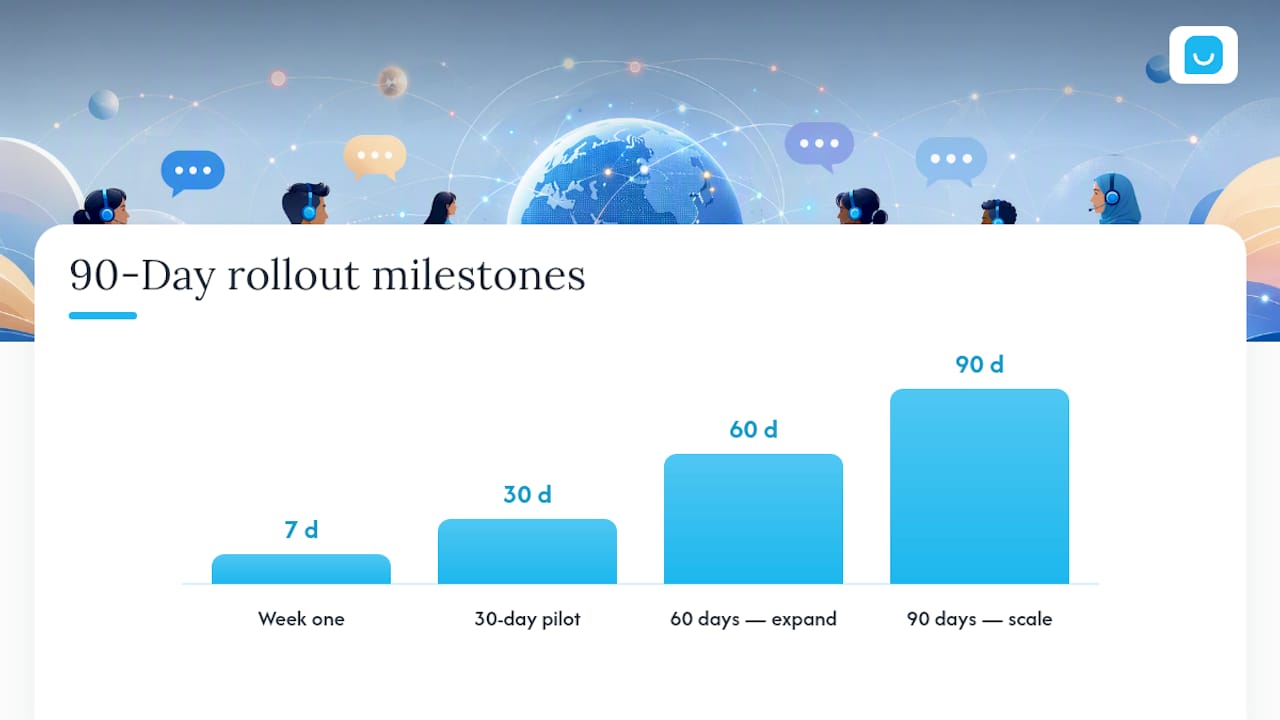
- Pick your first languages using data, not guesswork. Pull the top two or three non-English languages by website traffic, support ticket volume, or revenue from a region, and start there.
- Ship the quick wins in week one. Translate your top 20 FAQ articles, add automatic language detection to your chat widget, and deploy an AI assistant that can hand off to a human when it’s stuck.
- Run a 30 day pilot. Track CSAT, FCR, and escalation rate for the pilot language only. Fix knowledge gaps as they surface instead of waiting for a full review cycle.
- At 60 days, expand coverage. Add a second channel (voice or social) for your pilot language, and start localizing your top product pages or catalog answers.
- At 90 days, scale to the next language using the same playbook, and formalize a glossary and style guide so tone stays consistent as more languages come online.
Governance matters more than most teams expect at this stage. A shared glossary and a written style guide keep your brand from sounding like three different companies depending on which language a customer picks. Common multilingual support mistakes tend to cluster around skipping this step and assuming translation alone equals localization.
Pro Tip: Resist the urge to translate everything before launch. A polished FAQ in three languages beats a mediocre one in ten.
How Konvuno Handles Multilingual Support in Practice
Konvuno was built around the exact rollout most businesses actually need: fast, low-effort, and workable without a developer or a translation team on payroll.
- Seven languages out of the box, configured from a single dashboard rather than a code change.
- A lightweight widget that installs with one script tag, so the pilot phase described above can go live the same day.
- Automatic product feed sync from WooCommerce, Google Merchant, or Facebook, keeping multilingual answers about price and stock accurate without manual updates.
- Built-in CRM lead capture, so a conversation that starts as a support question can turn into a qualified lead without a separate tool.
- Human handoff when a question needs judgment the assistant can’t provide.
A typical starter configuration answers FAQs and product questions automatically, captures leads from visitors who ask about pricing or availability, and routes anything unresolved to a human, which covers most of the quick wins from the 90 day plan above without extra engineering work.
What I’d Tell Any Business Before They Launch This
The biggest mistake I see is trying to translate everything on day one. It feels thorough, but it spreads your quality control so thin that nothing gets reviewed properly, and a bad translation on a high-traffic page does more damage than no translation at all. Start with the flows that touch revenue: checkout questions, shipping policies, return requests. Everything else can wait.
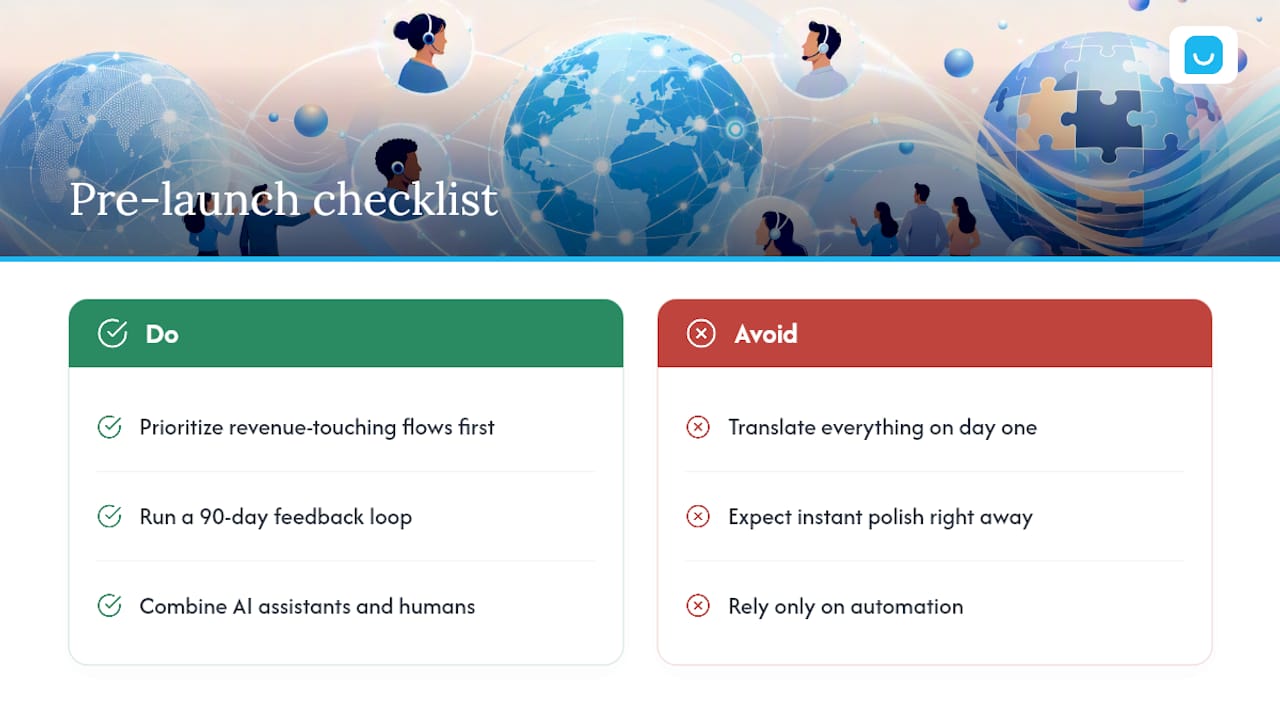
The second mistake is expecting instant polish. Your first month in a new language will surface gaps you didn’t know existed. That’s normal, not a sign the rollout failed. Treat the first 90 days as a feedback loop, not a launch you get one shot at.
Automation and human agents aren’t competing approaches here. AI assistants give you scale and 24/7 coverage; human agents give you the judgment and empathy that automation still can’t fake convincingly. The businesses that get this right use both, deliberately, rather than picking one and hoping it covers everything.
— Konstantin
Get Multilingual Support Running Without Hiring a Translation Team
If everything above sounds right but your team has neither the headcount nor the engineering time to build it, that’s exactly the gap Konvuno fills. It’s a configurable AI website assistant that answers visitor questions in seven languages, straight from your existing FAQs, website content, and product catalog, with no developer required and no per-seat pricing to negotiate.
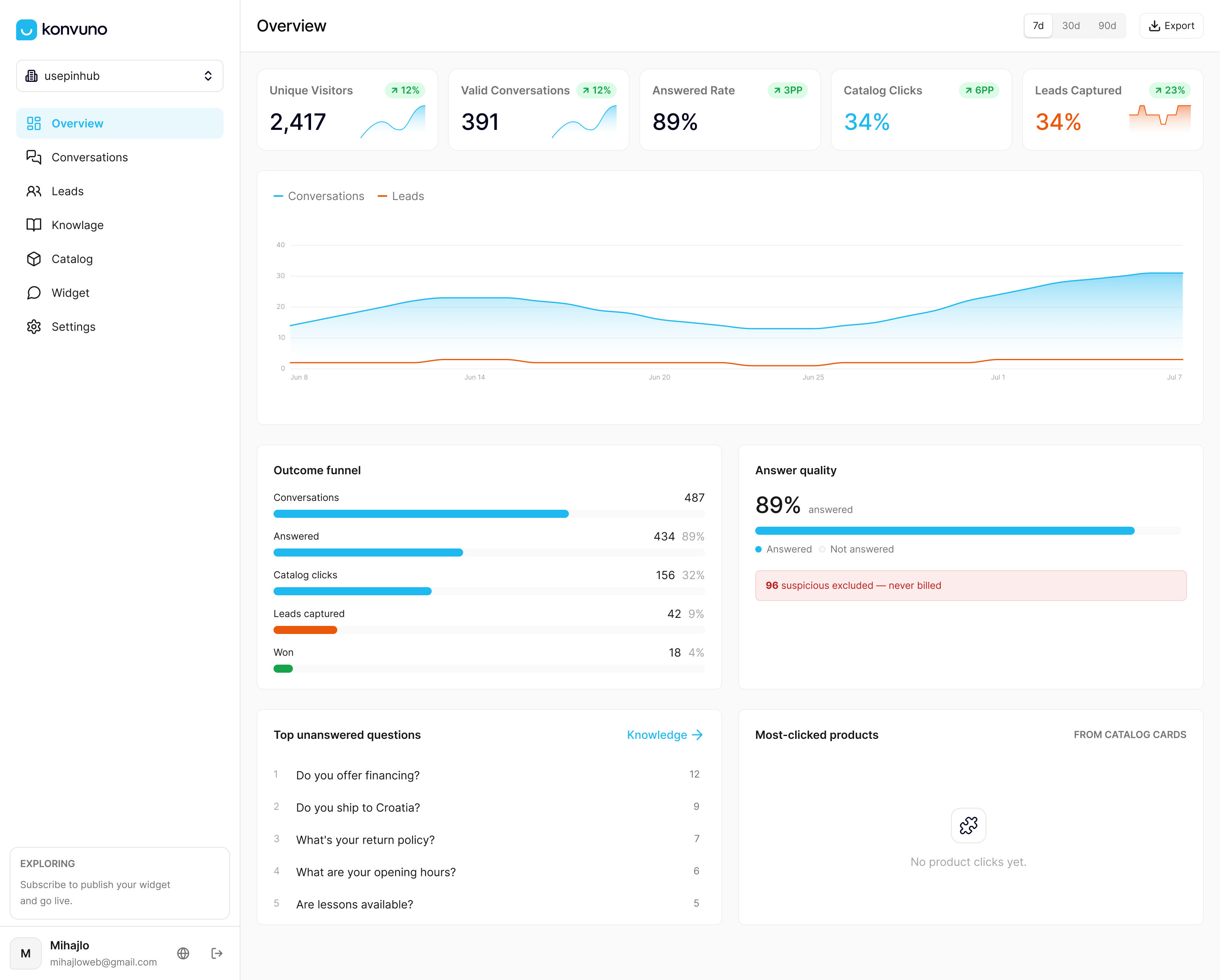
A demo takes about the time it would take to read this article twice: install the widget with one script tag, connect your product feed if you sell online, and the assistant starts answering common questions in whichever languages your visitors already speak. Anything it can’t resolve hands off to a human, and every conversation gets captured as a lead in the built-in CRM. If your FAQ page is your best multilingual asset right now, start with the FAQ assistant and expand into product answers with Shop Connect once you see which languages convert. Set up your first configuration at Konvuno.
Where to Learn More About Multilingual Support
A few resources worth bookmarking as you build out your own rollout:
- Phrase’s guide to multilingual customer support covers the fundamentals and satisfaction data in more depth.
- LanguageLine Solutions is a solid reference for on-demand interpretation when you hit a rare-language gap.
- Crowdin is worth exploring if you’re managing translators and glossaries across a growing content library.
- Common multilingual customer service errors is a practical checklist of what to avoid before you launch.
- Konvuno’s platform overview walks through setup for teams ready to move from planning to implementation.
Sources
- The Ins and Outs of Multilingual Customer Support
- The impact of multilingual customer support on customer satisfaction — Forbes
- LanguageLine Solutions — interpretation and translation services
- Language Weaver — enterprise AI translation