The Best Small Business Chatbot Options for 2026
Explore the top small business chatbot options for 2026, focusing on fast setup, accurate answers, and lead capture to boost sales.

For website-first small businesses, Konvuno is the strongest pick because it installs as a single widget, answers from your own content and product catalog, and captures leads into a built-in CRM without a developer. That combination matters more than raw chat quality for most owners, since the hard part of running a small-business chatbot isn’t the conversation, it’s keeping answers accurate as your inventory and FAQs change.
Here’s the shortlist, in plain terms:
- Website-first assistant (Konvuno): best for site owners and e-commerce stores who want fast setup and product-accurate answers.
- Messaging-first builders: best for brands whose sales happen mostly inside Instagram, Facebook, or WhatsApp.
- LLM API integrators: best for teams with developers who want fully custom logic built on models like ChatGPT or Claude.
- Enterprise platforms: best for larger or multi-location businesses that need deep CRM integration and service-level guarantees.
Three things separate a good small business chatbot from a frustrating one: it has to install without an engineer, it has to stay accurate on its own as your catalog or pricing changes, and it has to know when to hand off to a person. Salesforce points to chatbots as a fast way to add 24/7 coverage and route leads into a CRM, but the fastest time-to-value comes from tools that skip custom integration work entirely.
Key Takeaways
For website-first small businesses, the chatbot that wins is the one that installs fast, stays accurate on its own, and knows when to hand off to a person, not the one with the most sophisticated model behind it.
| Point | Details |
|---|---|
| Setup speed decides adoption | A no-code widget install can go live quickly; developer-built integrations usually take longer. |
| Accuracy beats sophistication | Catalog and FAQ sync matter more to customers than which LLM powers the responses. |
| Human handoff is non-negotiable | Any chatbot without a live escalation path will eventually fail a customer with a hard question. |
| Pricing model shapes total cost | Usage-based or flat pricing scales more predictably than per-seat plans as support teams grow. |
| Konvuno fits website-first SMBs | Its single-script install, product-feed sync, and built-in CRM make it the strongest pick for site-driven and e-commerce businesses. |
Table of Contents
- What Is the Best AI Chatbot for Small Business?
- Comparing Chatbot Options at a Glance
- Vendor Profiles: Pros, Cons, and Pricing
- How Do You Choose the Right Chatbot for Your Business?
- What Are the Best Use Cases for a Small Business Chatbot?
- Why Konvuno Fits Website-First Small Businesses
- What Actually Works in Real Small-Business Chatbot Deployments
- Try Konvuno for Your Website
- Frequently Asked Questions
- Sources
What Is the Best AI Chatbot for Small Business?
The honest answer depends on where your customers already are. A retail site with a WooCommerce catalog has different needs than a service business that lives on Instagram DMs. But across most small businesses, the winning formula is the same: minimal setup effort, accurate answers pulled from real content, and a clean path to a human when the bot hits its limit.
That’s a different standard than “best chatbot” articles often use. Plenty of platforms boast about model sophistication, comparing whose underlying LLM writes more naturally. For a small business answering “do you have this in size 10” or “what are your hours,” the underlying model matters far less than whether the bot’s answer is actually current. A chatbot for small businesses that speaks beautifully but quotes last month’s price is worse than a plain one that’s always right.
Konvuno takes the second path. It reads your FAQs, website pages, and product feed directly, so when you update a price in WooCommerce or swap out a Google Merchant feed, the chatbot’s answers update with it. No one has to remember to retrain anything.
Where messaging-first and API-based tools fit instead
Messaging-first builders exist because some businesses genuinely do most of their selling inside Facebook Messenger or WhatsApp, using templated flows built for that channel. If your leads come from Instagram comments and DMs rather than your website, that category deserves a look. LLM API integrators serve a narrower but real need: businesses with in-house developers who want a chatbot wired directly into custom databases or workflows, often built on OpenAI or Google Gemini. It’s powerful, and it’s slower and more expensive to build than almost anything else on this list.
Comparing Chatbot Options at a Glance
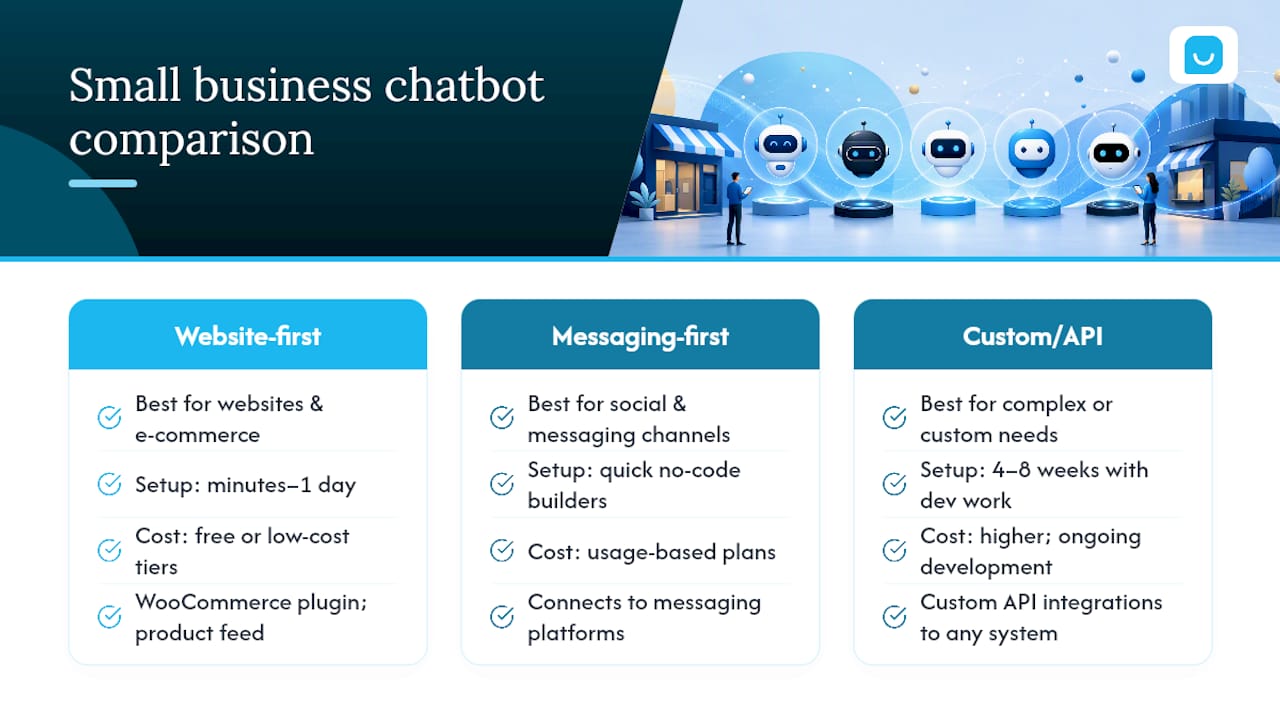
The table below lines up the dimensions that actually decide fit: not “which bot is smartest,” but which one matches how your business operates.
| Dimension | Konvuno | Messaging-first builders | LLM API integrators | Enterprise platforms |
|---|---|---|---|---|
| Best for | Website-first SMBs and e-commerce needing fast install and catalog sync | Social-first brands selling through DMs and comments | Teams with developers needing custom, data-connected agents | Larger or multi-location SMBs needing deep integrations |
| Starting price / free plan | Trial available, paid plans scale with usage | Often has a free tier with paid automation add-ons | No fixed price; cost is largely engineering time | Typically no meaningful free tier |
| Channels supported | Website widget, with multilingual support | Facebook, Instagram, WhatsApp | Any channel, but each one is custom-built | Website, chat, often phone and SMS |
| Integrations | WooCommerce, Google Merchant, Facebook product feeds, built-in CRM | Native social platform integrations, limited CRM depth | Whatever the developer builds, unlimited in theory | Deep CRM/ERP integrations, often via professional services |
| Ease of setup | No-code widget, single script tag | No-code, template-driven | Developer-required, weeks to months | Implementation team required, longest timeline |
| Automation & workflows | Built-in triggers for lead capture and handoff | Strong for drip campaigns and broadcast sequences | Fully custom branching logic | Advanced workflow engines, often overkill for small teams |
| Lead capture & CRM | Built-in CRM included | Usually requires a separate CRM connection | Must be built | Native CRM, but often the vendor’s own ecosystem |
| Multilingual support | 7 languages out of the box | Varies by platform | Depends on model and prompt design | Usually available, often at added cost |
| Human handoff | Built-in live handoff | Available, varies by plan | Must be engineered | Available, typically routed through existing support tools |
| Scalability | Scales with plan, no per-seat pricing | Scales well for messaging volume specifically | Scales with engineering investment | Built for scale, priced for scale |
A few things worth calling out that the table can’t fully capture. Free-plan availability is common across this category. Many vendors offer a free or low-cost entry tier meant for testing basic FAQ and lead-capture flows before you commit to a paid plan. This makes it low-risk to actually try two or three options side by side before deciding.
Pricing model matters as much as the affordable AI design tools sticker price. Per-seat pricing punishes growing teams, since every new support agent you add becomes a new line item. Usage-based or flat-plan pricing, which Konvuno uses, scales more predictably as your team or traffic grows.
Setup timeline is the most underestimated column. A no-code widget install can genuinely take minutes. A developer-built integration on an LLM API can take weeks once you account for prompt design, testing, and hooking it into your product data. If you’re a small business without dedicated engineering time, that gap isn’t cosmetic, it decides whether the project ships at all.
Vendor Profiles: Pros, Cons, and Pricing
Here’s what each option actually looks like once you get past the marketing page.
Konvuno
Konvuno installs with one script tag and configures entirely from a hosted dashboard. It answers from your FAQs, website content, and synced product catalog, and every lead it captures lands directly in a built-in CRM instead of requiring a separate integration.
Pros:
- Single-script install, typically live within minutes, no developer needed.
- Product catalog syncs automatically from WooCommerce, Google Merchant, or Facebook feeds, so pricing and stock stay current without manual updates.
- Built-in CRM and live handoff mean leads and escalations don’t require a third-party tool.
Cons:
- Best suited to website-driven businesses rather than brands whose primary traffic lives inside social messaging apps.
- Less suited to businesses needing fully custom conversational logic beyond FAQ and catalog answers.
Pricing centers on a trial period before committing to a paid plan, with plans priced by usage rather than per seat. See the FAQ Assistant feature page or catalog sync details for specifics.
Messaging-first builders
This category covers platforms built specifically around Instagram, Facebook, and WhatsApp automation, using visual flow builders and pre-made templates for common scenarios like abandoned-cart follow-up or comment-to-DM conversion.
Pros:
- Deep, native integration with the social platforms where the business already sells.
- Template libraries speed up setup for common promotional and support flows.
Cons:
- Weaker fit for answering website visitors directly, since the tooling is built around chat apps rather than a site widget.
- CRM and product-catalog depth often lag behind what a website-first tool offers.
Pricing typically includes a free entry tier with paid tiers unlocking broadcast volume and advanced automation.
LLM API integrators
This category is really a spectrum of agencies and freelance developers who wire model APIs, often from OpenAI, Anthropic, or Google, directly into a business’s own systems and data.
Pros:
- Maximum flexibility. If you can describe the logic, a developer can usually build it.
- Model choice lets you weigh trade-offs directly. Anthropic positions Claude around instruction-following and safety, which matters when a bot touches private order data, while Google Gemini leans into multimodal features like image understanding.
Cons:
- Requires ongoing engineering time for maintenance, not just initial build.
- No fixed pricing; cost scales with project complexity and can run well beyond what a subscription tool charges.
There’s no meaningful free tier here since you’re paying for development work, not software.
Enterprise platform category
These are the feature-heavy platforms built for larger SMBs or multi-location businesses that need deep CRM and ERP integration, advanced analytics, and formal support agreements.
Pros:
- Integration depth that smaller tools can’t match, particularly with existing enterprise CRM stacks.
- Support structures built for teams, not solo owners.
Cons:
- Implementation typically takes weeks to months and often requires a dedicated project owner internally.
- Pricing and contract terms are usually built around larger budgets than a typical small business carries.
How Do You Choose the Right Chatbot for Your Business?
Before you sit through another demo, get clear on what actually needs to be true for a chatbot to work in your business. Here’s the priority order:
- No-code website install. If setup requires a developer, that’s a hidden cost and a hidden delay.
- Accurate, current answers. The bot should pull from your actual FAQs and product data, not a static script someone has to update by hand.
- Live handoff to a human. Any bot without a clean escalation path will eventually frustrate a customer with a question it can’t answer.
- Multilingual support, if any share of your traffic comes from non-English speakers.
- Analytics on what visitors actually ask. This tells you what to fix on your site and what to automate next.
When you’re on a sales call or running a trial, ask vendors directly:
- Who owns the conversation data and captured leads, you or the platform?
- What happens when the bot doesn’t know an answer? Does it guess, or hand off?
- Is pricing based on seats, conversations, or a flat plan, and what happens if you exceed a limit?
- How long does initial setup realistically take, including catalog or CRM connection?
- Can you export your data if you switch platforms later?
Pro Tip: Ask for a written answer on data ownership before you sign anything. Verbal assurances during a sales call rarely survive a contract dispute later.
Watch for a few red flags during evaluation. Opaque pricing that only appears after a sales call usually means the real cost is higher than advertised. Per-seat pricing that looked cheap on the homepage can double once you add two support agents. A platform limited to a single channel might not match where your customers actually message you. And any tool without live handoff will eventually lose a customer over a question the bot can’t handle.
Realistically, a no-code, website-first chatbot can be live within a day, including catalog connection. A custom API-based build tends to run four to eight weeks once you account for design and testing. Budget accordingly, and treat any quote wildly outside those windows with suspicion.
What Are the Best Use Cases for a Small Business Chatbot?
Five tasks account for most of the value a small business chatbot delivers: answering repetitive FAQs around the clock, capturing and qualifying leads before a human ever gets involved, handling appointment booking, supporting product and order questions, and walking new customers through onboarding.
A few sample flows show how this plays out:
- Lead qualification: Visitor asks about pricing → bot asks two qualifying questions (company size, use case) → bot captures contact info into the CRM → sales gets a warm lead instead of a cold form fill.
- Booking flow: Visitor asks “can I book a consultation” → bot offers available time slots → visitor picks one → confirmation sent, calendar updated automatically.
- Escalation flow: Visitor asks a question outside the bot’s knowledge → bot recognizes the gap → bot offers live handoff → human agent picks up the conversation with full context.
Salesforce frames chatbots as a fast way to extend availability and route leads into existing CRM workflows, and that framing holds true at small-business scale, just without the enterprise price tag.
Track four metrics to know if it’s working: deflection rate (questions the bot resolves without a human), lead conversion rate from captured contacts, average response time compared to your prior support process, and overall ticket reduction on your support inbox. If none of those numbers move in the first month, something in the setup needs revisiting.
Why Konvuno Fits Website-First Small Businesses
Konvuno was built around one assumption: small business owners don’t have time to babysit a chatbot’s knowledge base. So the product reads directly from what you already have, your FAQs, your website content, and your product catalog, and keeps its answers synced to that source automatically.
Setup follows a short path:
- Add one script tag to your website. This typically takes a few minutes.
- Connect your data sources: FAQs, key pages, and a WooCommerce store or Google Merchant/Facebook feed if you sell products.
- Review the dashboard, check sample conversations, and adjust the FAQ Assistant’s coverage if anything’s missing.
- Turn on live handoff so a real person can step in when a question needs judgment.
- Check the analytics tab weekly to see what visitors are actually asking, and fill any content gaps it surfaces.
A few specifics worth knowing before you try it:
- The FAQ Assistant answers directly from your existing content instead of forcing visitors to hunt through pages.
- Catalog sync works with WooCommerce and standard product feeds, so a price change or out-of-stock item updates the bot’s answers without manual editing.
- Captured leads go straight into Konvuno’s built-in CRM, so there’s no separate integration step to wire up.
- The assistant supports 7 languages, useful for any business with international or non-English-speaking visitors.
Pro Tip: Start with just your FAQ and top 10 product pages connected. You can expand catalog coverage later, but a smaller, accurate knowledge base beats a large, half-checked one in the first week.
What Actually Works in Real Small-Business Chatbot Deployments
Most owners overestimate how much conversational sophistication matters and underestimate how much accuracy matters. A chatbot that writes clever sentences but quotes outdated inventory will erode trust faster than one that’s plainly automated but always correct. That’s the case for prioritizing catalog sync and content freshness over which language model sits underneath.

The businesses that get the most out of a chatbot don’t try to automate everything on day one. They pick one job, usually FAQ deflection or lead capture, get it working cleanly, and only then expand into booking or product support. Given limited time and no dedicated technical staff, a no-code, website-first install with a clear human handoff beats a more powerful but slower-to-build alternative almost every time.
If you’re starting from zero, pick a single use case, measure deflection and lead volume for two to three weeks, then decide what to add next.
Try Konvuno for Your Website
Konvuno gives you a shortcut past the two slowest parts of setting up a chatbot: writing and maintaining a knowledge base by hand, and building a separate system to catch the leads it generates. One script tag installs the widget. From there, it reads your FAQs and website content, syncs automatically with your WooCommerce store or product feed, and drops every captured lead into a CRM that’s already built in.
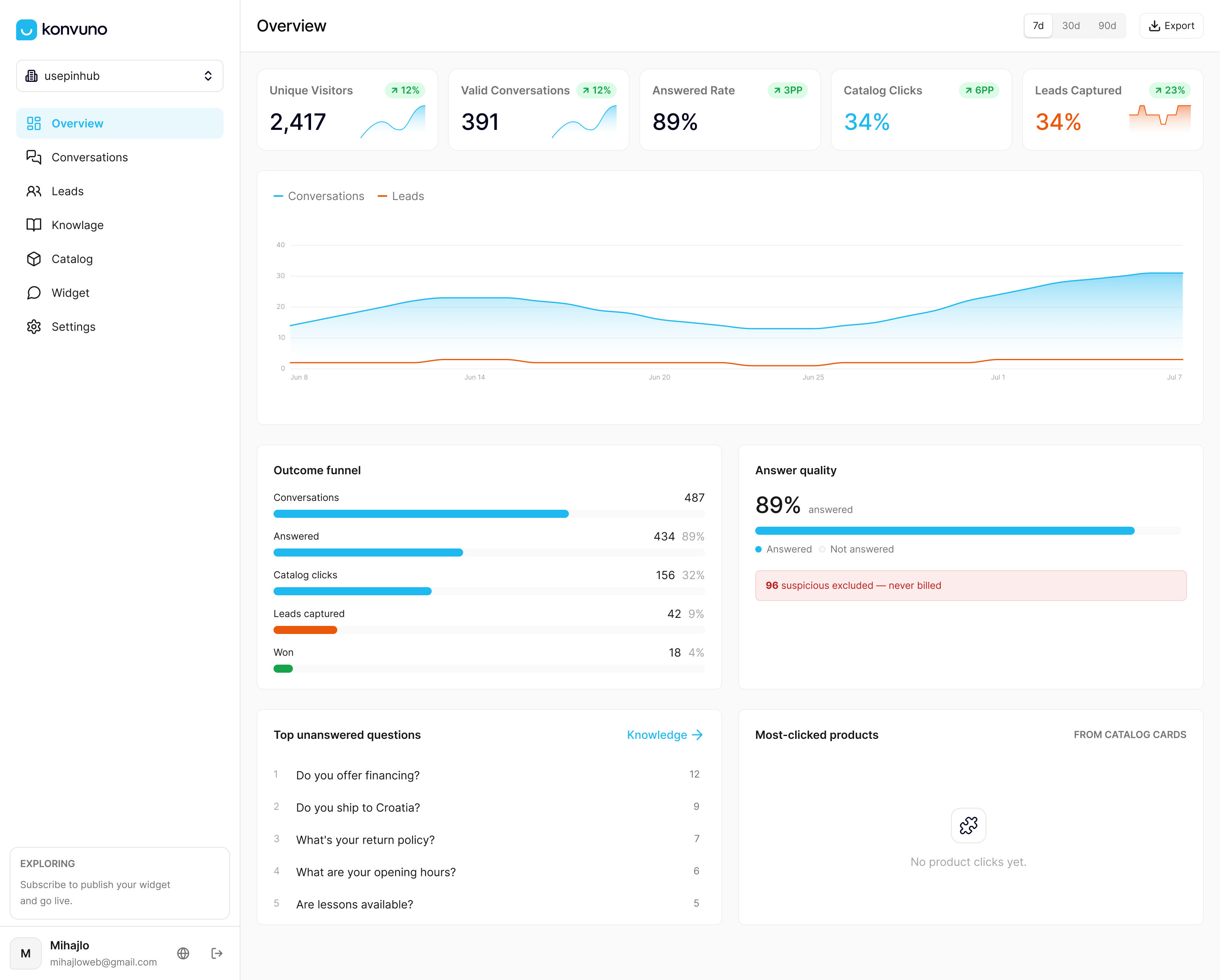
Starting a trial takes the same shape as the full setup: connect your data sources, review how the assistant answers a handful of real visitor questions, and turn on live handoff before you go live. Most owners can judge fit by observing visitor questions and bot resolution rates. If you run a website-first business, especially one with a product catalog that changes often, start with Konvuno and see what your own visitor questions reveal.
Frequently Asked Questions
What is the best AI chatbot for a small business? The right pick depends on where your customers interact with you. For website-driven and e-commerce businesses, a website-first assistant like Konvuno tends to fit best because it installs without a developer and keeps answers current through catalog sync. Social-first brands are usually better served by messaging-first builders instead.
How much does a small business chatbot cost? Most platforms in this category offer a free or low-cost entry tier for testing basic FAQ and lead-capture flows, with paid plans priced by usage rather than by seat. Enterprise platforms and custom API builds run considerably higher, since they involve ongoing development work rather than a subscription.
Can a small business chatbot integrate with an existing website or online store? Yes. Tools built for small businesses typically connect through a WooCommerce plugin or a product feed from Google Merchant or Facebook, syncing pricing and inventory automatically. Custom API integrations can connect to nearly any system, but that flexibility comes with a longer setup timeline.
Do small business chatbots support multiple languages? Many do. Konvuno, for example, supports 7 languages out of the box, which matters for any business with international visitors or a multilingual customer base. Coverage varies by platform, so confirm supported languages during a trial rather than assuming.
How long does it take to set up a chatbot for a small business? A no-code widget install can be live within minutes to a day, including basic FAQ and catalog connection. Developer-built integrations using an LLM API typically take four to eight weeks once you account for custom logic and testing.
Does a chatbot replace human customer support? No, and it shouldn’t try to. The strongest deployments use a chatbot to resolve routine questions and capture leads, then hand off to a human the moment a question needs judgment or context the bot doesn’t have.
Sources
A few sources worth a closer look if you want to dig into the technical or vendor landscape behind this comparison:
If you want to see Konvuno’s own setup and features in more detail, the FAQ Assistant and product catalog sync pages are the fastest places to start.