Small Business CRM Basics: What It Is and How to Start
A plain-English guide to small business CRM basics: what a CRM does, which features matter, how to set one up in a week and how to capture website leads.

A CRM (customer relationship management system) is one shared place where you keep every customer and prospect, every conversation with them and the next step for each. For a small business, the basics come down to three things: a record for each contact, a simple pipeline that shows where each lead stands, and reminders so nobody gets forgotten. The best starting point is the place where leads already arrive. If your website produces questions and inquiries every day, the first job is making sure each one lands in your CRM automatically. That is what the assistant we build at Konvuno does: it answers visitors from your own content and captures their details into a built-in CRM.
TL;DR
- A CRM stores contacts, tracks interactions and shows where every deal stands, so follow-ups stop depending on memory, inboxes and spreadsheets.
- You need one when leads slip through, several people touch the same customer, or you cannot say what will close next month. Company size is not the test.
- Start with core features only: contact records, a pipeline of 5 to 7 stages, task reminders and simple reports.
- Most small businesses can set one up in about a week: import contacts, define stages, connect email, train the team on a few daily actions.
- Your website is the cheapest lead source you have. Connect it to the CRM first.
Table of Contents
- What a CRM actually is
- What a CRM does for a small business
- Do you need a CRM yet?
- The features that matter at the start
- Your website is the first lead source to connect
- Set up a CRM in a week
- Keep the data accurate and the team using it
- Common mistakes
- Our perspective
- Start with the leads your site already gets
- FAQ
- Sources
What a CRM actually is
The US Chamber of Commerce describes CRM as a centralized record of customer and prospect interactions, drawing from channels such as phone, live chat, text, social media and email. Xero’s US guide puts it in plainer terms for small firms: software that organizes contacts, tracks interactions and manages sales in one place.
In practice, picture a single page for each person who has ever contacted you. It shows who they are, where they came from, what they asked, what you quoted, what they bought and what you promised to do next. Without that, the same facts live in someone’s inbox, a spreadsheet tab and a sticky note.
A few terms you will meet right away:
- Contact: a person or company record with name, email, phone and notes.
- Lead: someone who has shown interest but has not bought yet.
- Pipeline: the stages a lead moves through on the way to becoming a customer.
- Deal (or opportunity): a possible sale attached to a contact, with a value and a stage.
- Follow-up task: a reminder to do something specific by a specific day.
What a CRM does for a small business
The day-to-day value is simple.
It keeps contacts in one place. Instead of searching three inboxes for a customer’s last message, you open one record. The US Chamber guide also notes that a CRM can combine data from point-of-sale and e-commerce platforms into a single customer profile, which matters if you sell online and talk to customers by email or chat.
It makes follow-up automatic. Xero’s guide says CRM reminders can flag follow-ups, scheduled calls and customers who have not been contacted recently. A forgotten reply is the most common way small businesses lose a sale, and a reminder is the cheapest fix.
It shows what is coming. The Chamber guide lists lead assignment and follow-up, list segmentation, sales forecasting and automation of routine sales and marketing tasks among typical CRM functions. For an owner, the practical version is one screen showing how many leads are new, how many have a proposal out and how many were won or lost.
It stops customers repeating themselves. When whoever answers can see purchase history and earlier questions, customers do not have to explain their problem twice. AWS’s SMB guide makes the same point about support staff and retention.
Do you need a CRM yet?
A spreadsheet and a shared inbox can work for the very first customers. The need grows with complexity, not headcount. Watch for these signs:
- You lost a sale because nobody followed up.
- You ask other people what stage a deal is in.
- Customer details differ between spreadsheets and inboxes.
- More than one person talks to the same customer.
- You spend more time organizing sales information than acting on it.
- You cannot say with any confidence what revenue to expect next month.
If two or more of these sound familiar, you are ready. If your website gets steady traffic and visitors ask questions but leave without giving you their email, the sixth sign has a cousin: leads you never even recorded.
What the research says about results
A 2024 systematic review of 46 studies on CRM in small and medium enterprises reported a 25 to 40% improvement in customer retention, a 15 to 30% increase in sales and 20 to 35% operational efficiency gains. The same review links success strongly to managerial support, customization and user training. Read the ranges as what is possible when a CRM is actually used, not as a promise. The pattern is the useful part: results follow adoption, so a smaller tool people open every day beats a bigger one nobody does.

The features that matter at the start
Xero’s Canadian guide names four core features for small businesses: contact management, pipeline tracking, task reminders and simple reporting. It advises prioritizing those before paying for advanced capabilities you do not yet need. Add the two that most owners with a website find essential, and you have a sound shortlist.
| Feature | What it does | Why it matters |
|---|---|---|
| Contact management | One record per person or company, with history | Everyone sees the same facts |
| Pipeline tracking | Stages from new lead to won or lost | You see what needs attention |
| Task reminders | Dated to-dos tied to a contact | Follow-ups stop slipping |
| Simple reporting | Leads, wins, sources, response times | You learn what works |
| Website lead capture | Chat and form inquiries land as contacts automatically | No manual copying, no lost leads |
| Store or catalog connection | Orders and product data attached to customers | Answers and offers reflect what people bought |
Skip anything that requires a consultant to configure. If you need a developer to change a field, you will stop changing fields.
Your website is the first lead source to connect
Most small business CRM guides begin with importing contacts. That is right, but it covers only the people you already know. The visitors who browsed your pricing page, asked about shipping or wondered whether you serve their area at 9 p.m. are the leads that disappear, because nobody was there to answer.
This is where an AI website assistant fits next to a CRM. Konvuno installs as one lightweight widget with a single script tag and is configured from a hosted dashboard, with no developers needed. It answers visitors from your own FAQs, website content and product catalog. It captures leads into a built-in CRM, and it hands the conversation to a person when a question needs one. If you run WooCommerce or publish a Google Merchant or Facebook product feed, the catalog syncs automatically, so product, price and availability answers stay current without manual updates.
For a business with no support team or live chat staff, that means a visitor’s question gets answered, and their contact details land in a record you can follow up on. For more on how chat connects to an outside CRM, see our guide to chatbot CRM integration with field mapping. If you also want to understand which questions drive your traffic, our piece on customer questions analysis for small teams shows how to turn them into fixes.
Lead capture is only half the picture. Generating inquiries from local search and your site is its own discipline, and a local lead generation system is worth reading alongside your CRM setup so the leads you attract have somewhere organized to go.
Set up a CRM in a week
Xero’s guide says most businesses can be up and running within a week, and the steps below follow that outline.
Step 1: Map how a lead becomes a customer today
Write down the real path: how people find you, who replies, what you send, when you quote, how you close. Set up the CRM to match this, not an idealized version. The most common failure is configuring a tool for a process nobody follows.
Step 2: Pick a simple tool and a short list of must-haves
Choose a CRM with features you will use. Make a list of must-haves from the table above, check what it connects to (email, your store, your website) and look at the total monthly cost for the users and contacts you really have. Per-seat pricing grows quickly when a few people each need access, so check how the price scales before you commit.
Step 3: Import contacts and clean them first
Export customers from your spreadsheet, email program or store as a CSV file (a plain table saved as text). Before importing, remove duplicates and fill gaps in names and emails. Importing messy data just moves the mess into a more expensive place.
Step 4: Define pipeline stages
Keep it short. Xero’s example uses New Lead, Contact Made, Proposal Sent and Won or Lost. Five to seven stages are plenty for most small businesses. Give each stage a clear entry rule, such as “Proposal Sent means a written price has gone out,” so two people would put the same deal in the same place.
Step 5: Collect only essential fields
Start with name, email, phone, source, stage and next action. You can add fields once the habit is built. A form with fifteen required fields trains people to skip the CRM.
Step 6: Connect email and your website
Link the inbox you use for customers so conversations are logged. Then connect your website so chat and form inquiries arrive as contacts. With Konvuno, captured leads go straight to the built-in CRM, and the dashboard shows conversations, leads, knowledge management and analytics on what visitors actually ask.
Step 7: Train on five daily actions
Do not run a long training. Teach five habits: log a call, add a note, move a deal to the next stage, set a task and find a contact. If everyone does those daily, the CRM stays useful.
Keep the data accurate and the team using it

A CRM is only as good as what is in it. Validity’s 2024 survey of 631 CRM administrators in the US, UK and Australia found that 24% said less than half of their data was accurate and complete. Incomplete data (68%), missing data (65%) and incorrect data (61%) were the top problems, and 31% reported that poor data quality costs at least 20% of annual revenue.
Small teams can prevent most of this with a few routines:
- Name an owner. One person is responsible for data quality, even if the business has three employees.
- Make key fields required. If a stage change needs a next action, people will enter one.
- Merge duplicates monthly. Do it on a calendar reminder, not when you notice.
- Review quarterly. Delete dead records, fix stage rules that confuse people and ask the team what slows them down.
- Measure use. Count how many leads have a next task and how many deals sit untouched.
Capturing data automatically helps most. A lead that arrived through a chat conversation already has its question, its source and its contact details attached, with no one typing them in.
Common mistakes
- Buying for the future. Advanced forecasting and automation add cost and complexity before you have the volume to use them.
- Copying a competitor’s pipeline. Your sales path is yours. Map it first.
- Skipping the website. If inquiries arrive in a separate inbox, they will not reach the CRM.
- Sending marketing email carelessly. If you email people from your CRM, the FTC’s CAN-SPAM compliance guide says commercial messages must have accurate sender information and must not mislead, and it applies to business-to-business email as well as consumer email. Read it before your first campaign.
- Letting it go stale. A CRM nobody updates is worse than none, because people trust it anyway.
Our perspective
Most CRM advice assumes the leads are already in the system. In our experience of building for small businesses, the gap is earlier: a visitor arrives with a question, nobody is online, and they leave. No pipeline can track a person you never captured.
That is why we built Konvuno around the website. One script tag, a dashboard you configure yourself, answers drawn from your own FAQs, pages and product catalog, and leads that go into a built-in CRM. A human can take over when a question needs one. There are no per-seat fees and no developer dependency, so an owner can run it alone.
Our advice is the same as the basics above: start small, connect the source of your leads first and keep the habit simple. A CRM that fills itself with real questions from real visitors is one you will actually open.
Konstantin
Start with the leads your site already gets
Konvuno plans are published at €29 per month for Starter, €79 per month for Growth and €199 per month for Business. You can configure everything and preview it before paying, and every plan includes full conversational catalog capabilities. Catalogs from WooCommerce and Google Merchant or Facebook product feeds stay current through automatic sync, and the assistant speaks 7 languages, which suits shops that serve customers in more than one.
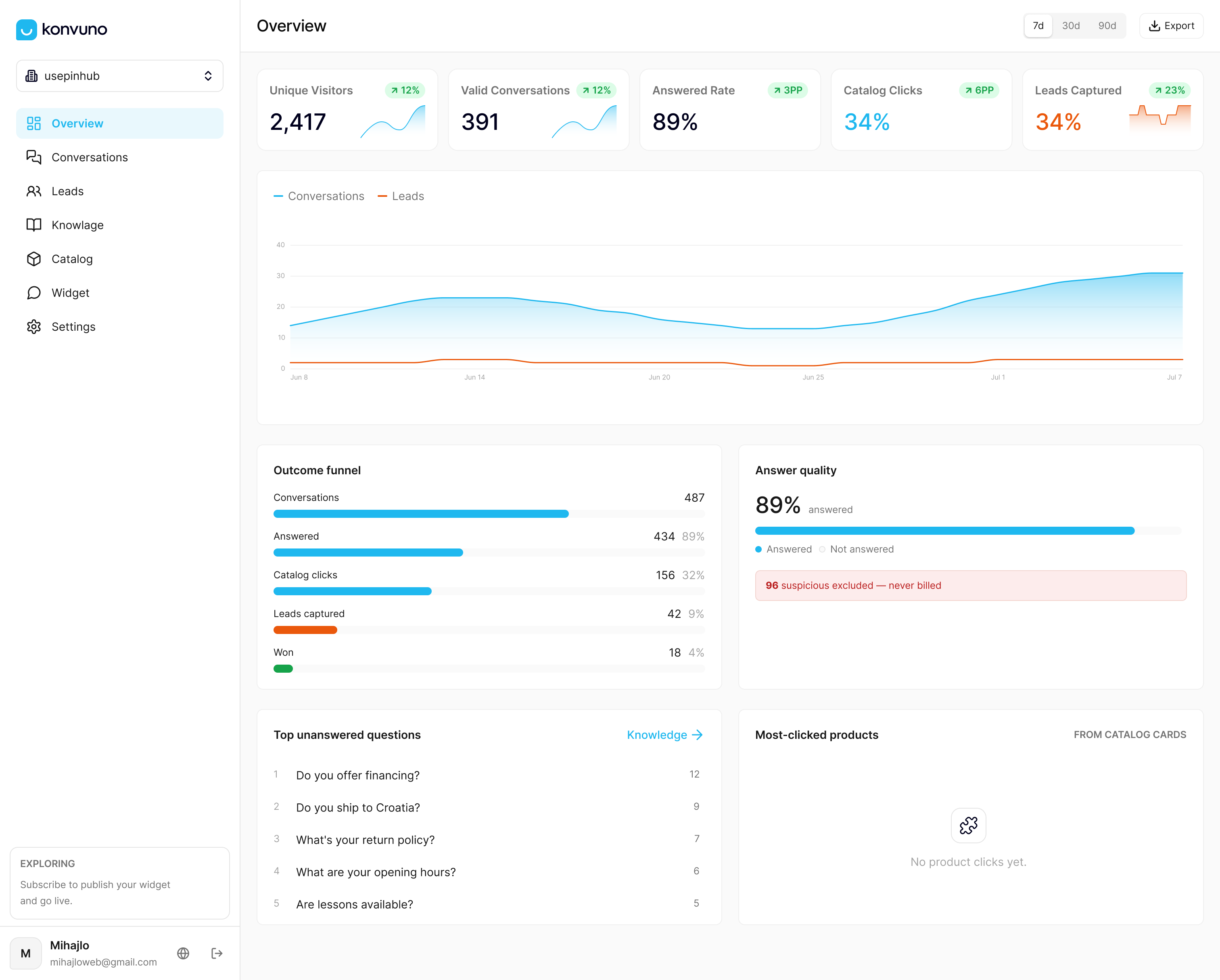
If you want to see what a first configuration looks like, our guide to website chatbot best practices for small teams walks through it without any developer work.
FAQ
Is a spreadsheet enough instead of a CRM?
A spreadsheet works while you have a handful of customers and one person handling them. It starts to fail when several people touch the same account, details differ between files and inboxes, or you cannot see which deals need follow-up. Those are the moments to move to a CRM.
How much data should I put into my CRM at the start?
Less than you think. Begin with name, email, phone, source, pipeline stage and next action. Add fields later, once the team uses the system daily, so the CRM does not feel like paperwork.
How many pipeline stages do I need?
Five to seven is enough for most small businesses. A simple version is New Lead, Contact Made, Proposal Sent and Won or Lost. Write a one-line rule for each stage so everyone places deals consistently.
Can a CRM capture leads from my website automatically?
Yes, when your website tool connects to it. Konvuno’s assistant captures visitor details during conversations and stores them in its built-in CRM, with a handoff to a person when a question needs one. That way inquiries arrive as records instead of scattered emails.
Sources
- Everything You Need to Know About CRM Software, US Chamber of Commerce
- CRM for small business: simple guide to get started, Xero US
- CRM for small business: how to choose the right one, Xero Canada
- CRM for SMBs: Build vs buy guide, AWS
- Customer Relationship Management Systems and their Impact on SMEs, SSRN
- The State of CRM Data Management in 2024, Validity
- CAN-SPAM Act: A Compliance Guide for Business, FTC