Self-Service Support: How to Set It Up for a Small Business
Self-service support lets customers answer their own questions 24/7. Learn what to include, how to build a portal or assistant, and how to measure results.

Self-service support lets customers find answers and finish routine tasks on their own, without waiting for a person. For a small business, the most practical setup is a short set of tools: a clear FAQ, an assistant on your website that answers from your own content, and a fast path to a human when the assistant can’t help. This guide shows what to include, how to build it, and how to tell whether it works.
TL;DR
- Self-service support means FAQs, knowledge bases, tutorials and chatbots that help customers resolve issues or complete tasks without an agent.
- Its main benefits are 24-hour access, shorter waits, consistent answers and more time for your team on complex issues.
- It only works when it is easy to find, easy to use and connected to a live person when customers get stuck.
- Start from the questions customers really ask, keep answers synced with your site and catalog, and review results weekly in the first month.
- Measure deflection, resolution, escalation and repeat contact, not page views.
Table of Contents
- What self-service support actually is
- Why small businesses adopt it
- How a self-service portal works
- What to include in your self-service setup
- How to build it in five steps
- Keeping answers accurate, multilingual and human-connected
- How to tell whether it’s working
- Our perspective
- Where Konvuno fits
- A simple first-month plan
- FAQ
- Sources
What self-service support actually is
Self-service support is digital support that lets customers access information and perform routine tasks without live agents. FAQ pages, knowledge bases, tutorials and chatbots are the usual building blocks. A customer who wants to know your return window, check whether a product is in stock or find out how to book doesn’t need to email you and wait.
IBM describes it as tools, resources and systems that help customers resolve issues, find information or complete tasks independently. It can run through support websites, apps, chatbots, email and phone menus, and modern systems can automate routine requests such as password changes and simple technical help.
Shopify’s description is useful for small shops: the tools range from FAQ pages and knowledge bases to AI chatbots and video tutorials, often used alongside human support. The words “alongside human support” matter. Good self-service doesn’t replace you. It handles the repetitive questions so you can handle the rest.

What a customer can do with it
In practice, a small business customer can use self-service to:
- Look up opening hours, pricing, shipping times and policies.
- Ask a product question and get an answer based on your current catalog.
- Find setup or usage instructions.
- Check availability or compare two items.
- Leave contact details when they want a quote or a callback.
- Reach a person when the question is beyond what the tool can answer.
Why small businesses adopt it
IBM lists several benefits: customers can resolve issues at their own pace, reduce waiting and get help outside normal business hours. Beyond that, self-service means consistent answers, fewer routine requests, lower costs and more capacity for complex issues.
For a business with no support team, the after-hours point is often the biggest one. A visitor who has a question at 9 p.m. and gets no reply is likely to open another tab. We cover that scenario in more detail in our piece on after-hours support with a chatbot.
TechTarget adds a business view: a strong self-service strategy can lower cost to serve, improve convenience and make service operations more scalable. It also notes the condition: the experience has to be easy to find, easy to use and connected to live support when customers get stuck. That condition shapes everything in the next sections.
How a self-service portal works
A self-service portal is the place where these tools live. It can be a dedicated help center page, a customer account area, or a widget that sits on every page of your site. The mechanics are simple:
- A knowledge source. Your FAQs, policies, service descriptions and product data.
- A way to search or ask. A search box, a browsable help center, or a conversational assistant that reads the knowledge source and replies in plain language.
- Actions. Optional tasks the customer can complete, such as capturing contact details, tracking an order or booking.
- A handoff. A route to email, phone or live chat when the answer isn’t there.
- A feedback loop. Conversation records and analytics that show what people asked and where answers fell short.
Most small businesses don’t need a customer login area to get value. If your customers mainly ask pre-sales and policy questions, an assistant on your public website covers most of the need. A login-based portal makes more sense when customers manage accounts, subscriptions or invoices.
What to include in your self-service setup

A useful setup is built from content and features, in that order. Content first, because a polished tool with weak answers frustrates people faster than no tool at all.
Content that earns its place
- Top questions, in customers’ words. Pull them from emails, chat logs, contact forms and phone notes. Our guide on writing FAQs from customer data walks through this.
- Policies stated plainly. Shipping, returns, cancellations, warranties, payment methods.
- Product and service details. Prices, availability, sizes, what’s included, who it’s for.
- How-to steps. Short numbered instructions, with a screenshot or short video where it helps.
- Contact paths. Who to reach, when they answer, and what to include in the message.
How you group these matters too. A short list of clear categories beats one long page of questions. See how to organize chatbot FAQs so both people and the assistant find the right answer.
Features that make it work
| Feature | Why it matters | What to look for |
|---|---|---|
| Search or conversational answers | Customers ask in their own words | Answers drawn from your own content |
| Live catalog data | Prices and stock change | Automatic sync from your store or product feed |
| Human handoff | Stuck customers need a person quickly | A clear path that passes along the conversation |
| Lead capture | Questions often come from buyers | Contact details stored in a simple CRM |
| Language support | Customers don’t all browse in English | Answers in the visitor’s language |
| Analytics | You learn what people want | Reports on actual questions asked |
How to build it in five steps
1. List the questions you answer every week
Open your inbox and sent folder. Tally the repeated questions for two weeks. You’ll usually find that a small number of topics account for most messages. Our customer questions analysis templates give a simple way to sort them.
2. Write one clear answer for each
Keep answers short, specific and current. State the policy, then the exception, then the next step. Avoid phrases that only make sense inside your company.
3. Choose where the answers live
A help page is good for search traffic and for customers who like to browse. An on-site assistant is better for visitors who want a direct reply while looking at a product. Many small businesses use both, drawing on the same content.
4. Connect your product data
If you sell online, the assistant should answer from your real catalog, not from a copy that goes stale. Feed-based sync solves this: when you update prices or stock in your store or feed, the answers follow.
5. Decide the handoff rules before launch
Write down which topics always go to a person (complaints, refunds in dispute, custom quotes, anything involving health or safety) and how the customer reaches you. TechTarget’s point about connection to live support applies here: a seamless transition prevents frustration. Chatbots are now a mainstream part of this picture, and the role of chatbots in business success is worth understanding before you decide how far to automate.
Keeping answers accurate, multilingual and human-connected
Accuracy is a maintenance habit, not a launch task. Three habits keep it healthy:
- One source of truth. Update your policy page, and let the assistant read from it, rather than editing answers in several places.
- Scheduled reviews. Check the questions the assistant couldn’t answer, then add or fix content. Our 30-day chatbot pilot lays out a review rhythm.
- Clear wording for the assistant. If you configure instructions, keep them specific. Our notes on prompt checks for chatbots cover this.
For multilingual sites, write the source content well first, then confirm that the assistant replies in the visitor’s language and that handoff messages are understandable too. A customer who gets a good answer in Spanish and a handoff in English has still hit a wall.
How to tell whether it’s working
Page views and chat session counts look good on a dashboard but say little. Guideflow recommends tracking deflection, resolution, escalation and repeat-contact rates, and using customer feedback and ticket trends to find content that fails. Its suggested rhythm is a weekly review in the first month and every two weeks after that.
Here is what each measure tells you:
- Deflection: how many questions never reached a person.
- Resolution: how many of those were actually solved, not just abandoned.
- Escalation: how many went to a human, and on which topics.
- Repeat contact: how many customers came back with the same issue.
Deflection alone can mislead. A customer who gives up looks the same as one who got an answer. That’s why we wrote about ticket deflection that can hide unsolved issues and a resolution-first approach to support automation. If you want the operational side, FAQ automation as a program shows how to turn this into a routine.
Our perspective
We built Konvuno around a simple belief: a small business shouldn’t need developers or a support department to offer good self-service.
Most owners already have the raw material: FAQs, website pages and a product catalog. The job is to make that material answer visitors’ questions at any hour, in their language, and to pass the conversation to a person when it matters. That’s why the assistant answers from your own content, syncs catalogs from WooCommerce or any Google Merchant or Facebook product feed, and includes a handoff to a human.
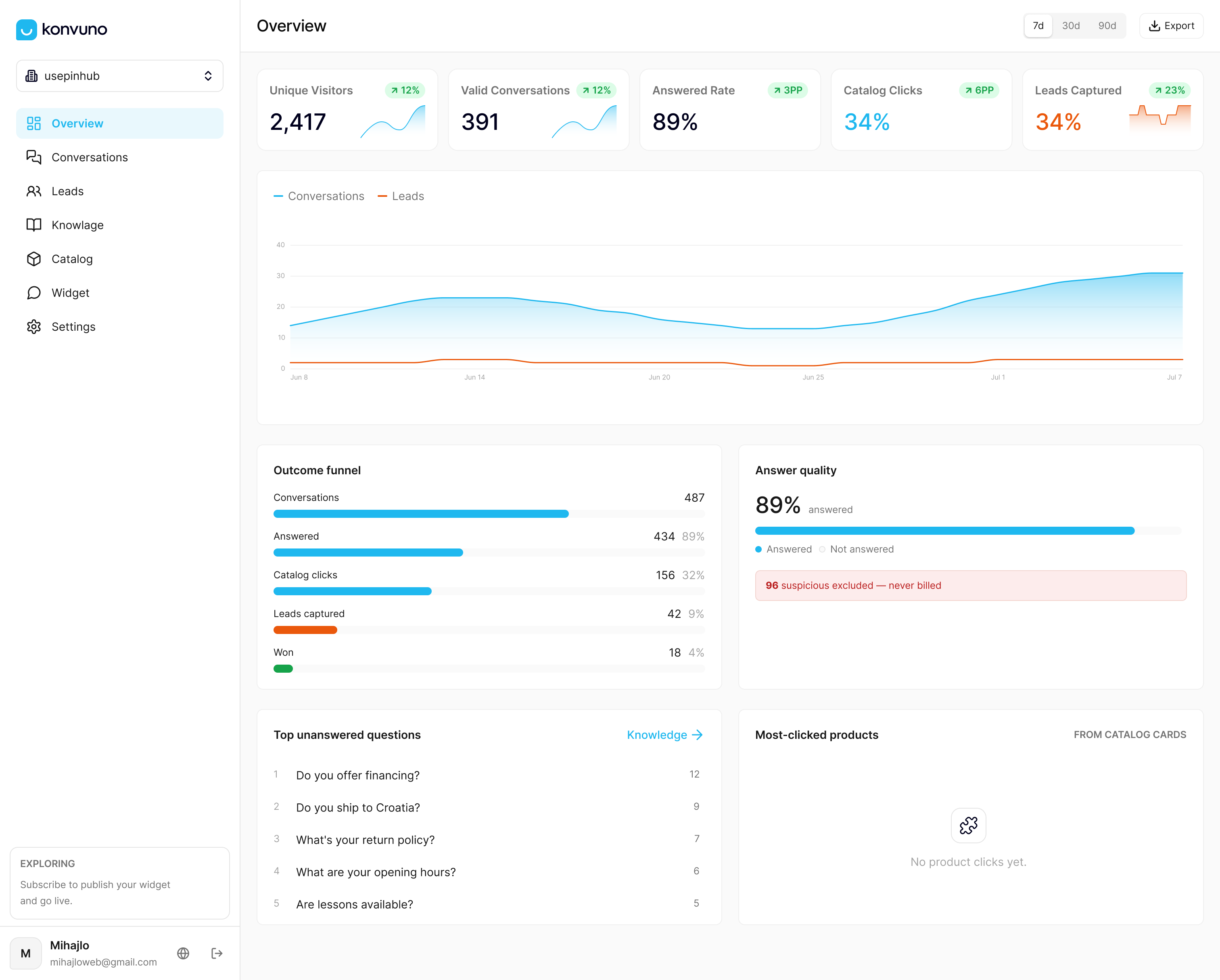
We also think owners should see what visitors really ask. The dashboard shows conversations, captured leads and analytics on questions, so each week you can improve the answers that matter most. And because there is no per-seat pricing, adding a colleague to the dashboard doesn’t change your bill.
Our approach is to let you configure and preview everything before you pay, so you can see the assistant answer your questions in your voice. Self-service works best when it feels like your business, just available around the clock.
Konstantin
Where Konvuno fits
If you want self-service on your website without a development project, Konvuno is a configurable AI website assistant you install with a single script tag and manage from a hosted dashboard. It answers from your FAQs, site content and product catalog, captures leads into a built-in CRM, supports 7 languages and hands off to a person when needed. Catalogs sync automatically from WooCommerce or any Google Merchant or Facebook product feed, which our Shop Connect feature is built around.
Plans are Starter at €29 per month, Growth at €79 per month and Business at €199 per month, and every plan includes full conversational catalog capabilities. See the details on the Konvuno plans page.
A simple first-month plan
| Week | Focus | Output |
|---|---|---|
| 1 | Collect and sort repeated questions | Top 20 questions with draft answers |
| 2 | Publish answers, connect catalog, set handoff | Live assistant or help page |
| 3 | Review unanswered questions and escalations | Fixes to content and handoff rules |
| 4 | Review resolution and repeat contact | Decision on what to add next |
Keep the scope small at first. Twenty good answers beat two hundred uneven ones, and you’ll learn from real visitors which topics to expand.
FAQ
What does self-service support do?
It lets customers find information and complete routine tasks without contacting a person. Typical tools include FAQ pages, knowledge bases, tutorials and chatbots. It frees your team for questions that need judgment.
How do I create a self-service portal for my website?
Start by collecting the questions customers ask most, then write short, current answers. Put them where visitors already are, such as a help page or an on-site assistant that reads your content. Add a clear route to a person and review results weekly at first.
Is 24/7 customer support possible for a small business?
Yes, for the questions that can be answered from existing content. An on-site assistant can reply at any hour, and questions it can’t handle can be captured as leads or messages for you to answer when you’re back. Be clear about when a human will respond.
What should I do when self-service can’t solve the problem?
Offer a quick path to a live person and carry the conversation over so the customer doesn’t repeat themselves. IBM notes that a seamless transition helps prevent frustration. Define in advance which topics always go straight to you.
Sources
- What is customer self-service? | TechTarget
- What is Customer Self-Service? | IBM
- Self Customer Service: Definition and Examples | Shopify
- Business benefits of a customer self-service strategy | TechTarget
- How to build self-service experiences that actually reduce tickets | Guideflow
- The Role of Chatbots in Business Success Today