Read a conversation
What the header, the labels, the messages and the line at the bottom of a conversation tell you — and what to do when the visitor needed a person.
Click any row in the list on the Conversations screen and the whole chat opens on the right, exactly as the visitor and the assistant wrote it.
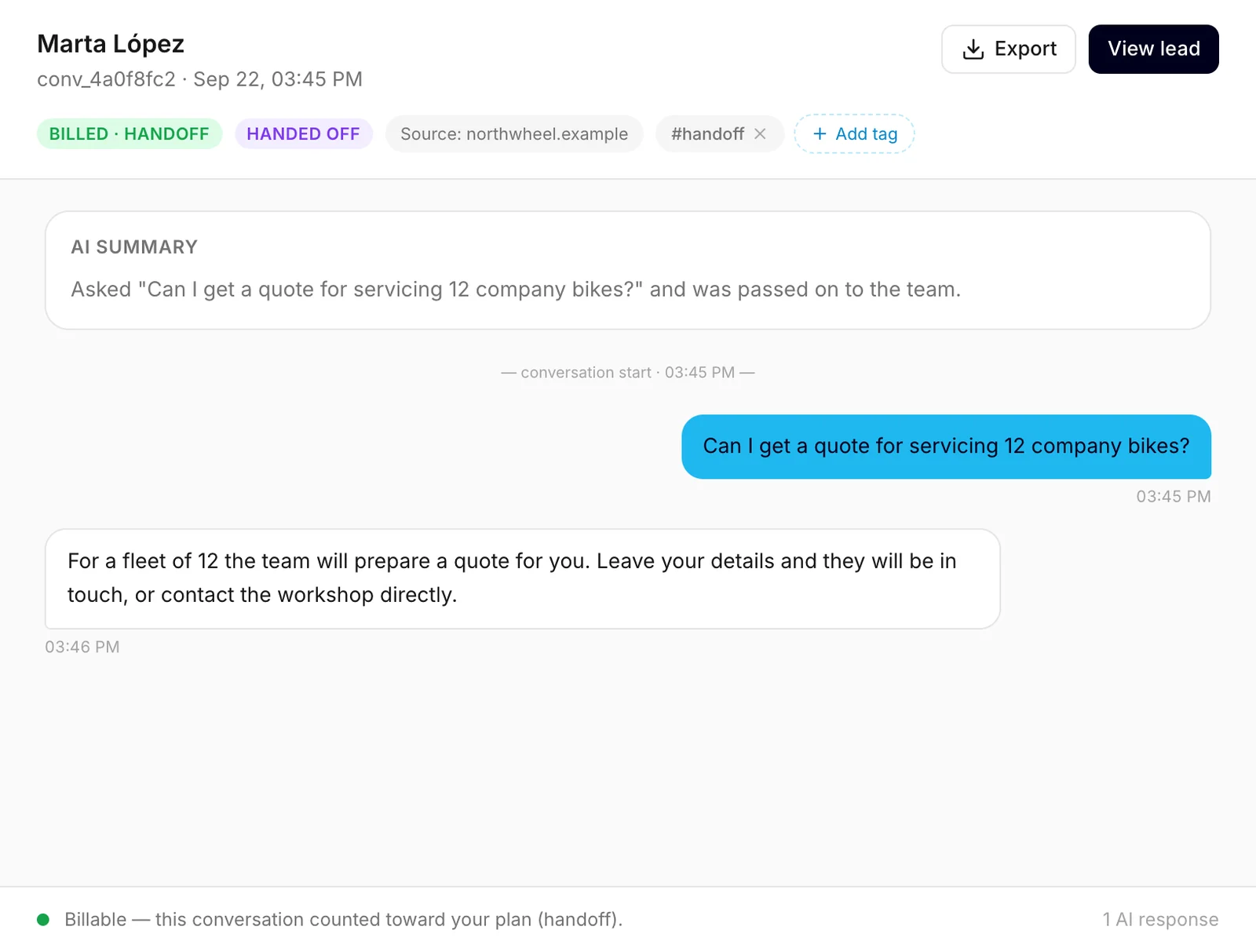
The header
- The name — the visitor's name if they left their details in the contact form, Anonymous visitor if they did not, or Automated traffic for a conversation flagged as suspicious.
- A short reference and the start time under the name, such as
conv_a793a2f9 · Sep 23, 05:37 AM. - Export downloads the conversation as a text file. See Tags and export.
- View lead appears when the visitor left their details. It opens their lead under Leads. See The lead below.
The labels
The row of labels under the name says what happened in the conversation:
- New lead — the visitor left their details, and nobody has changed the lead's status yet.
- Billed, followed by a reason — the conversation counted toward your plan. The reasons are explained below.
- Handed off — the visitor needed a person. See Hand-offs.
- Suspicious · excluded — the conversation looked automated or abusive. It is never counted toward your plan.
- Preview — your own test from the widget preview. It never counts toward your plan, however well the assistant answered.
Next to the labels:
- Source — the website the chat happened on, such as
northwheel.example. It helps when your widget runs on more than one site, for example your main site and your shop. To protect your visitors' privacy, Konvuno saves only the website, never the page the visitor was on. Some older conversations show no source. - the conversation's tags and Add tag. See Tags and export.
Why a conversation counted
| Reason after Billed | What happened |
|---|---|
| knowledge answer | The assistant answered from one of your FAQs. |
| catalog result | The assistant found products or services in your catalog. |
| business context answer | The assistant answered a question about your business from your business description. |
| handoff | The visitor needed a person. See Hand-offs. |
| lead captured | The visitor sent the contact form. |
The reason is the first thing that made the conversation count. A conversation counts only once, so what happens later in it does not change the label.
The summary
Above the messages, AI summary sums the conversation up in one to three sentences: what the visitor wanted and how it ended. It saves you reading a long chat to know whether it needs you.
- Konvuno writes it the first time someone in your team opens the conversation after it has ended, while the box says Writing a summary…. A conversation ends 30 minutes after its last message. It is saved, so everyone sees the same summary from then on.
- It is written in the dashboard language of whoever opens it first, whatever language the visitor used.
- Conversations still going on, and conversations flagged as Suspicious · excluded, have no summary.
Note
A summary is written by AI from the messages below it. When the details matter — a price, a date, an address — check them in the conversation itself.
The messages
The visitor's messages are on the right, the assistant's on the left, each with the time it was sent. The assistant's answers look the way the visitor saw them — bold words, lists and links included; a link opens in a new tab. Product cards the visitor saw in the chat are not repeated here, but the answer that came with them is.
The line at the bottom
The strip at the bottom sums the conversation up in one sentence:
- for a conversation that counted, that it was billable, with the reason;
- for one that did not, "Not billable — no answer from your knowledge, no hand-off and no lead.";
- for your own test, "A test from the widget preview — it never counts toward your plan.";
- for a suspicious one, "Excluded as suspicious traffic — not counted toward your allowance."
On the right, it shows how many answers the assistant gave. That number does not affect your plan — a conversation counts once, however many answers it has. See Which conversations count.
Hand-offs

The assistant hands a conversation over to you when the visitor:
- asks to talk to a person;
- asks for something only you can do — a quote, a booking, an order or account matter; or
- asks for a specific detail your knowledge does not have, such as a price, availability or a policy.
It does not hand over questions it can answer, or off-topic requests.
The visitor then sees the direct contacts you set up — email, phone, WhatsApp — and a button to leave their details in the contact form. The chat stays open: they can keep asking questions in the same conversation. You choose those contacts on the widget's Behavior tab — see How visitors reach you.
What happens next depends on the visitor:
- They sent the contact form. They are now a lead: you get an email, and View lead takes you to their details. See Lead emails.
- They did not. They may call, email or message you directly using the contacts they were shown. Konvuno does not email you about a hand-off without the form, so check the conversations labelled Handed off regularly — the Handed off filter lists them. See Filters.
The lead
When the visitor left their details, View lead opens their lead on the Leads screen — their email, phone, status and your notes. From there, View full conversation brings you back here. See Work with a lead.
How other businesses use it
- A plumber opens every Handed off conversation first thing in the morning and calls back the visitors who asked for an emergency visit.
- A yoga studio notices several conversations counted as business context answer about class prices and turns the answer into an FAQ, so it stays exactly as worded.
- An online bookshop reads catalog conversations to see which titles visitors looked for and did not find.
- A travel agency clicks View lead on every hand-off to see whether the traveller also left a phone number before replying by email.