Send leads to other tools
Send every new lead to Zapier, Make, your CRM or your own server with a webhook — how to set it up, test it, and what happens when a lead does not arrive.
With a webhook, Konvuno sends every new lead to an address you choose the moment the visitor sends the form. Most businesses point it at Zapier or Make, which pass the lead on to a CRM, a spreadsheet or an email list without any code. Developers can point it at their own server.
The webhook is part of every paid plan, and only an owner can set it up. It adds to the lead email rather than replacing it, and every lead still lands on the Leads screen.
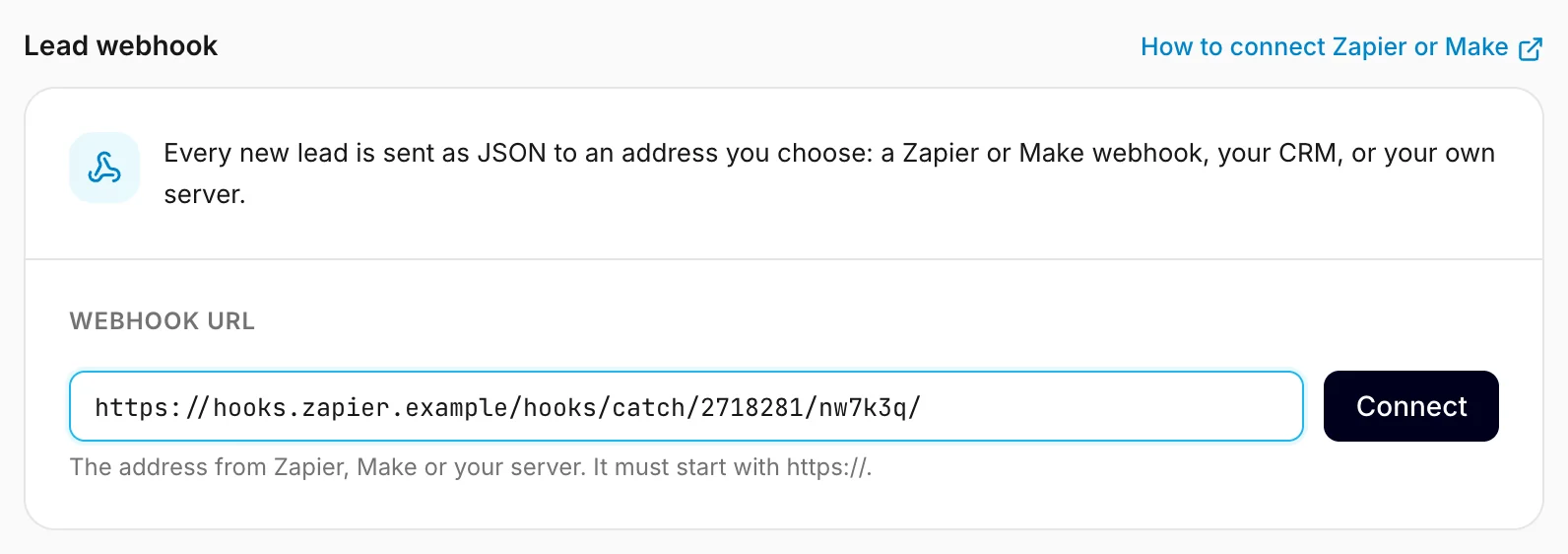
Set it up
- Create a webhook in the tool that should receive your leads and copy its address:
- Make: start a scenario with Webhooks → Custom webhook, click Add, and copy the address Make shows. Custom webhooks work on Make's free plan.
- Zapier: create a Zap with Webhooks by Zapier as the trigger and Catch Hook as the event, and copy the webhook URL. Zapier offers webhooks on its paid plans only.
- Your own server: any
https://address that accepts a JSONPOST.
- In Konvuno, open Settings → Integrations.
- Paste the address into Webhook URL and click Connect.
- Click Send test lead. Zapier and Make learn the lead's fields from this first request, so send it before you map the fields in the next step of your Zap or scenario.
The address must start with https://. Leads are personal details, so Konvuno never sends them
unencrypted, and it refuses addresses that point into a private network.
Check that it works
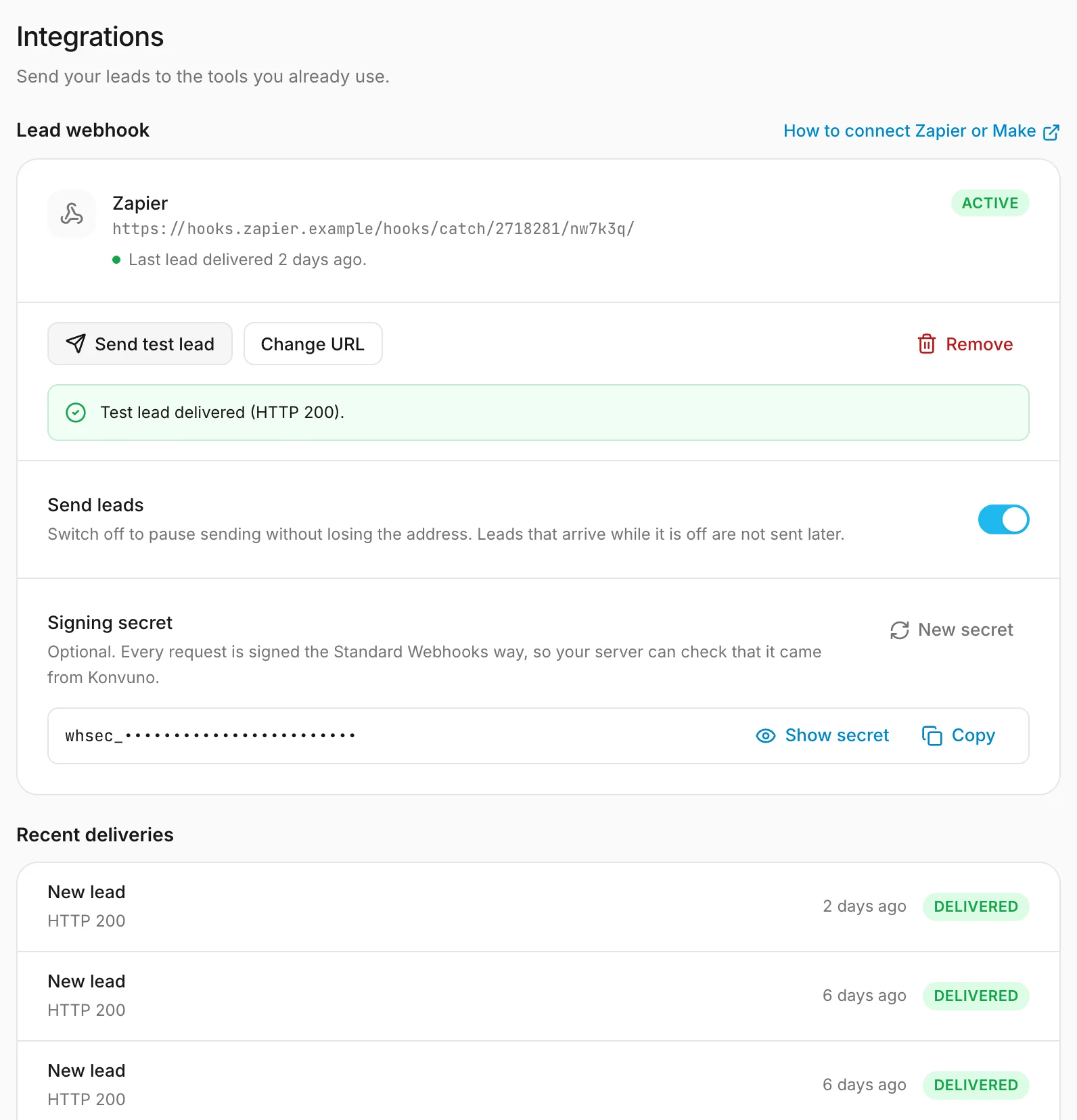
The badge next to the address tells you how the webhook is doing:
- Active — the last lead arrived.
- Failing — the last attempt did not, and Konvuno is trying again. The line under the address says why.
- Paused — you switched sending off.
- Stopped — the receiving tool said the address no longer exists, so Konvuno stopped on its own.
Recent deliveries lists the last ten sends, test leads included, with
the answer the receiving tool gave. A test lead looks exactly like a real one, with obviously made-up
details and "test": true, so you can filter it out in your Zap or scenario.
What is sent
Each lead is one JSON POST:
{
  "type": "lead.created",
  "timestamp": "2026-09-25T10:00:05.000Z",
  "data": {
    "lead_id": "6f7a3c1e-…",
    "created_at": "2026-09-25T10:00:03.000Z",
    "name": "Ana Petrović",
    "email": "[email protected]",
    "phone": "+381 60 555 0123",
    "company": null,
    "message": "Do you have this bike in a smaller size?",
    "consent_given": true,
    "consent_text": "I agree to be contacted about my request.",
    "business_id": "4e6f7274-…",
    "business_name": "Northwheel",
    "conversation_id": "c0f3…",
    "source_url": "https://northwheel.example",
    "dashboard_url": "https://app.konvuno.com/leads?lead=6f7a3c1e-…",
    "test": false
  }
}
A field the visitor left empty is null. source_url is the website the chat happened on, and
dashboard_url opens the lead in Konvuno. The contents of the chat are not sent — open the lead
to read it.
When a lead does not arrive
If the receiving tool does not answer with success, Konvuno tries again after 1 minute, 5 minutes, 30 minutes, 2 hours, 6 hours, 12 hours and 24 hours — about two days in all. If the lead still has not arrived by then, Konvuno stops trying and emails the account that registered the business (at most one such email a day). A lead that never reached your tool is still on the Leads screen.
The usual causes are a Zap or scenario that was switched off, or an address that changed. Fix it, then click Send test lead. If you changed the address, retries still in progress go to the new one.
Pause, change or remove
- Send leads switches sending off and on. Leads that arrive while it is off are not sent later.
- Change URL points the webhook somewhere else. Your signing secret stays the same.
- Remove stops sending and deletes the delivery history. Your leads stay in Konvuno.
If your plan ends, the webhook stays but nothing is sent until you choose a plan again.
Check that a request came from Konvuno
This part is for developers. Every request is signed the Standard
Webhooks way, with three headers: webhook-id,
webhook-timestamp and webhook-signature. Verify them with any Standard Webhooks library and the
Signing secret shown under the address.
webhook-id stays the same on every retry of the same lead, so use it to skip a lead you already
received. New secret replaces the secret at once — update it on your
server straight after.
Note
Once a lead has reached your tool, it is stored there as well. Deleting the lead in Konvuno does not delete that copy — remove it in the tool itself.
How other businesses use it
- A bike shop sends each lead through Make into a Google Sheet that the whole team shares.
- A web agency passes leads from its website straight into its CRM with a Zap, so a salesperson picks them up with everything else.
- A roofing company turns each lead into a task on its project board, so the next free estimator takes it.
- A software company points the webhook at its own server, checks the signature and creates a ticket for every lead.