The funnel and answer quality
Follow conversations from the first message to a won customer, and see how many the assistant really answered.
Below the chart on the Overview screen sit two cards side by side. The Outcome funnel follows your conversations to the end result — a new customer. The Answer quality card zooms in on the second step: how many conversations got a real answer.
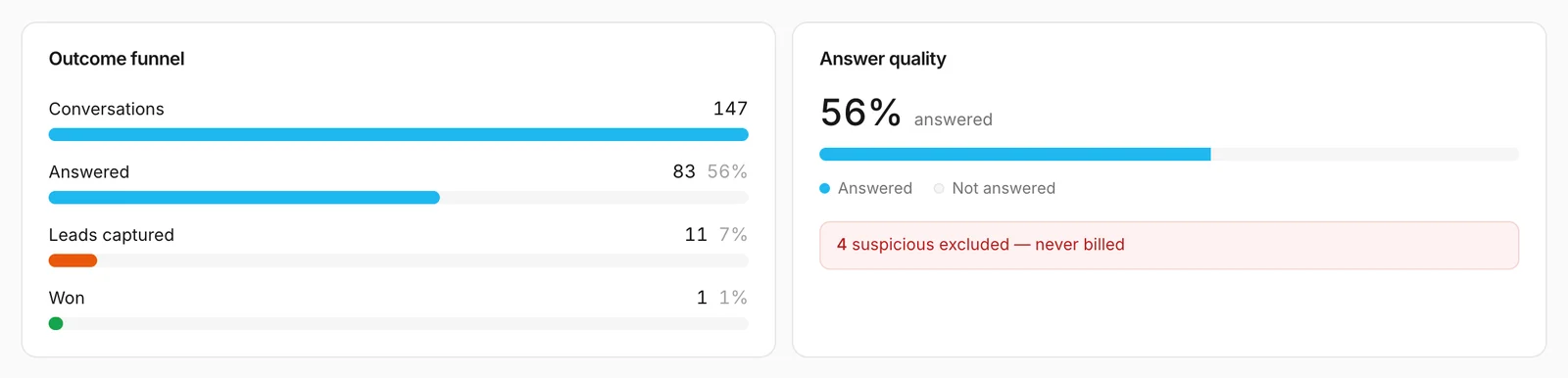
Outcome funnel
Each bar is one step, measured against the first one. The percentage on the right is the share of all conversations that reached that step.
| Step | What it counts |
|---|---|
| Conversations | Every conversation in the period — including greetings and suspicious ones, but never your own tests. |
| Answered | The conversations in which the assistant answered at least one question from your knowledge — see Answered rate. |
| Leads captured | Contact forms visitors sent you. |
| Won | The leads from this period that you have since marked Won under Leads. |
Clicks on product cards are not part of the funnel: to protect your visitors' privacy, Konvuno does not record them at the moment.
A visitor can leave their details without getting an answer — asking for a person straight away, for example — so Leads captured can be higher than Answered.
When a lead counts as won
Won is the only step you fill in yourself. When a lead becomes a customer, open it under Leads and set its status to Won. A lead that went nowhere gets Lost, which the funnel does not count.
The lead is counted in the period it came in, not the day you marked it. A lead from three weeks ago that you mark Won today raises Won on the 30d view, not on 7d.
Tip
Keep lead statuses up to date and the funnel becomes a sales report: how many website conversations it takes to win one customer.
Answer quality
The big number is the share of conversations that were Answered, and the bar shows the rest as Not answered. It is the same figure as Answered rate.
Not answered does not only mean the assistant failed. It also includes:
- visitors who only said hello and left;
- off-topic questions the assistant politely declined;
- questions it could not answer;
- visitors who asked for a person or left their details without asking anything the assistant could answer;
- suspicious conversations.
The red line underneath counts the conversations Konvuno flagged as suspicious in the period: automated traffic, spam, or attempts to trick the assistant. They never count toward your plan. You can read them under Conversations, marked Suspicious · excluded.
How other businesses use it
- A hotel sees many conversations but few leads, and adds "Leave your email and we'll send you our rates" to its welcome message.
- A solar panel installer marks every signed contract Won, every declined quote Lost, and reports the Won figure to its partners each month.
- A language school notices that half of its "not answered" conversations are greetings, and adds suggested questions about course dates and prices.