When the assistant cannot answer
What visitors see when the assistant does not know, when the chat is paused, when a conversation gets very long, and when they are asked to confirm they are human.
Most of the time, a visitor asks and gets an answer. This page covers the other moments — what the visitor sees, why it happens and what you can do about it.
The assistant does not know
When your knowledge does not cover a question, the assistant says it is not sure rather than guessing, and points the visitor to your contact details or a relevant link. If the visitor needs something only you can give — a price you have not added, a booking — it hands them over to you. See Contact form and hand-off.
Questions like these are collected for you. They show under Missing answers on the Knowledge screen and in Questions without an FAQ on the Overview screen — each one is an FAQ waiting to be written.
The chat is paused
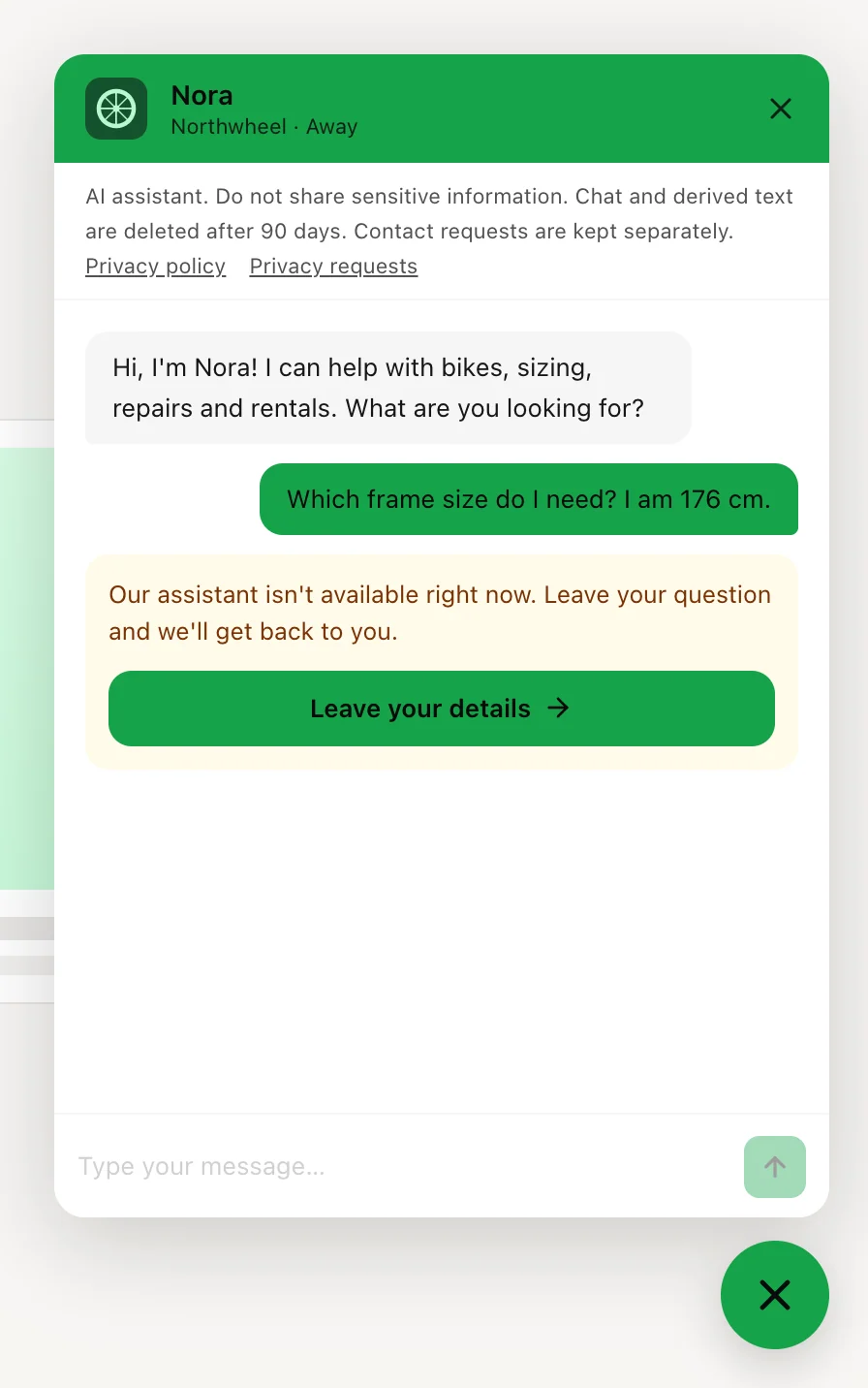
When Konvuno pauses the answers for your business, a visitor who writes sees
Our assistant isn't available right now. Leave your question and we'll get back to you.
with the Leave your details
button under it. The
message box stays visible but greyed out, so nothing can be typed or sent, and the chat header
reads Away
instead of Online
.
This happens when your plan's conversations for the billing period are used up, or when there is a problem with your subscription, such as a failed payment. The contact form keeps working the whole time, so a visitor can still reach you.
The chat comes back by itself once the cause is fixed — there is nothing to publish. See The widget shows, but says it is unavailable.
Tip
Settings shows how many conversations your plan has left this period. If you often get close to the limit, a bigger plan keeps the chat answering through the whole month — see pricing.
A short break
Now and then the chat asks a visitor to wait a moment:
The assistant is temporarily unavailable. Please try again in a moment.
— a short pause on Konvuno's side. The visitor clicksRetry
to send their message again.You're sending messages quickly. Wait a moment, then try again.
— shown to a visitor who sends a lot of messages in a short time. They clickRetry
after a short wait.The assistant hit a problem. Please try again.
— the message did not get through, usually because of the visitor's connection.Retry
sends it again.
A very long conversation
A single conversation cannot go on forever. When one gets very long, the widget says
This conversation has reached its maximum length. Start a new one to continue.
When the visitor clicks Start a new conversation
,
their last question is sent again in a fresh conversation, and they carry on from there. Nothing
is locked, and the earlier messages stay on the screen.
"Confirm you're human"
To keep automated traffic from using up your plan, the widget sometimes asks a visitor to prove
they are a person. They see Quick check
and Please confirm you're human to continue.
with a small
check from Cloudflare underneath. Usually it passes by itself, or with one click, and the
visitor's message is then sent as normal.
If the check cannot be completed, the widget says The check couldn't be completed. Please try again.
and offers
Retry
. Visitors who chat normally rarely see the check at all.
How other businesses use it
- A tax advisor reads the unanswered questions every Monday and turns the three most common into FAQs — the assistant says "I'm not sure" less every week.
- A caterer that runs close to its plan's limit in December upgrades for the season, so the chat keeps answering during the busiest weeks.
- A dance school keeps its contact form short — name and email — so a visitor who meets a paused chat can still leave their details in a few seconds.