How answers look
What a visitor sees when they ask something — suggested questions, formatted answers with links, product cards, and how long the chat remembers the conversation.
This page shows a conversation from the visitor's side: how they ask, what an answer looks like, what the product cards under an answer show, and what happens when they click something.
Suggested starters
Under your welcome message, the visitor sees your suggested starters as buttons with a small arrow. A tap sends that question exactly as if the visitor had typed it. The starters disappear as soon as the visitor sends their first message, and they do not come back in the same conversation.
An answer
While the assistant is writing, three dots show in a grey bubble. The answer then appears in that bubble. It can contain bold words, short lists and links — the assistant keeps it short and plain, in the length you picked under How the assistant answers.
What the assistant knows comes only from you: your FAQs, your business description and, if you turned on catalog recommendations, your catalog. With Answer only from approved sources switched off it may add careful general advice, but it never makes up your prices, stock, links, opening hours or policies.
The assistant also stays on topic. If a visitor asks for something unrelated to your business — homework, a poem, a logo — it says in a sentence or two that it cannot help with that here and steers back to your business. A visitor who keeps asking unrelated things gets a short standard reply that invites them to ask about your business instead.
When the assistant does not know an answer, it says so. See When the assistant cannot answer.
Product cards
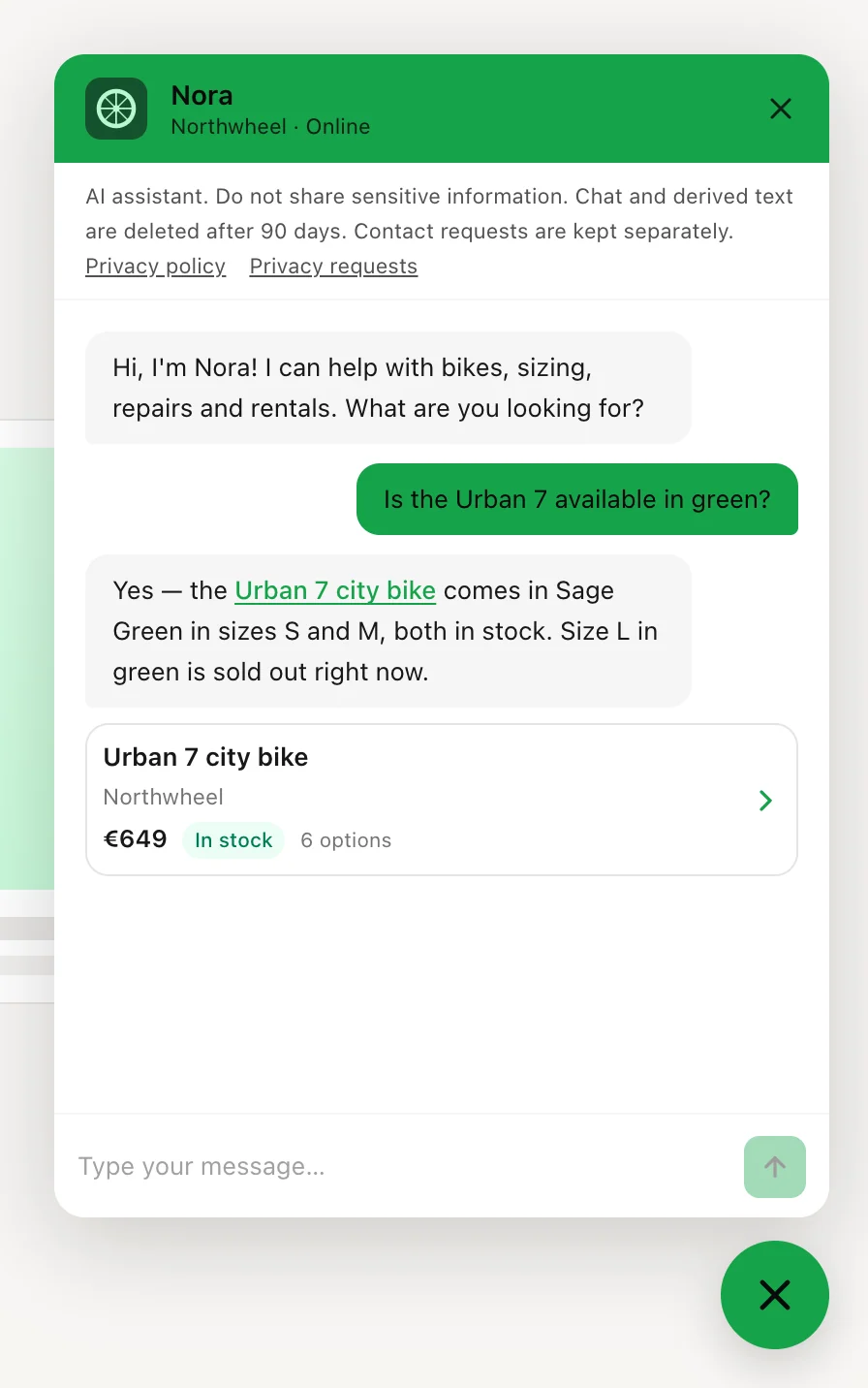
If you turned on Catalog recommendations and the answer names items from your catalog, a card appears under the answer for each of them — up to four. The cards arrive a moment after the text, once the answer is complete, and they only show the items the answer itself links to, so the cards and the text never disagree. An item needs a page address (URL) in your catalog to get a card — the card is a link to that page.
A card shows:
- the name of the product or service;
- the brand, or the category if the item has no brand;
- a photo, if your catalog has one for it. An item without a photo, brand or category shows the start of its description instead;
- the price. When the options of a product cost different amounts, the card shows the lowest, as "from" that price;
- the stock —
In stock
,Pre-order
orOut of stock
. Products only: a service, such as a repair or a haircut, never shows stock; - how many options the product comes in, such as sizes or colours.
The cards show your catalog as it is at that moment, so a price you change under Catalog shows on the next card straight away.
What a click does
Clicking a link in an answer or a product card takes the visitor to that page:
- A page of the same website the chat is on opens in the same tab. The conversation stays: when the visitor opens the chat on the new page, it is all still there.
- Any other website opens in a new tab, so your page stays open behind it. That includes
another part of your own site on a different address, such as
shop.example.comwhen the widget is onexample.com. Evenwww.example.comandexample.comcount as different addresses here.
Tip
If your product pages live on a separate address, such as shop.example.com, install the
widget there too and add that address to your
allowed domains. Visitors can then ask about a product on the
product page itself.
How long a conversation is remembered
The widget remembers the conversation in the open browser tab only:
- Reloading the page, or moving to another page of the same website in the same tab keeps the conversation. The chat stays closed on the new page; the visitor clicks the launcher to see it again.
- After 30 minutes without activity, the chat closes and the conversation is forgotten. The next time the visitor opens the chat, a new conversation starts with your welcome message.
- A new tab, another browser or another device always starts a new conversation. So does closing the tab.
There are no accounts for visitors, so a returning customer never sees an old conversation. You still can: conversations stay under Conversations for 90 days.
How other businesses use it
- A garden centre links each fertiliser in its catalog to the product page, so "what should I feed my roses?" gets two product cards with prices and stock.
- A hair salon lists its treatments as services, so "how much is a balayage?" gets a card with the treatment and its price — and never a stock label.
- A software company answers "how do I export my data?" with a link to its own help page, which opens in the same tab — and the chat is still there when the customer has read it.
- A furniture shop adds a photo address to every catalog item, so each card shows the sofa or the table next to its price.