Leads
What a lead is, how visitors become leads, what each status means and how the Leads screen is laid out.
A lead is a visitor who left their contact details in your widget so you can get back to them. Every lead lands on the Leads screen — with their name, email or phone number, what they wanted, and a link to the chat they came from. It is a simple customer list: you work through it, mark each lead's progress, and Konvuno keeps it until you delete it.
Where leads come from
Leads come from the contact form in the widget, titled
Leave your details
. A visitor reaches it in two ways:
- When they need a person. If a visitor asks to talk to someone, asks for a quote or a
booking, or asks for something your knowledge does not cover, the assistant offers your direct
contacts and the
Leave your details
button. See Hand-offs. - When the chat is paused. If the assistant cannot answer at the moment — for example because your plan's conversations for this period are used up — the widget still offers the form, so you do not lose the customer.
The form always needs an email address or a phone number. You choose which fields it asks for, and the consent text visitors must tick, on the widget's Behavior tab — see How visitors reach you.
Leads are never created any other way: you cannot add one by hand, and forms sent from the widget preview's Test mode are not saved.
The list
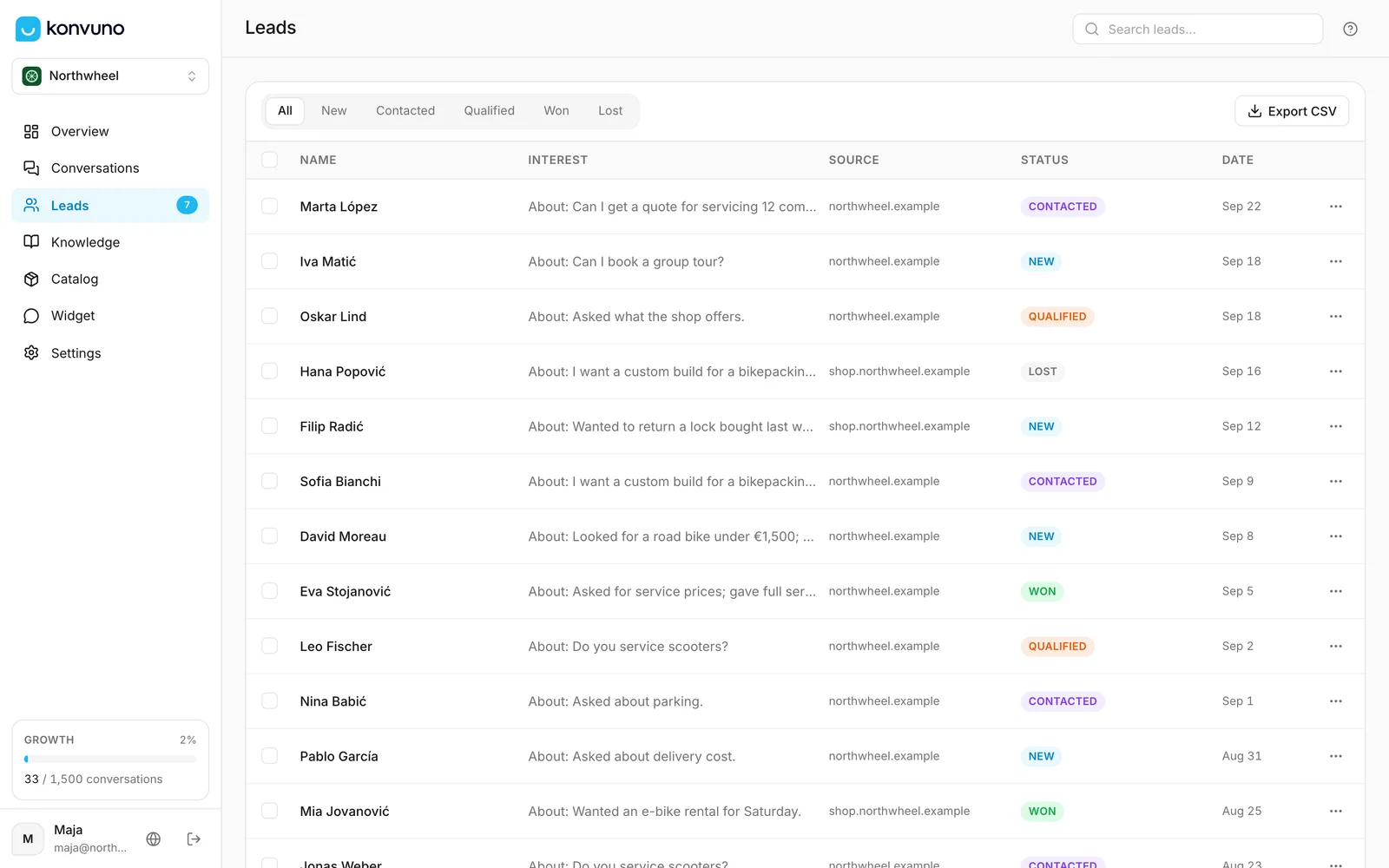
Each row is one lead, newest first:
- Name — the name they typed, or Anonymous if they left it empty.
- Interest — what they wrote in the form's message box. When they left it empty, the summary of their conversation appears instead, once someone has opened it.
- Source — the website they sent the form from, such as
northwheel.example. - Status — how far you have got with them. See Statuses.
- Date — the day they sent the form.
Click a row to open the lead and work with it — see Work with a lead. The number next to Leads in the sidebar is how many leads are still New.
Statuses
| Status | Use it for |
|---|---|
| New | Every lead starts here. Nobody has replied yet. |
| Contacted | You have called or written back and are waiting for an answer. |
| Qualified | They are a real prospect — they need what you offer. |
| Won | The deal is done: they booked, bought or signed. |
| Lost | It went nowhere: they chose someone else, or stopped replying. |
Konvuno sets New when a lead arrives and never changes a status by itself after that — moving a lead along is up to you. See Change the status.
Note
The Overview screen counts every Won lead as Won, and never a Lost one — so marking lost leads Lost keeps that number honest, and keeps the lead in case they come back. See When a lead counts as won.
Filter and search
- The status buttons above the list — All, New, Contacted, Qualified, Won and Lost — show only the leads with that status.
- The search box at the top right of the screen finds leads by name, email address, phone
number, company, the message they wrote, the AI summary of their conversation, or a tag. It
matches parts of words, so
bianfinds "Bianchi". A phone number is found however it is written:064 123 4567also finds+381641234567.
The count at the bottom of the list tells you how many leads match.
How long leads are kept
Leads stay until you delete them. The conversation a lead came from is deleted automatically after 90 days — see How long conversations are kept — and from then on the lead no longer links to it. Everything the visitor typed into the form stays with the lead.
Who can do what
Owners and members can do everything on this screen: read leads, change their status, add tags and notes, email them, export them and delete them.
How other businesses use it
- A kitchen installer moves every lead to Contacted the moment someone calls back, so the New list is always the list of people still waiting.
- A veterinary clinic uses Qualified for pet owners who asked for an appointment and Won once the visit is booked.
- A SaaS company treats Qualified as "demo booked" and reads the Won number on Overview as paying customers.
- A hotel searches
weddingto find every enquiry about wedding packages before its monthly events meeting.