Privacy notice and consent
What visitors are told about privacy in every chat, where their privacy requests go, what the widget keeps in their browser, and how consent on the contact form works.
Visitors should know they are talking to an AI and what happens to what they write. The widget tells them in every conversation, without any setup on your side — and your own privacy details make the notice complete.
The privacy notice
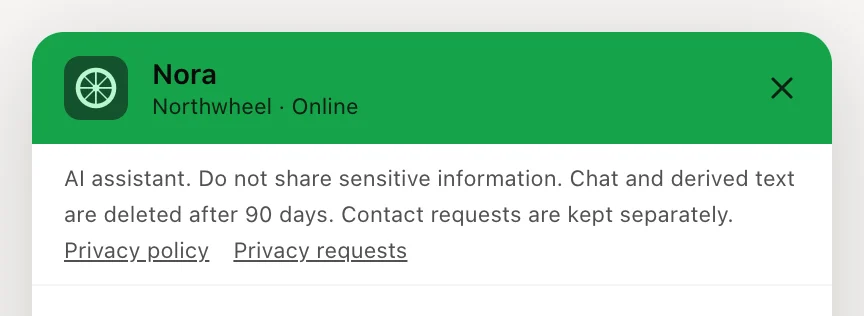
A short notice sits at the top of every chat, under the header. It tells the visitor that:
- they are talking to an AI assistant;
- they should not share sensitive information in the chat;
- the chat and the text derived from it are deleted after 90 days;
- contact requests — what they send through the contact form — are kept separately.
The notice is always shown and cannot be switched off or reworded. It appears in the widget's own language — see Languages.
The two links
Under the notice are two links:
Privacy policy
opens your privacy policy in a new tab. It only appears once you fill in Privacy policy URL.Privacy requests
is always there. It opens the visitor's email app with a message to your Privacy contact email — or to Konvuno's support address, if you left that empty.
Both are set on the Behavior tab — see Privacy and consent.
Heads up
Fill in your own Privacy contact email. Without it, your customers' privacy requests reach Konvuno's support instead of you — and they are requests about your customers.
What stays in the visitor's browser
- Nothing, until the visitor opens the chat. A visitor who only sees the launcher leaves nothing behind in their browser.
- Once they open it, the widget keeps the conversation in that browser tab only, so it survives a reload or a click to another page. It is forgotten when the tab closes or after 30 minutes without activity — see How long a conversation is remembered.
- The widget itself sets no cookies.
Consent on the contact form
If you wrote a consent text, the contact form shows it next to a checkbox, and the form cannot be sent until the box is ticked. The exact text, the language the visitor saw it in and the time are saved with the lead — so you can always show what someone agreed to. See Contact form and hand-off.
When a visitor's data is deleted
If a visitor's data is deleted after a privacy request and they then write again in the same chat,
the widget ends the conversation and says This session has ended. Its local history has been cleared.
The visitor can start a
new conversation, which has no link to the deleted one.
Note
The notice tells visitors how the chat itself works. It does not replace your own privacy policy. If you are not sure what yours must say about the chat, ask whoever advises you on data protection.
How other businesses use it
- A physiotherapy practice adds a starter "How do I book a first visit?" so patients ask about appointments rather than describing their symptoms in the chat.
- An online fashion shop links its privacy policy and sets its data-protection address as the privacy contact, so requests go straight to the person who handles them.
- A marketing agency writes the consent text "I agree to be contacted by email about my project", and the text is stored with every lead it receives.